OWASP Top 10 Vulnerabilities Explained – Complete Guide for Beginners

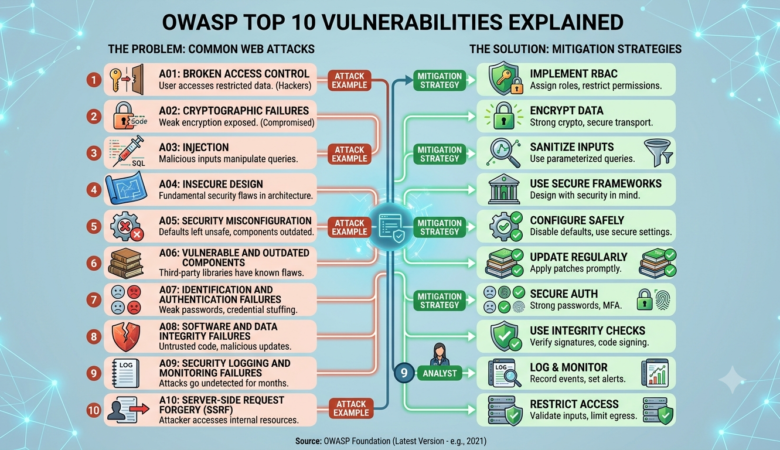
OWASP Top 10 Vulnerabilities Explained Web applications power everything from online banking and e-commerce to healthcare portals and business management systems. As organizations increasingly rely on web-based applications, attackers continue searching for weaknesses that can be exploited to steal sensitive data, disrupt services, or gain unauthorized access. One of the most trusted resources for improving web application security is the OWASP Top 10. Published by the Open Worldwide Application Security Project (OWASP), this list identifies the most critical security risks affecting web applications. Developers, security professionals, penetration testers, and organizations around the world use it as a foundation for building secure software and reducing cyber risks. Understanding these vulnerabilities is essential for anyone involved in software development or cybersecurity. In this guide, we’ll explain each category from the latest OWASP Top 10 list, discuss how attackers exploit these weaknesses, and provide practical recommendations to reduce your organization’s exposure. What Is OWASP? OWASP (Open Worldwide Application Security Project) is a non-profit organization dedicated to improving software security. It provides free resources, tools, documentation, and educational materials that help developers build more secure applications. Some of OWASP’s most popular projects include: OWASP Top 10 OWASP Web Security Testing Guide OWASP ASVS (Application Security Verification Standard) OWASP Cheat Sheet Series OWASP Dependency-Check OWASP ZAP (Zed Attack Proxy) These resources are widely recognized across the cybersecurity industry and are frequently referenced in security training and compliance programs. What Is the OWASP Top 10? The OWASP Top 10 is a regularly updated awareness document that highlights the ten most significant security risks affecting modern web applications. Rather than listing every possible vulnerability, it focuses on the issues that are both common and capable of causing serious damage if left unaddressed. Organizations use the OWASP Top 10 to: Improve secure software development Train developers and security teams Perform security assessments Reduce application security risks Meet compliance and regulatory expectations Because the threat landscape changes over time, OWASP periodically updates the list based on industry data and expert input. 1. Broken Access Control Broken Access Control occurs when users can perform actions or access resources beyond the permissions assigned to them. Instead of enforcing proper authorization, an application may allow attackers to view confidential information, modify records, or perform administrative actions. Examples Accessing another user’s account by changing an ID in the URL Viewing confidential files without authorization Editing or deleting records belonging to other users Bypassing administrative restrictions Potential Impact Data breaches Unauthorized transactions Privilege escalation Loss of customer trust Prevention Enforce server-side authorization checks Follow the principle of least privilege Deny access by default Validate permissions for every request Perform regular access-control testing 2. Cryptographic Failures Previously known as Sensitive Data Exposure, this category focuses on failures in protecting sensitive information through proper encryption. Many organizations incorrectly store or transmit sensitive information such as: Passwords Credit card numbers Medical records Personal identification information Financial data Weak encryption or poor key management allows attackers to steal valuable information. Common Causes Using outdated encryption algorithms Weak SSL/TLS configurations Storing passwords in plain text Improper key management Missing HTTPS Prevention Use modern encryption standards Encrypt sensitive information at rest and in transit Hash passwords using secure algorithms Implement strong TLS configurations Regularly rotate encryption keys 3. Injection Injection vulnerabilities occur when untrusted user input is interpreted as commands by an application. One of the most well-known examples is SQL Injection, where attackers manipulate database queries to access or modify sensitive information. Other forms include: SQL Injection Command Injection LDAP Injection NoSQL Injection XML Injection Example Scenario A login form accepts user input without proper validation. An attacker submits specially crafted SQL code that bypasses authentication and gains unauthorized access to the database. Risks Database compromise Remote code execution Data theft Account takeover Prevention Use parameterized queries Validate and sanitize user input Avoid dynamic query construction Apply least-privilege database permissions Use secure frameworks with built-in protections 4. Insecure Design Insecure Design refers to weaknesses that originate during the planning and architecture phases of software development rather than coding mistakes alone. Even well-written code can become vulnerable if the application lacks proper security design. Examples Missing rate limiting Weak authentication workflows Poor password recovery processes Inadequate business logic validation Prevention Integrate security into the Software Development Life Cycle (SDLC) Perform threat modeling Conduct architecture reviews Apply secure design principles Test business logic before deployment 5. Security Misconfiguration Security Misconfiguration remains one of the most common causes of successful cyberattacks. Applications often become vulnerable due to incorrect settings, unnecessary features, or insecure default configurations. Common Examples Default administrator credentials Publicly accessible cloud storage Debug mode enabled in production Unpatched software Open ports and unnecessary services Risks Unauthorized access Information disclosure System compromise Malware infections Prevention Remove unnecessary services Disable default accounts Apply security patches promptly Harden server configurations Regularly audit security settings Why Developers Should Care About the OWASP Top 10 Ignoring application security can have serious consequences. A single exploited vulnerability may result in: Financial losses Regulatory penalties Customer data breaches Business disruption Reputation damage Legal consequences Developers who understand the OWASP Top 10 are better equipped to write secure code, identify potential weaknesses early, and reduce the overall attack surface of their applications. Modern secure development practices begin with awareness, and the OWASP Top 10 provides an excellent roadmap for building safer software. 6. Vulnerable and Outdated Components Modern applications rely heavily on third-party libraries, frameworks, plugins, and software packages. While these components speed up development, they can also introduce security risks if they are outdated or contain known vulnerabilities. Cybercriminals frequently scan websites and applications for software running outdated versions with publicly disclosed security flaws. Common Examples Outdated content management systems (CMS) Old JavaScript libraries Unsupported PHP versions Unpatched web servers Vulnerable open-source packages Risks Remote code execution Data theft Website defacement Malware infections Full server compromise Prevention Maintain an inventory of software components. Remove unused libraries and plugins. Apply security patches promptly. Use supported software versions. Perform regular vulnerability scans. Monitor security advisories for dependencies. 7.
Multi-Factor Authentication (MFA): Complete Guide to Better Cybersecurity

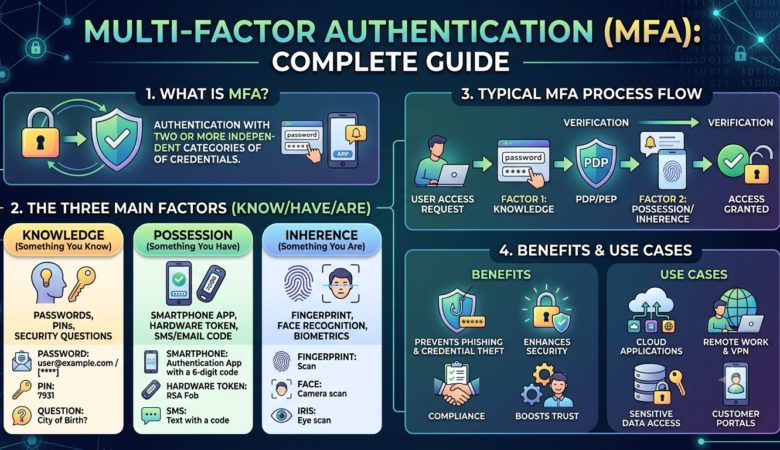
Multi-Factor Authentication (MFA): Complete Guide Cyber threats have become more advanced than ever before, making traditional password-based security insufficient for protecting sensitive data and online accounts. While strong passwords remain an essential part of cybersecurity, they can be stolen through phishing attacks, malware, credential stuffing, or data breaches. Once a password is compromised, attackers can gain unauthorized access to valuable business systems and personal information. This is where Multi-Factor Authentication (MFA) plays a vital role. MFA adds one or more additional verification steps beyond a password, making it significantly harder for cybercriminals to access an account—even if they already know the password. Today, organizations of all sizes rely on MFA to protect cloud applications, email accounts, banking systems, remote access platforms, and business-critical services. Whether you’re a small business owner, an IT administrator, or an individual looking to improve online security, understanding MFA is essential. In this complete guide, you’ll learn what Multi-Factor Authentication is, how it works, the different authentication factors, its benefits, common MFA methods, and why it has become a cornerstone of modern cybersecurity. What Is Multi-Factor Authentication (MFA)? Multi-Factor Authentication (MFA) is a security process that requires users to verify their identity using two or more independent authentication factors before gaining access to an account, device, or application. Instead of relying solely on a password, MFA combines multiple forms of verification, making unauthorized access much more difficult. A typical MFA login process might involve: Entering a username and password. Approving a login request through an authentication app. Providing a fingerprint or facial scan. Even if an attacker steals the password, they still need the second (or third) authentication factor to complete the login process. Why Multi-Factor Authentication Matters Passwords are one of the most commonly targeted elements in cyberattacks. Weak, reused, or stolen passwords are responsible for many data breaches each year. Implementing MFA provides an additional layer of security that helps protect against these threats. MFA helps organizations: Prevent unauthorized account access Reduce the risk of phishing attacks Protect cloud services Secure remote workers Safeguard financial transactions Improve customer trust Meet regulatory compliance requirements As remote work and cloud computing continue to expand, MFA has become an essential component of a modern cybersecurity strategy. How Multi-Factor Authentication Works MFA verifies a user’s identity by requiring multiple forms of authentication from different categories. A standard login process works like this: Step 1: Enter Login Credentials The user enters a username and password. Step 2: Identity Verification The system requests another authentication factor, such as: A one-time code A fingerprint scan A security key An approval notification Step 3: Access Granted If all authentication factors are successfully verified, the user gains access to the requested system or application. If any verification fails, access is denied. The Three Main Authentication Factors Multi-Factor Authentication is based on three primary categories of authentication. 1. Something You Know This includes information only the user should know, such as: Passwords PINs Passphrases Security questions Although these are common, they can be compromised through phishing or brute-force attacks. 2. Something You Have This factor requires possession of a trusted device or physical object. Examples include: Smartphone authentication apps Hardware security keys Smart cards USB security tokens One-time password generators Because attackers typically do not possess the user’s physical device, this factor provides strong additional protection. 3. Something You Are Biometric authentication verifies physical characteristics unique to each individual. Common biometric methods include: Fingerprint recognition Facial recognition Iris scanning Voice recognition Biometrics provide convenience while making unauthorized access more difficult. Common Types of Multi-Factor Authentication Organizations can choose from several MFA methods depending on their security requirements. Authentication Apps Authentication apps generate time-based one-time passwords (TOTPs) that change every 30 to 60 seconds. Advantages include: High security Works offline Easy setup Resistant to SIM-swapping attacks SMS Verification Codes Users receive a one-time code via text message. Advantages: Easy for beginners No additional hardware required Limitations: Vulnerable to SIM-swapping Mobile network dependency Less secure than authentication apps Email Verification A verification code or secure link is sent to the user’s registered email address. While convenient, this method is only as secure as the email account itself. Push Notifications A notification is sent to the user’s smartphone asking them to approve or deny the login attempt. Benefits include: Fast authentication User-friendly experience Reduced typing errors Hardware Security Keys Hardware security keys are physical USB, NFC, or Bluetooth devices that verify a user’s identity during login. Benefits include: Excellent phishing resistance Strong protection for privileged accounts Suitable for high-security environments Biometric Authentication Modern devices increasingly support biometric verification. Examples include: Fingerprint scanners Face recognition Iris scanning Biometrics offer convenience while reducing reliance on passwords. Benefits of Multi-Factor Authentication Stronger Account Protection Even if passwords are stolen, attackers still need additional verification to access accounts. Reduced Risk of Phishing Phishing attacks often succeed because users unknowingly reveal passwords. MFA significantly limits the usefulness of stolen credentials. Better Protection for Remote Work Employees frequently access company resources from home or while traveling. MFA helps secure these remote connections by requiring additional verification before granting access. Improved Regulatory Compliance Many cybersecurity standards and regulations recommend or require MFA, including: PCI DSS HIPAA ISO/IEC 27001 NIST Cybersecurity Framework SOC 2 Using MFA can help organizations meet security and compliance obligations while reducing audit risks. Enhanced Customer Trust Customers expect businesses to protect their personal and financial information. Offering MFA for customer accounts demonstrates a commitment to security and helps build confidence in your services. Lower Risk of Data Breaches By adding an extra verification layer, MFA greatly reduces the chances of unauthorized access, minimizing the likelihood of costly data breaches, ransomware incidents, and account takeovers. Multi-Factor Authentication (MFA) vs. Two-Factor Authentication (2FA) Many people use the terms MFA and 2FA interchangeably, but they are not exactly the same. Feature Multi-Factor Authentication (MFA) Two-Factor Authentication (2FA) Number of Factors Two or more authentication factors Exactly two authentication factors Security Level Higher flexibility and stronger protection Stronger than passwords alone Common Example

Zero Trust Security Model Explained

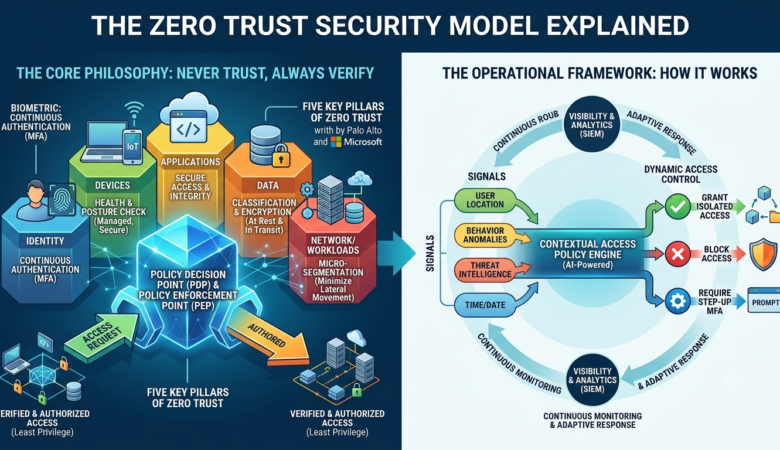
Zero Trust Security Model Explained In today’s digital world, cyber threats are becoming more advanced than ever before. Traditional security models that rely on protecting only the network perimeter are no longer enough to defend against modern cyberattacks. As organizations adopt cloud computing, remote work, mobile devices, and hybrid infrastructures, attackers have more opportunities to exploit vulnerabilities and gain unauthorized access. This changing threat landscape has led to the rise of the Zero Trust Security Model, a modern cybersecurity approach that assumes no user, device, or application should be trusted automatically—even if they are already inside the organization’s network. Instead of trusting everything behind a firewall, Zero Trust follows the principle of “Never Trust, Always Verify.” Every request for access must be continuously authenticated, authorized, and validated before access is granted. In this comprehensive guide, you’ll learn what the Zero Trust Security Model is, how it works, why it is important, its core principles, benefits, implementation steps, challenges, best practices, and why it has become one of the most effective cybersecurity strategies for modern businesses. What is the Zero Trust Security Model? The Zero Trust Security Model is a cybersecurity framework that eliminates implicit trust inside or outside an organization’s network. Unlike traditional security models that automatically trust users once they enter the corporate network, Zero Trust requires verification every time someone attempts to access data, applications, or systems. The model assumes that: Every user could be compromised. Every device could be infected. Every network connection could be unsafe. Every application should be verified. Every access request must be authenticated. The primary objective is to reduce the attack surface and prevent unauthorized access, even if attackers manage to enter the network. Why is Zero Trust Important? Cybersecurity has changed dramatically over the past decade. Modern organizations rely on: Cloud applications Remote employees Hybrid work environments Mobile devices Third-party vendors Internet of Things (IoT) devices These technologies have expanded the traditional network perimeter, making perimeter-based security much less effective. Zero Trust helps organizations protect sensitive information by continuously verifying every access request. It reduces the chances of: Data breaches Insider threats Credential theft Malware infections Ransomware attacks Unauthorized lateral movement Instead of assuming users are trustworthy, Zero Trust requires proof before granting access. The Core Principle: Never Trust, Always Verify At the heart of Zero Trust is a simple philosophy: Never Trust. Always Verify. Every login attempt, file request, application access, or network connection is evaluated based on multiple security factors before access is granted. Verification may include: Identity authentication Multi-Factor Authentication (MFA) Device health checks User behavior analysis Location verification Risk assessment Access policies Even after access is granted, monitoring continues throughout the user’s session. How the Zero Trust Security Model Works Zero Trust follows a continuous verification process. 1. Verify Identity Every user must prove their identity before accessing company resources. Common verification methods include: Username and password Multi-Factor Authentication (MFA) Biometric authentication Single Sign-On (SSO) Identity providers 2. Validate Devices Not every device should be trusted. Security systems evaluate whether the device: Has updated software Uses antivirus protection Is encrypted Meets security policies Is company-managed Compromised devices may be denied access. 3. Grant Least Privilege Access Users receive only the permissions necessary to perform their jobs. For example: HR employees access HR systems. Finance staff access accounting software. Developers access development servers. No one receives unnecessary privileges. 4. Continuously Monitor Activity Zero Trust doesn’t stop monitoring after login. Security systems continuously evaluate: Login behavior File access Network traffic User activity Device status Suspicious behavior may trigger additional verification or automatically terminate access. 5. Respond to Threats If unusual activity is detected, Zero Trust solutions can: Block access Require re-authentication Notify administrators Isolate compromised devices Start automated incident response Core Components of Zero Trust Identity and Access Management (IAM) Identity is the foundation of Zero Trust. Every user must be authenticated before receiving access. Multi-Factor Authentication (MFA) Passwords alone are no longer sufficient. MFA adds another layer of protection by requiring: Mobile authentication apps SMS verification codes Hardware security keys Fingerprint authentication Device Security Only secure and compliant devices should connect to organizational resources. Device monitoring ensures: Updated operating systems Active antivirus software Disk encryption Security compliance Network Segmentation Instead of one large trusted network, Zero Trust divides the network into smaller secure segments. If attackers compromise one segment, they cannot easily move to another. This technique is known as micro-segmentation. Continuous Monitoring Security tools continuously collect information from: Users Applications Servers Endpoints Cloud services This enables rapid detection of suspicious behavior. Benefits of the Zero Trust Security Model Improved Security Every request is verified before access is granted. This significantly reduces unauthorized access. Reduced Risk of Data Breaches Attackers cannot freely move inside the network after gaining initial access. Better Protection Against Insider Threats Employees with excessive privileges represent a significant security risk. Zero Trust limits unnecessary access. Stronger Remote Work Security Remote employees receive the same level of protection as office users. Cloud Security Zero Trust protects: Cloud applications SaaS platforms Hybrid environments Multi-cloud deployments Regulatory Compliance Zero Trust supports compliance with various security frameworks, including: PCI DSS HIPAA ISO 27001 SOC 2 NIST Cybersecurity Framework Common Zero Trust Technologies Organizations often combine multiple security technologies. These include: Identity and Access Management (IAM) Multi-Factor Authentication (MFA) Endpoint Detection and Response (EDR) Network Access Control (NAC) Security Information and Event Management (SIEM) File Integrity Monitoring (FIM) Endpoint Protection Platforms (EPP) Data Loss Prevention (DLP) Privileged Access Management (PAM) Secure Access Service Edge (SASE) How to Implement Zero Trust Identify Critical Assets Begin by identifying: Sensitive data Business applications Databases Cloud resources Servers Verify Every User Require strong authentication for all users. Implement Multi-Factor Authentication wherever possible. Enforce Least Privilege Grant only the minimum permissions required. Review permissions regularly. Secure Endpoints Ensure all devices meet security standards before connecting. Segment the Network Separate sensitive systems into isolated security zones. Monitor Continuously Use monitoring tools to detect unusual activity in real time. Automate Security Responses Automated actions reduce response

Password Security Best Practices for Businesses | Protect Your Company from Cyber Threats

Password Security Best Practices for Businesses In today’s digital workplace, passwords remain one of the most important lines of defense against cyberattacks. Every business, regardless of its size or industry, relies on passwords to protect sensitive information, customer data, financial records, cloud applications, and internal systems. Unfortunately, weak password habits continue to be one of the leading causes of data breaches worldwide. Cybercriminals often exploit poor password practices through techniques such as phishing, brute-force attacks, credential stuffing, and password spraying. Once attackers gain access to a single account, they may move laterally through the network, steal confidential information, install ransomware, or disrupt business operations. Implementing strong password security practices is one of the simplest and most cost-effective ways to strengthen an organization’s cybersecurity posture. While advanced security technologies are valuable, they cannot fully compensate for weak or reused passwords. This guide explores the most effective password security best practices for businesses, helping organizations reduce security risks, improve compliance, and build a culture of cybersecurity awareness. Why Password Security Matters Passwords are the keys to nearly every digital asset within an organization. Email accounts, cloud platforms, customer databases, financial software, and collaboration tools all depend on secure authentication. If attackers obtain employee credentials, they may be able to: Access confidential company data Steal customer information Transfer sensitive files Install malware or ransomware Commit financial fraud Impersonate employees Disrupt business operations A single compromised password can lead to significant financial losses, legal issues, and damage to a company’s reputation. Strong password management helps reduce these risks and forms a critical layer in a defense-in-depth security strategy. Common Password Security Threats Understanding common attack methods helps businesses build stronger defenses. Phishing Attacks Phishing emails trick users into revealing their usernames and passwords by directing them to fake login pages that closely resemble legitimate websites. Brute-Force Attacks Attackers use automated software to guess passwords by trying thousands or even millions of combinations until one succeeds. Credential Stuffing Many users reuse passwords across multiple services. When credentials from one website are leaked, attackers test the same username and password on other platforms. Password Spraying Instead of guessing many passwords for one account, attackers try a few commonly used passwords across many accounts, reducing the chance of triggering account lockouts. Social Engineering Cybercriminals manipulate employees into voluntarily sharing passwords by pretending to be trusted colleagues, IT staff, or vendors. Password Security Best Practices for Businesses 1. Create Strong and Unique Passwords The foundation of password security is using passwords that are difficult to guess. A strong business password should: Be at least 14–16 characters long Include uppercase and lowercase letters Contain numbers and special characters where appropriate Avoid dictionary words and predictable patterns Be unique for every account For example, a passphrase made from several unrelated words is often easier to remember and harder to crack than a short, complex password. Avoid passwords such as: Password123 Company2026 Welcome1 Admin123 Qwerty123 Instead, encourage employees to create long, memorable passphrases that are unique to each service. 2. Never Reuse Passwords Password reuse is one of the most common security mistakes. If one online service experiences a data breach, attackers often attempt to use the stolen credentials on: Email accounts Cloud storage Banking systems CRM platforms Project management tools Business applications Using a different password for every account prevents one breach from compromising multiple systems. 3. Implement Multi-Factor Authentication (MFA) Even the strongest passwords can be stolen through phishing or malware. Multi-Factor Authentication (MFA) adds an extra layer of protection by requiring users to verify their identity using an additional factor. Common MFA methods include: Authentication apps Hardware security keys Biometric verification One-time verification codes With MFA enabled, stolen passwords alone are usually not enough for attackers to gain access. 4. Use a Business Password Manager Remembering dozens of unique passwords is difficult. A password manager solves this problem by securely storing and generating complex passwords. Benefits of password managers include: Automatic password generation Secure encrypted storage Password sharing for teams Detection of weak or reused passwords Faster login experiences Reduced reliance on memory Business password managers also allow administrators to manage employee access and revoke credentials when staff members leave the organization. 5. Establish a Password Policy Every organization should have a documented password policy that clearly explains security expectations. An effective policy should define: Minimum password length Password complexity requirements Rules against password reuse MFA requirements Password manager usage Account lockout procedures Reporting process for suspected credential theft Employees should receive the policy during onboarding and review it regularly as part of cybersecurity awareness training. 6. Train Employees on Password Security Technology alone cannot prevent password-related incidents. Employees play a crucial role in protecting business accounts. Regular security awareness training should teach staff how to: Recognize phishing emails Create strong passwords Avoid password reuse Report suspicious login attempts Protect authentication codes Use password managers effectively Practical examples and simulated phishing exercises can reinforce these lessons and help employees develop safer habits. 7. Protect Privileged Accounts Administrator accounts have elevated permissions and can access critical systems. If these accounts are compromised, attackers may gain control over the entire network. To protect privileged accounts: Use unique, highly complex passwords Require MFA for every login Limit administrative privileges to essential personnel Monitor privileged account activity Review permissions regularly Applying the principle of least privilege ensures employees have only the access they need to perform their jobs. 8. Monitor for Compromised Credentials Businesses should regularly check whether employee credentials have appeared in known data breaches. Security teams can use monitoring services or identity protection tools to detect exposed usernames and passwords. If compromised credentials are found, affected passwords should be changed immediately, and users should be required to enable MFA if they have not already done so. Proactive monitoring helps reduce the window of opportunity for attackers and strengthens overall account security.

File Integrity Monitoring: Why It Matters for Modern Cybersecurity

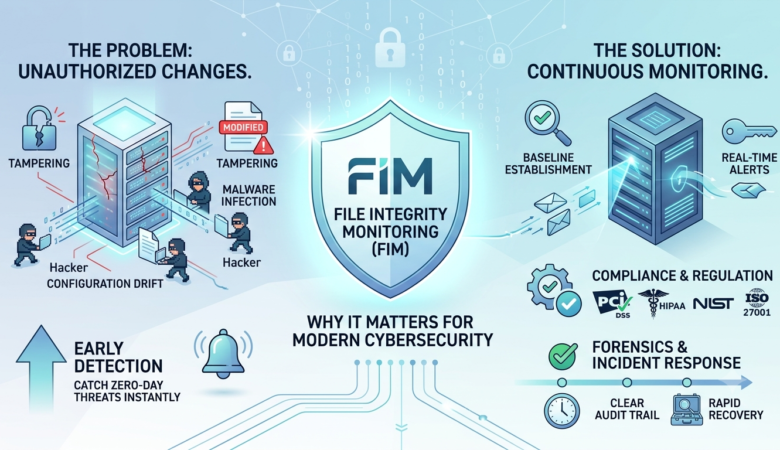
File Integrity Monitoring: Why It Matters Cybersecurity threats continue to evolve every year, making it more challenging for businesses and individuals to protect sensitive information. While firewalls, antivirus software, and intrusion detection systems play critical roles in security, they are not enough on their own. Attackers often modify important system files, configuration settings, or application data after gaining unauthorized access. Detecting these changes quickly can mean the difference between stopping an attack early and suffering a major security breach. This is where File Integrity Monitoring (FIM) becomes essential. File Integrity Monitoring helps organizations detect unauthorized changes to critical files and directories in real time or through scheduled scans. Whether you’re managing a small business website or a large enterprise network, FIM provides valuable visibility into suspicious activity before it causes serious damage. In this guide, you’ll learn what File Integrity Monitoring is, how it works, why it’s important, its benefits, common use cases, implementation best practices, and the leading tools available today. What Is File Integrity Monitoring? File Integrity Monitoring (FIM) is a cybersecurity process that continuously tracks changes made to important files, operating system components, application files, and configuration settings. The primary goal is simple: Detect unauthorized modifications Alert administrators immediately Maintain system integrity Support compliance requirements FIM compares the current version of files against a trusted baseline. If unexpected changes occur, administrators receive alerts for further investigation. Examples of monitored files include: System configuration files Website files Database configuration files Security policy files User account settings Registry entries (Windows) Linux configuration files Why File Integrity Monitoring Matters Cybercriminals rarely announce their presence. Instead, they quietly modify files to install malware, create backdoors, or disable security controls. Without monitoring these changes, organizations may remain compromised for weeks or even months. File Integrity Monitoring helps by: Detecting attacks early Identifying insider threats Preventing unauthorized changes Supporting forensic investigations Improving compliance readiness Early detection reduces both financial losses and recovery time. How File Integrity Monitoring Works Most File Integrity Monitoring solutions follow a straightforward process. 1. Create a Baseline The software scans important files and records information such as: File name File size Creation date Modification time Permissions Cryptographic hash values (SHA-256, SHA-512) This becomes the trusted baseline. 2. Monitor Files The software continuously or periodically checks monitored files against the baseline. 3. Detect Changes Whenever a file changes, the software identifies differences such as: Modified content Permission changes Ownership changes Deleted files Newly created files 4. Generate Alerts If unauthorized changes occur, administrators receive notifications through: Email Dashboard alerts SMS SIEM integration Security monitoring platforms 5. Investigation Security teams determine whether the change was: Authorized Accidental Malicious Appropriate action is then taken. Types of Changes File Integrity Monitoring Detects A quality FIM solution can detect many different events. File Modification Changes made to existing files. File Creation New files added to protected directories. File Deletion Removal of important files. Permission Changes Unauthorized changes to file permissions. Ownership Changes Unexpected changes in file ownership. Registry Changes Windows registry modifications that may indicate malware activity. Configuration Changes Unauthorized edits to application or operating system configurations. Benefits of File Integrity Monitoring 1. Faster Threat Detection The sooner suspicious changes are detected, the faster security teams can respond. 2. Reduced Risk Attackers often rely on modifying system files. FIM detects these actions before attackers establish persistence. 3. Compliance Support Many security standards recommend or require File Integrity Monitoring, including: PCI DSS HIPAA ISO 27001 NIST Cybersecurity Framework SOC 2 FIM provides audit logs that help demonstrate compliance. 4. Better Visibility Administrators gain complete insight into critical file activity across servers and workstations. 5. Incident Investigation Historical logs make it easier to determine: What changed When it changed Who changed it Which systems were affected 6. Protection Against Insider Threats Not every security incident comes from outside attackers. Employees with excessive privileges may accidentally or intentionally modify important files. FIM helps identify these activities quickly. Common Use Cases Protecting Web Servers Website files are common targets for attackers. Hackers may: Inject malicious code Replace web pages Upload backdoors Modify CMS files FIM quickly detects these changes. Securing Databases Database configuration files contain valuable settings. Unauthorized changes can expose sensitive customer information. Monitoring Cloud Infrastructure Cloud servers require the same level of monitoring as on-premise systems. FIM helps maintain visibility across hybrid environments. Protecting Financial Systems Banks and financial institutions rely on FIM to monitor transaction systems and sensitive applications. Healthcare Security Hospitals protect patient information by monitoring critical healthcare systems for unauthorized changes. File Integrity Monitoring vs Antivirus Many people assume antivirus software provides enough protection. In reality, the two technologies serve different purposes. Feature File Integrity Monitoring Antivirus Detects file changes Yes Limited Detects malware Limited Yes Monitors configurations Yes No Compliance support Excellent Limited Tracks unauthorized modifications Yes No Using both together provides stronger protection. Best Practices for File Integrity Monitoring Identify Critical Files Focus monitoring on: Operating system files Website directories Configuration files Security policies Databases Create Accurate Baselines Always establish a trusted baseline after verifying the system is clean. Reduce False Positives Exclude files that change frequently but are expected to change, such as temporary files and logs. Enable Real-Time Monitoring Immediate alerts improve incident response. Review Alerts Regularly Ignoring alerts defeats the purpose of monitoring. Investigate suspicious changes promptly. Integrate with SIEM Combining FIM with Security Information and Event Management (SIEM) platforms provides better visibility across the environment. Keep Software Updated Regular updates ensure the monitoring solution can detect the latest threats. Popular File Integrity Monitoring Tools Several trusted tools are available for organizations of different sizes. OSSEC An open-source host-based intrusion detection system with strong file monitoring capabilities. Wazuh A popular security platform offering File Integrity Monitoring, vulnerability detection, and log analysis. Tripwire One of the oldest and most respected commercial File Integrity Monitoring solutions. AIDE (Advanced Intrusion Detection Environment) A lightweight open-source solution commonly used on Linux servers. SolarWinds Security Event Manager Provides enterprise-level monitoring and centralized alerting. Challenges of File Integrity Monitoring Although extremely useful, FIM has some limitations. Common challenges include: Large numbers of alerts Incorrect baseline creation Storage requirements for logs Resource usage on large environments Administrative overhead Proper planning helps minimize these issues. Future of File Integrity Monitoring Cybersecurity continues to evolve rapidly. Modern FIM solutions increasingly include: Artificial intelligence for smarter alerts Machine learning for anomaly detection Cloud-native monitoring Behavioral analytics Automated incident response Integration with Zero Trust security architectures These