
Complete WordPress Security Guide

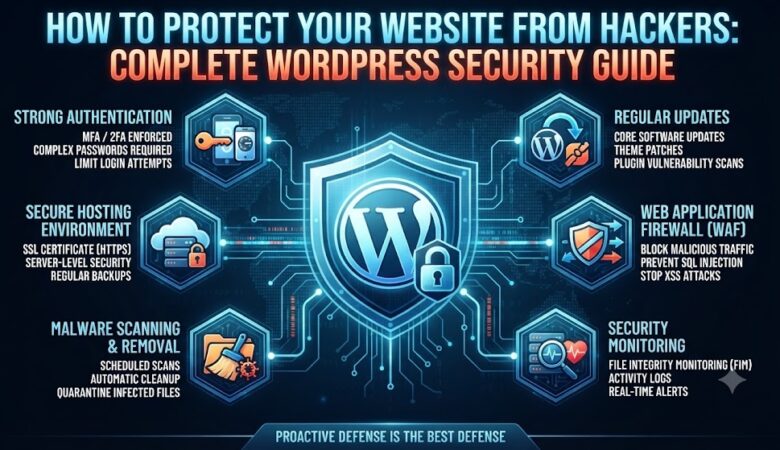
How to Protect Your Website from Hackers: Complete WordPress Security Guide Running a website is an exciting adventure—whether you’re sharing your passion, building a business, or running a digital storefront. But along with opportunity comes risk. Every website, big or small, is a potential target for hackers. WordPress, the world’s most popular website platform, is no exception. If you think, “Why would anyone hack my site?” consider this: hackers don’t always target big brands. Automated bots scan millions of websites daily, looking for vulnerabilities to exploit—no matter your site’s size or topic. But don’t worry! With the right steps, you can significantly reduce your risk and keep your site, your content, and your visitors safe. Why Hackers Target WordPress Sites WordPress powers over 40% of the web. Its popularity makes it a tempting target. Hackers might want to: Steal data (like customer info or email addresses) Inject spam or malware Redirect your visitors to scam sites Hold your website hostage for ransom Use your server to send spam or join a botnet Most attacks are automated and look for common weaknesses—not just high-profile sites. 1. Keep WordPress, Themes, and Plugins Updated The number one reason WordPress sites get hacked? Outdated software. Developers regularly release updates to patch security holes. If you delay updates, you leave your site exposed. What to do: Enable automatic updates if possible. Check for updates to WordPress core, themes, and plugins at least weekly. Remove unused plugins and themes—unused code is a risk. 2. Use Strong, Unique Passwords Weak passwords are an easy win for hackers. Tools called “brute-force bots” can guess thousands of common passwords per second. Tips for strong passwords: Use at least 12 characters, mixing upper/lowercase letters, numbers, and symbols. Avoid names, birthdays, or easy patterns. Consider a password manager to generate and store complex passwords securely. Don’t reuse passwords between your site and other services! 3. Enable Two-Factor Authentication (2FA) 2FA adds a second layer of security—usually a unique code from your phone. How to set up 2FA: Use plugins like Wordfence Login Security or Google Authenticator. Require 2FA for all admin accounts. Even if someone steals your password, they can’t log in without your phone or authenticator device. 4. Choose Reliable Themes and Plugins Not all plugins and themes are created equal. Poorly coded or abandoned plugins are a major security risk. How to choose safely: Download only from reputable sources like the WordPress.org repository or trusted vendors. Check plugin reviews, last update date, and active installations. Delete any plugins or themes you no longer use. 5. Limit Login Attempts and Hide Login Page By default, WordPress lets users try to log in as many times as they want. Limiting attempts stops brute-force bots in their tracks. How to do it: Use plugins like Limit Login Attempts Reloaded. Consider changing your login page URL from /wp-login.php to something unique using WPS Hide Login. 6. Use SSL/HTTPS An SSL certificate encrypts data between your website and your visitors. Google also gives HTTPS sites a small SEO boost. How to get SSL: Many hosts provide free SSL via Let’s Encrypt. Install and force HTTPS using a plugin like Really Simple SSL. 7. Set Proper User Roles and Permissions Don’t give every user admin rights! WordPress has roles like Administrator, Editor, Author, Contributor, and Subscriber. Best practices: Give users the minimum permissions they need. Regularly review user accounts. Remove or downgrade accounts for ex-employees or inactive users. 8. Install a WordPress Security Plugin A good security plugin can: Block suspicious traffic Scan for malware Monitor file changes Enforce strong passwords Alert you to issues Popular security plugins: Wordfence Security Sucuri Security iThemes Security 9. Backup Your Website Regularly No security plan is perfect. If you get hacked, a recent backup lets you restore your site quickly. Tips: Use plugins like UpdraftPlus or BackupBuddy. Store backups offsite (cloud storage or external drive). Test your restore process occasionally. 10. Secure Your wp-config.php and .htaccess Files These files contain sensitive settings and should be protected. How to secure them: Add the following code to your .htaccess file to restrict access: <Files wp-config.php> order allow,deny deny from all</Files> Move wp-config.php one directory above your web root if your host allows. 11. Disable File Editing from the Dashboard Hackers who gain access to your admin can inject malware using the file editor. Solution: Add this line to your wp-config.php file: define(‘DISALLOW_FILE_EDIT’, true); 12. Monitor and Log Activity Keep an eye on what’s happening under the hood. Monitoring plugins can alert you to suspicious actions. Suggestions: WP Activity Log Stream 13. Protect Against DDoS Attacks Distributed Denial of Service (DDoS) attacks flood your site with traffic, making it unavailable. How to minimize risk: Use a CDN with built-in DDoS protection (e.g., Cloudflare). Block suspicious IPs and limit XML-RPC requests. 14. Harden Your Database Use a custom database prefix (not the default wp_). Restrict database user privileges. Change your database password regularly. 15. Remove Unused Services and Scripts Every extra feature is a potential vulnerability. Turn off or uninstall anything you don’t need. Final Thoughts: Make Security a Habit Securing your WordPress website isn’t a one-time job—it’s a continuous process. Hackers never rest, and neither should your vigilance. Review your security setup regularly, stay informed about new threats, and make updates part of your website routine. Quick Checklist: Are all plugins, themes, and WordPress core up to date? Are backups running and stored offsite? Is 2FA enabled for all admin users? Are strong, unique passwords enforced? Is a security plugin active and configured? By following these steps, you’ll make your site a much harder target—and keep your content, your visitors, and your reputation safe.
Understanding Computer Forensics

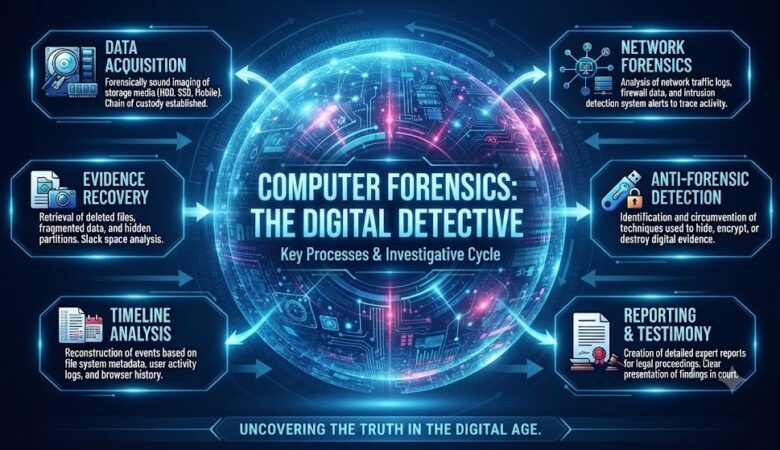
Understanding Computer Forensics: The Digital Detective Behind Cybercrime Investigations In our interconnected world, almost every move we make leaves a digital footprint—whether it’s a text, a bank transfer, or a photo uploaded to the cloud. These conveniences make life easier, but they also create hidden risks. Behind the scenes, a new breed of crime is emerging: data breaches, identity theft, corporate espionage, and financial scams, all powered by digital technology. This is where computer forensics steps in. Think of computer forensics as CSI for the cyberspace: a blend of detective work, technical savvy, and legal know-how. These digital investigators dive deep into hard drives, smartphones, and cloud accounts, uncovering the clues that cybercriminals try to hide. What Is Computer Forensics? Computer forensics, sometimes called digital forensics, is the science of discovering, preserving, analyzing, and presenting digital evidence in a way that stands up in court. It’s about answering: what happened, how did it happen, who was involved, and when—all while making sure the evidence is untampered and legitimate. Unlike regular IT troubleshooting, forensics isn’t just about fixing problems—it’s about piecing together the digital puzzle to reveal the truth. Evidence can include: Deleted files or emails Internet browsing history Login records USB device history Hidden or encrypted data Malware or suspicious software Network connections Every action someone takes on a digital device leaves a trace. A skilled forensic analyst knows exactly where to look. Why Does Computer Forensics Matter?   Cybercrime isn’t just a plot in movies—it’s a daily reality for businesses, governments, and individuals. Criminals are constantly inventing new ways to steal, disrupt, and deceive, making digital investigations vital. Computer forensics helps: Solve hacking incidents and data breaches Recover deleted or hidden information Detect insider threats and employee misconduct Support lawsuits and criminal cases Protect intellectual property and trade secrets Investigate financial fraud and scams Without proper forensic work, crucial evidence might be lost forever, making it impossible to catch the culprits or even know what really happened. The Computer Forensics Process: How the Digital Mystery Gets Solved 1. Identification First, investigators figure out what devices and accounts might hold evidence. This could be anything from a desktop at the office, to a smartphone, an email server, or even a cloud storage account. 2. Preservation Preserving evidence is critical. Investigators use specialized tools to copy data without altering the original, keeping the evidence pristine for court. Forensic copies are made, and originals are locked away. 3. Collection All relevant data—files, logs, emails, memory captures, and more—are gathered. Every step is documented to ensure the “chain of custody” (a record proving the evidence hasn’t been tampered with). 4. Examination Using advanced software, analysts dig through the data. They look for things like deleted files, hidden malware, suspicious logins, or unusual network connections. 5. Analysis This is where the pieces come together. Investigators build a timeline, figure out who did what and when, and determine whether data was stolen, altered, or destroyed. 6. Reporting Finally, everything is compiled into a clear, thorough report that explains the findings in plain language. The report must be credible for both technical experts and non-tech-savvy audiences, such as judges or juries. Specialized Areas of Computer Forensics   Disk Forensics: Recovering deleted files or hidden partitions from hard drives and storage devices. Memory Forensics: Analyzing a device’s RAM to spot running malware or encryption keys. Network Forensics: Tracking network traffic, packets, and logs to investigate attacks. Mobile Device Forensics: Extracting messages, call logs, photos, and app data from smartphones and tablets. Cloud Forensics: Examining data stored across cloud servers and services—a growing challenge as businesses move online. The Tools of the Trade Professional investigators use: Autopsy FTK Imager EnCase Magnet AXIOM Cellebrite (especially for mobile devices) Wireshark (for network analysis) These tools help recover deleted files, analyze system memory, and create detailed forensic reports. Real-World Applications Computer forensics isn’t limited to big headline-grabbing cyberattacks. It’s also used to: Investigate employee theft or data leaks Catch financial fraudsters in banks or insurance companies Respond to ransomware attacks Support court cases involving digital evidence Resolve intellectual property disputes For example, after a ransomware attack, a forensic analyst might identify how the attackers got in, what data was stolen, and help law enforcement trace the culprits. Challenges in Computer Forensics The field isn’t without its hurdles: Encryption: Strong encryption protects user privacy, but also makes it tough for investigators to access data lawfully. Huge Volumes of Data: Businesses generate massive amounts of information, making it hard to find the “smoking gun” among millions of files. Cloud Storage: With data spread across multiple locations and providers, collecting evidence can be complex. Anti-Forensic Tactics: Criminals use software to erase, hide, or scramble evidence, constantly challenging investigators. What Makes a Good Computer Forensics Professional? It’s not just technical knowledge—though knowing how computers, networks, and storage work is essential. A great forensic analyst combines: Analytical thinking and curiosity Attention to detail Understanding of laws and legal procedures Strong communication skills (to explain findings simply) Up-to-date technical know-how Career Opportunities Digital Forensics Analyst Incident Response Specialist Cybercrime Investigator Malware Analyst Security Consultant Opportunities abound in government, law enforcement, banking, healthcare, tech companies, and consulting firms. Staying Ahead: The Future of Computer Forensics The digital world keeps evolving. New challenges like Internet of Things (IoT) devices, drones, and cryptocurrency mean forensic experts must keep learning. Artificial Intelligence, machine learning, and automation are becoming valuable tools to sift through vast data and detect patterns human eyes might miss. Final Thoughts Computer forensics is the bridge between technology and justice, uncovering the truth in a digital world. These professionals are the digital detectives, tracking clues across networks, devices, and clouds to solve mysteries, protect people, and bring wrongdoers to justice. Whether you’re considering a career in digital forensics or just want to understand how cybercrime investigations work, one thing is clear: as long as there is technology, there will be a need for digital detectives.

How to Build an Isolated Virtual Lab for Cybersecurity Testing: Step-by-Step Guide

Lab Setup Document: Building a Virtual Lab Environment   Course: Cyber Security Lab / Module 1 Objective: To establish a secure, isolated virtualized environment for penetration testing and vulnerability assessments.   Part 1: Virtual Network Architecture & Component Mapping To evaluate security compliance safely without risking infrastructure degradation or triggering production alerts, an isolated local virtual environment was provisioned using VMware Workstation Pro. The architecture segregates the attacking asset, a known vulnerable target framework, and enterprise target client operating systems onto a unified host-only subnet mask structure.   Lab Host Configuration Metrics The following structural table maps the components verified within the isolated virtual network environment: VM Host Name Operating System Version / Release Assigned IP Address Default User Account Lab Role Profile Windows 10 Pro Windows 10   150.1.7.100 lonovo Main Windows Host Machine on which VMWare is installed. Pentesters Kali Linux 2026.1 150.1.7.101 root / kali Attacker OS Metasploitable2 Metasploitable Linux 2.0 150.1.7.104 msfadmin Vulnerable Target Windows 10 Windows 10 22H2 150.1.7.105 Pentesters Modern Client Target Windows 7 Legacy Windows 7 SP1     Legacy Client Target           Part 2: Installing Operating Systems       Part-3: Configuring Network Adapters Windows 10 (Main Windows Machine on which VMWare is installed)             Host Only IP: 150.1.7.100       Kali Linux (Main Attacking Machine)             Host Only IP: 150.1.7.101     Metasploitable Linux             Host Only IP: 150.1.7.104     Windows 10 (VM Ware Machine)             Host Only IP: 150.1.7.105       Windows 7 (VM Ware Machine)             Host Only IP: 150.1.7.____           Verification of Assigned IP Address (Host Only) to each Machine using ping   Part-1 – Windows 10 Main Host Machine (Connection Test using ping command with other machines on VM Ware)   Windows 10 (Main Windows host machine) Connected with Kali Linux (Attacking Machine)     Windows 10 (Main Windows host machine) Connected with Metasploitable Linux           Windows 10 (Main Windows host machine) Connected with Windows 10 (VM Ware windows machine)   Windows 10 (Main Windows host machine) Connected with Windows 7 (VM Ware windows machine)                 Verification of Assigned IP Address (Host Only) to each Machine using ping   Part-2 – Kali Linux Main Attacking Machine (Connection Test using ping command with other machines)   Kali Linux (Main Attacking Machine) Connected with Windows 10 (Main Windows host machine)     Kali Linux (Main Attacking Machine) Connected with Metasploitable Linux       Kali Linux (Main Attacking Machine) Connected with Windows 10 (VM Ware windows machine)   Kali Linux (Main Attacking Machine) Connected with Windows 7 (VM Ware windows machine)       Verification of Assigned IP Address (Host Only) to each Machine using ping   Part-3 – Metasploitable Linux (Connection Test using ping command with other machines)   Metasploitable Linux Connected with Windows 10 (Main Windows host machine)     Metasploitable Linux connected with Kali Linux (Main Attacking Machine)       Metasploitable Linux Connected with Windows 10 (VM Ware windows machine)   Metasploitable Linux Connected with Windows 7 (VM Ware windows machine)           Verification of Assigned IP Address (Host Only) to each Machine using ping   Part-4 – Windows 10 (VM Ware windows machine) (Connection Test using ping command with other machines)   Windows 10 (VM Ware windows machine) Connected with Windows 10 (Main Windows host machine)       Windows 10 (VM Ware windows machine) connected with Kali Linux (Main Attacking Machine)     Windows 10 (VM Ware windows machine) connected with Metasploitable Linux   Windows 10 (VM Ware windows machine) Connected with Windows 7 (VM Ware windows machine)       Verification of Assigned IP Address (Host Only) to each Machine using ping   Part-5 – Windows 7 (VM Ware windows machine) (Connection Test using ping command with other machines)   Windows 7 (VM Ware windows machine) Connected with Windows 10 (Main Windows host machine)   Windows 7 (VM Ware windows machine) connected with Kali Linux (Main Attacking Machine)   Windows 7 (VM Ware windows machine) connected with Metasploitable Linux   Windows 7 (VM Ware windows machine) Connected with Windows 10 (VM Ware windows machine)       Part-4: Verification and Validation Perform a Ping Sweep & Document IPs   From Kali Linux (Attacking OS) running ping sweep using fping -g command revealed that on the network following machines are alive against these IP addresses:-   Host OS Windows 10            –           IP: 150.1.7.100 is alive Kali Linux (attacking OS)     –           IP: 150.1.7.101 is alive             iii.        VM OS Metasploitable2        –           IP: 150.1.7.104 is alive VM OS Windows 10              –           IP: 150.1.7.105 is alive         Scan Metasploitable & Save Output   From Kali Linux (Attacking OS) running nmap against Metasploitable2 and saved the results into a text file named metasploitable_scan.txt and saved this file on desktop     Hostname Resolution for Windows VMs   To verify that Kali Linux can resolve the hostnames of Windows VMs on the NetBIOS workgroup: Using nmblookup (NetBIOS Name Query) Runing nmblookup -A command on target Windows IP: 150.1.7.105 which is denied/ no reply from 150.1.7.105         Using nmap NetBIOS Script Runing nmap -sU –script nbstat.nse command on target Windows IP: 150.1.7.105 (still no response)       iii.        Add Local Hostname Resolution Resolved directly by hostname by edit /etc/hosts file:     Final Verification Steps Test Hostname Resolution with ping Run a simple ping command using the hostname instead of the IP address: ping win10-vm -c 2   Requirement Status Evidence 1. Ping Sweep Done Executed via fping / nmap 2. Target Scan (metasploitable_scan.txt) Done Saved port scan output for 150.1.7.104 3. Hostname Resolution Done Mapped in /etc/hosts & verified via ping win10-vm -c 2       Reflection Report: Lab Setup & Isolated Environments Challenges Faced and Solutions: During the setup of the virtual security testing lab, two main challenges were encountered: Network Isolation & ICMP Blocking: Initially, Windows target machines dropped ping

Top 15 Cybersecurity Threats

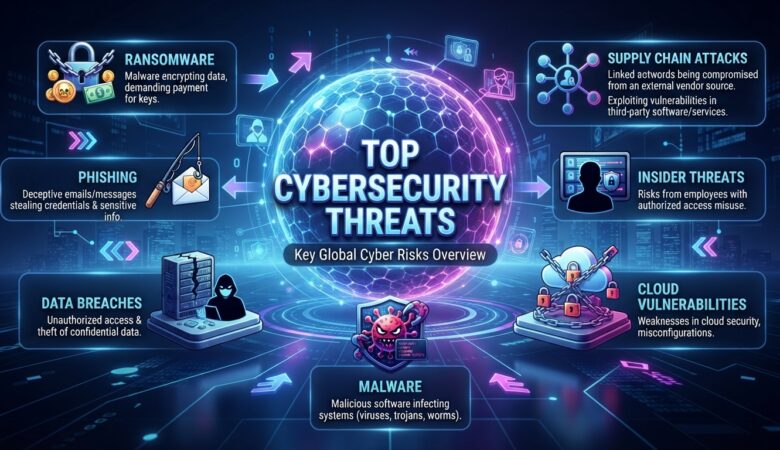
Top 15 Cybersecurity Threats Every Business Should Know In an era where digital transformation is the norm, businesses face not only opportunities but also risks—especially those lurking in cyberspace. Cybersecurity threats are evolving, relentless, and can affect companies of every size. Whether you run a growing startup or manage a large corporation, understanding these threats is essential to keeping your business, customers, and reputation safe. This definitive guide will walk you through the top 15 cybersecurity threats confronting businesses today, explain how they work, and offer practical advice to keep your organization secure. 1. Phishing Attacks Phishing is the most widespread and persistent cyber threat. It typically arrives as a seemingly genuine email, text, or message that impersonates a trusted entity—like your bank, a partner, or even a colleague. The intent is to trick employees into revealing passwords, financial info, or clicking harmful links. Why it’s dangerous: Phishing serves as the gateway for most other cyberattacks. A single click on a malicious link can open the door to malware, data breaches, or financial theft. Real-world scenario: In 2024, a healthcare company lost millions after a phishing email disguised as a vendor invoice led to a major data breach. How to protect your business: Conduct regular phishing awareness training. Implement email filtering and anti-phishing tools. Encourage employees to verify suspicious requests. 2. Ransomware Ransomware is malicious software that encrypts your company’s files, demanding payment (usually in cryptocurrency) for the decryption key. This type of attack can cripple business operations and result in catastrophic financial loss. Why it’s dangerous: Ransomware attacks can halt your operations for days or even weeks. Some businesses never recover. Case in point: In 2023, a major city’s public services were held hostage by ransomware, forcing them to pay a hefty ransom just to regain access to their files. How to defend your business: Regularly back up data and store backups offline. Patch software and operating systems promptly. Train employees to avoid risky downloads and attachments. 3. Insider Threats Not all cybersecurity risks come from outside the organization. Insider threats involve employees, contractors, or trusted partners who intentionally or accidentally compromise your security. This could be due to negligence, lack of training, or malicious intent. Why it’s dangerous: Insiders have privileged access, making them capable of inflicting significant harm—sometimes without being noticed until it’s too late. How to minimize insider threats: Limit employee access to only what they need. Monitor activity on sensitive accounts. Foster a security-aware workplace culture. 4. Malware Malware, short for malicious software, includes viruses, worms, trojans, spyware, and adware. It can infiltrate your network via email attachments, infected websites, or compromised devices, causing data loss, system outages, or even theft of sensitive info. Why it’s dangerous: Malware can spread rapidly and stay hidden for months, causing extensive damage before detection. How to prevent malware: Use robust antivirus and endpoint protection. Keep all systems updated. Block downloads from untrusted sources. 5. Denial-of-Service (DoS) and Distributed Denial-of-Service (DDoS) Attacks DoS and DDoS attacks overwhelm your servers with traffic, making your website or services unavailable to real customers. DDoS attacks often use a botnet—a network of infected devices—to dramatically amplify their impact. Why it’s dangerous: These attacks can cripple businesses, result in lost revenue, and damage your reputation. How to protect your business: Invest in DDoS protection services. Monitor network traffic for anomalies. Have a response plan ready. 6. Man-in-the-Middle (MitM) Attacks MitM attacks occur when an attacker secretly intercepts and possibly alters communication between two parties. These attacks often happen over unsecured Wi-Fi or through compromised routers. Why it’s dangerous: Sensitive data—like login credentials and financial information—can be stolen without your knowledge. How to defend against MitM attacks: Use encrypted communications (HTTPS, VPNs). Educate staff about secure Wi-Fi use. Implement strong network security protocols. 7. Credential Stuffing Credential stuffing uses stolen username and password combinations from previous breaches to try and gain access to other sites. Since many people reuse passwords, this attack is surprisingly effective. Why it’s dangerous: If any of your employees or customers reuse passwords, their accounts can be compromised easily. How to prevent it: Require strong, unique passwords. Use multi-factor authentication. Monitor for suspicious login attempts. 8. Zero-Day Exploits A zero-day exploit attacks a software vulnerability before the developer has a chance to patch it. These are highly sought after by cybercriminals because they can bypass even the most up-to-date defenses. Why it’s dangerous: Zero-day attacks can devastate businesses, especially if the software is widely used. How to reduce risk: Keep all software updated. Use advanced threat detection systems. Stay informed about new vulnerabilities. 9. Social Engineering Social engineering manipulates human psychology rather than technical flaws. Attackers might pose as IT support, business partners, or even executives to trick employees into revealing sensitive information or taking risky actions. Why it’s dangerous: People are often the weakest security link. How to defend your business: Train employees to verify identities and requests. Establish clear security policies for sensitive actions. Encourage a “trust, but verify” culture. 10. Supply Chain Attacks Supply chain attacks target your vendors, partners, or suppliers to gain access to your systems. By compromising a trusted third party, attackers can bypass even the strongest defenses. Why it’s dangerous: Even if your security is robust, you’re only as secure as your weakest supplier. How to mitigate risks: Vet third-party vendors for security practices. Limit third-party access to only what’s necessary. Monitor vendor activity and establish incident response agreements. 11. Business Email Compromise (BEC) In a BEC attack, cybercriminals impersonate executives, partners, or vendors to trick employees into transferring money or sensitive data. These scams are often carefully researched and highly targeted. Why it’s dangerous: BEC scams cause billions in losses worldwide each year. How to prevent BEC: Establish strict protocols for financial transactions. Train staff to verify unusual requests, especially those involving money or sensitive data. Use email authentication technologies (SPF, DKIM, DMARC). 12. Data Breaches A data breach is when sensitive information—like customer records, payment details, or intellectual property—gets exposed or

Cybersecurity for Beginners

What is Cybersecurity? A Complete Beginner’s Guide (2026) Imagine waking up one morning to find your email hacked, your social media flooded with spam, or your bank account emptied overnight. As scary as that sounds, these scenarios happen to millions every year. The reason? Cyber threats are a part of modern life. That’s where cybersecurity comes in: it’s the digital shield protecting you, your loved ones, and organizations from the dangers lurking online. The Heart of Cybersecurity At its core, cybersecurity is all about keeping your digital life safe. It’s the practice of defending computers, networks, and data from attacks, damage, or unauthorized access. Just as you lock your doors at night or install security cameras, cybersecurity is about locking down your digital world. Why Does It Matter? Think about all the personal information stored online: photos, messages, credit card numbers, medical records, and even your location. For businesses and governments, the stakes are even higher, involving trade secrets or national security. Without strong cybersecurity, all this data is at risk. How Cyber Attacks Happen Let’s break down some common ways cybercriminals try to break in: Phishing Attacks: Ever receive a suspicious email pretending to be from your bank? That’s phishing, trying to trick you into sharing personal info. Malware: This is malicious software—like viruses, spyware, and ransomware—that sneaks onto your device to steal, spy, or lock your files. Social Engineering: Sometimes hackers don’t need fancy tools; they just manipulate people into giving up secrets, like calling and pretending to be tech support. Weak Passwords: Using “123456” or “password” is like leaving your front door wide open. Real-World Example In 2021, a major fuel pipeline in the U.S. was shut down due to a ransomware attack. Hackers got in through a weak password, encrypted the company’s data, and demanded millions to restore access. The result? Gas shortages, panic buying, and a major financial hit. This story isn’t rare—cyberattacks like this occur every day. The Building Blocks of Cybersecurity To really understand cybersecurity, let’s look at its main components: 1. Confidentiality Keeping information private. Only authorized people should access sensitive data, like your bank details or medical records. 2. Integrity Making sure information isn’t altered or tampered with. Imagine if someone could secretly change the amount on your paycheck—integrity measures prevent that. 3. Availability Ensuring data and systems are accessible when you need them. If a hospital’s computers went down in an emergency, the consequences could be dire. These three pillars—confidentiality, integrity, and availability—are known as the CIA triad, and they’re at the heart of every cybersecurity strategy. Common Threats You May Face Let’s make this personal. What kinds of cyber threats might you encounter? Phishing Emails: Fake messages claiming you’ve won a prize or need to “verify your account.” Fake Websites: Sites that look real but steal your login info. Malware from Downloads: Downloading free games, movies, or apps from untrusted sites can infect your device. Unsecured Wi-Fi: Using public Wi-Fi without protection (like at cafes or airports) can let hackers snoop on your data. Everyday Cybersecurity Tips The good news? You don’t need to be a tech genius to protect yourself. Here are practical, beginner-friendly habits: Use Strong Passwords: Combine uppercase, lowercase, numbers, and symbols. Avoid using names or birthdays. Enable Two-Factor Authentication (2FA): This adds an extra layer—like getting a code by text—to log in. Update Regularly: Software updates patch security holes. Don’t ignore those “update now” prompts! Be Wary of Suspicious Links: Hover over links in emails to see where they really go. If in doubt, don’t click. Back Up Your Data: Use cloud storage or an external drive. If you’re hacked, you won’t lose everything. Use Antivirus Software: Even free versions offer a basic level of protection. Secure Your Home Wi-Fi: Change default passwords and use strong encryption (WPA3 if possible). Think Before You Share: Be careful about what you post online—especially personal details. Cybersecurity at Work and School If you’re part of a company, school, or other organization, you’ll encounter more complex threats: Business Email Compromise: Hackers impersonate bosses or vendors to trick employees into transferring money. Data Breaches: Sensitive records (like customer info) are leaked or stolen. Insider Threats: Sometimes, threats come from within—disgruntled employees or careless mistakes. Organizations invest in firewalls, secure networks, employee training, and sometimes even “ethical hackers” who test defenses by trying to break in (with permission). How Do Hackers Think? Understanding the mindset of attackers can help you stay ahead. Most hackers go after the easiest target—don’t be the low-hanging fruit! Many use automated tools to scan millions of devices for weak passwords or outdated software. If you follow basic security steps, you’re already ahead of most people. The Human Side of Cybersecurity One of the biggest myths is that cybersecurity is all about computers. In reality, it’s just as much about people—their habits, awareness, and decisions. Many breaches succeed because of human error: clicking the wrong link, choosing a weak password, or trusting the wrong person. That’s why education is so important. The more you know, the safer you are. Cybersecurity Myths Debunked Let’s clear up some common misconceptions: “I’m not important enough to be hacked.” Hackers target everyone, not just big companies. Your data can be valuable for identity theft or fraud. “Antivirus software is enough.” It’s a good start, but you also need safe habits and regular updates. “All Wi-Fi is safe.” Public Wi-Fi is often unsecured. Use a VPN if possible, especially for sensitive tasks. “It won’t happen to me.” Many victims thought the same. It’s better to be proactive. Careers in Cybersecurity Interested in turning your curiosity into a career? Cybersecurity professionals are in high demand, with millions of unfilled jobs worldwide. Here are some roles: Security Analyst: Monitors systems for threats. Penetration Tester (“Ethical Hacker”): Finds and fixes vulnerabilities before criminals do. Security Engineer: Builds and maintains secure systems. Incident Responder: Handles breaches and limits damage. Chief Information Security Officer (CISO): Leads an organization’s cybersecurity strategy. No matter your background, there’s a