Best Cybersecurity Tools Every IT Professional Should Use

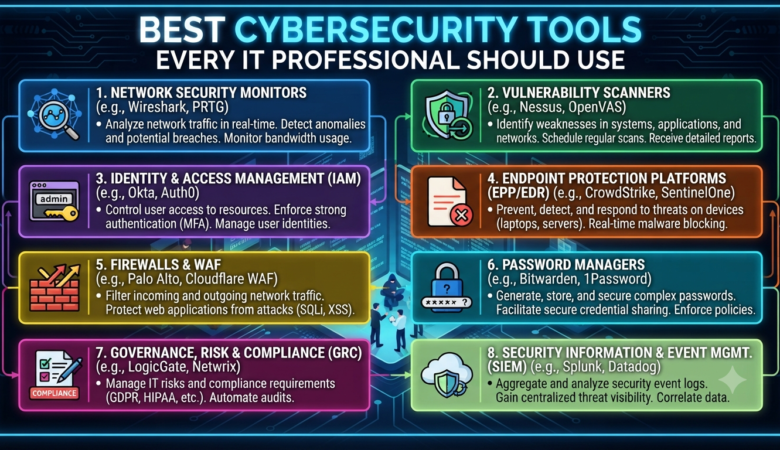
Best Cybersecurity Tools Every IT Professional Should Use   In today’s fast-paced, hyperconnected world, the threat landscape is constantly evolving. Whether you’re managing a small business network or securing the infrastructure of a global enterprise, robust cybersecurity isn’t just a nice-to-have—it’s essential for survival. The right tools can be the difference between a close call and a catastrophic breach. But with so many cybersecurity tools on the market, how do you know which ones are truly indispensable for IT pros? This guide breaks down the best cybersecurity tools every IT professional should know, covering network protection, endpoint security, vulnerability scanning, penetration testing, password management, log analysis, and more. Why Cybersecurity Tools Matter Imagine defending a castle with just a wooden shield—you wouldn’t stand a chance against a modern siege. The same goes for defending your digital assets. Cybersecurity tools are your moat, drawbridge, watchtowers, and guards. They help you: Detect and block attacks before they cause harm Find vulnerabilities before hackers do Monitor networks for suspicious activity Respond quickly to incidents Educate and empower users Whether you’re a system admin, network engineer, or security analyst, your toolkit should be as sharp and up-to-date as the threats you face. 1. Firewalls: Your First Line of Defense What they do: Firewalls act as gatekeepers, controlling the flow of traffic between your internal network and the outside world. They block unauthorized access while allowing legitimate communication. Top tools: pfSense: Open-source, powerful, and highly customizable. pfSense is a favorite for businesses of all sizes. Cisco ASA: A robust enterprise solution with advanced features for large organizations. Sophos XG Firewall: Known for its user-friendly interface and deep visibility into network traffic. Why it matters: A properly configured firewall can stop most attacks before they even reach your network—think of it as the locked front door to your digital house. 2. Antivirus and Anti-Malware: Guarding Every Endpoint What they do: Antivirus (AV) and anti-malware tools scan devices for malicious software. They detect, quarantine, and remove viruses, worms, trojans, ransomware, spyware, and more. Top tools: Bitdefender GravityZone: Renowned for its strong protection, minimal system impact, and centralized management. Malwarebytes: Especially effective at catching modern threats missed by traditional AV. Windows Defender: Built into Windows 10/11, free, and steadily improving—great baseline protection. Why it matters: With users constantly downloading files, opening emails, and plugging in USB drives, endpoints are a common entry point for attacks. Good AV/anti-malware is non-negotiable. 3. Intrusion Detection and Prevention Systems (IDS/IPS) What they do: IDS/IPS tools monitor network traffic for malicious activity. IDS tools alert you to potential threats, while IPS solutions can automatically block them. Top tools: Snort: Open-source, highly customizable, and trusted by pros worldwide. Suricata: Fast, multi-threaded, and great for high-traffic networks. OSSEC: An open-source host-based IDS with log analysis and rootkit detection. Why it matters: IDS/IPS tools are like security cameras for your network—spotting suspicious activity before it becomes a disaster. 4. Vulnerability Scanners: Finding the Weak Spots What they do: Vulnerability scanners check systems, software, and networks for known security flaws and misconfigurations. Top tools: Nessus: Arguably the industry standard, with a huge database of vulnerabilities. OpenVAS: Free and open-source; ideal for smaller organizations or those with tight budgets. Qualys: Cloud-based and scalable, perfect for enterprises with lots of assets. Why it matters: Attackers are always on the lookout for weaknesses. Regular vulnerability scanning helps you find and fix issues—before hackers do. 5. Penetration Testing Frameworks: Think Like a Hacker What they do: Penetration (pen) testing simulates real-world attacks on your systems to identify gaps in your defenses. Top tools: Metasploit Framework: The go-to tool for ethical hackers; automates and simplifies exploit development. Kali Linux: A Linux distribution packed with hundreds of penetration testing and security tools. Burp Suite: Essential for web application testing and uncovering flaws like SQL injection or XSS. Why it matters: Defending your network is easier when you know what a real attack looks like. Pen testing tools help you see your environment through an attacker’s eyes. 6. Network Monitoring and Analyzers: Know What’s Happening What they do: These tools track network traffic, performance, and health, helping you spot unusual behavior or bottlenecks. Top tools: Wireshark: The gold standard for network protocol analysis, used to capture and inspect packets in real time. SolarWinds Network Performance Monitor: Enterprise-grade, with customizable dashboards and powerful alerting. Nagios: Open-source and highly extensible, ideal for monitoring servers and network devices. Why it matters: Network monitoring is like having a radar for your environment—quickly detecting DDoS attacks, rogue devices, or data exfiltration attempts. 7. Security Information and Event Management (SIEM) What they do: SIEM tools collect, analyze, and correlate logs from across your organization to spot threats, investigate incidents, and ensure compliance. Top tools: Splunk: Powerful, scalable, and packed with features for large enterprises. ELK Stack (Elasticsearch, Logstash, Kibana): Open-source and highly customizable, suitable for smaller teams or those with in-house expertise. IBM QRadar: Used in many large organizations for advanced threat detection. Why it matters: With so many devices and apps generating logs, SIEM tools help you see the big picture—turning noise into actionable security insights. 8. Password Managers: Taming the Password Beast What they do: Password managers generate, store, and autofill complex passwords, making it easy to use unique logins everywhere—without memorizing them all. Top tools: LastPass: Easy to use, with browser and mobile support. 1Password: Known for its security and “Watchtower” feature, which checks for breaches. Bitwarden: Open-source, affordable, and trusted by security professionals. Why it matters: Weak and reused passwords are still a top cause of breaches. A password manager turns good intentions into real-world security. 9. Patch Management Solutions: Keeping Everything Up to Date What they do: Patch management tools automate the process of finding, testing, and applying software updates across your environment. Top tools: ManageEngine Patch Manager Plus: Supports Windows, macOS, and Linux, with a user-friendly dashboard. Ivanti Patch for Windows: Formerly Shavlik, great for automating Microsoft and third-party app updates. PDQ Deploy: Excellent for smaller organizations looking for fast, reliable patching. Why

10 Common Cyber Attacks and How to Prevent Them

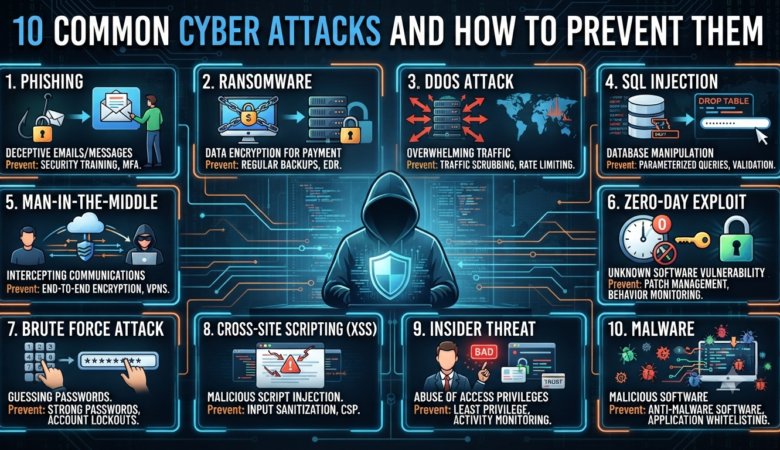
10 Common Cyber Attacks and How to Prevent Them In our digital-first world, cyber attacks are an ever-present threat for individuals and organizations alike. From subtle phishing scams to devastating ransomware, the risk of falling victim grows each year. But understanding the most common types of cyber attacks—and how to defend against them—can dramatically lower your risk and help you navigate the online world with confidence. Let’s break down the top 10 cyber attacks you’re most likely to encounter, explain how they work, and provide practical, actionable steps to keep your data safe. 1. Phishing Attacks What Is Phishing? Phishing is the most widespread and persistent cyber attack today. Attackers disguise themselves as trustworthy entities—banks, coworkers, or service providers—to trick you into sharing sensitive information like passwords, credit card numbers, or Social Security numbers. Phishing attacks usually arrive via email, but can also come through SMS (smishing), phone calls (vishing), or even fake websites. Real-World Example You receive an email that looks like it’s from your bank, warning you of suspicious activity. It urges you to click a link and “verify your account.” The link leads to a counterfeit website designed to steal your login credentials. How to Prevent Phishing Be skeptical: Don’t trust emails asking for personal info or urgent action. Check the sender: Look for slight misspellings or suspicious email addresses. Hover before you click: Preview links before clicking to ensure they lead to legitimate sites. Enable two-factor authentication (2FA): Even if your password is stolen, 2FA adds a layer of defense. Use anti-phishing filters: Modern email services and security suites can help flag suspicious emails. 2. Ransomware What Is Ransomware? Ransomware is malicious software that locks your files or systems until you pay a ransom—usually in cryptocurrency. Victims are often given a deadline, with threats of permanent data loss if demands aren’t met. Real-World Example A hospital’s network is encrypted by ransomware, paralyzing patient care and records access. The attackers demand millions to restore access. How to Prevent Ransomware Back up data regularly: Store backups offline or in the cloud, and test your restore process. Update software: Patch all applications and operating systems to fix vulnerabilities. Use reputable security software: Antivirus and anti-malware tools can block many threats. Train staff: Human error is the leading cause; teach employees to avoid suspicious downloads and emails. 3. Malware What Is Malware? Malware is a broad term for any software designed to damage, disrupt, or steal from computers or networks. Types include viruses, worms, trojans, spyware, and adware. Real-World Example A trojan hidden in a free software download silently steals login credentials, sending them to a remote hacker. How to Prevent Malware Install and update antivirus software: Regularly scan your system for threats. Download from trusted sources: Avoid “cracked” software or untrusted websites. Update everything: Outdated software is a common entry point for malware. Use strong firewalls: Monitor and control incoming/outgoing traffic. 4. Denial-of-Service (DoS) and Distributed DoS (DDoS) Attacks What Are DoS and DDoS Attacks? A DoS attack overwhelms a website or server with traffic, making it unavailable to legitimate users. DDoS takes it further by using a network of compromised computers (botnet) to amplify the attack. Real-World Example An online retailer’s website is flooded with fake traffic on Black Friday, crashing the site and causing lost sales. How to Prevent DoS and DDoS Attacks Use a Content Delivery Network (CDN): Services like Cloudflare absorb large surges of traffic. Monitor network traffic: Set up alerts for unusual spikes. Implement rate limiting: Restrict the number of requests to your site. Work with your ISP or hosting provider: They can often help mitigate attacks. 5. Man-in-the-Middle (MitM) Attacks What Is a Man-in-the-Middle Attack? In a MitM attack, a cybercriminal secretly intercepts and possibly alters communications between two parties. This often happens on unsecured Wi-Fi networks. Real-World Example You log into your bank’s website from a coffee shop’s public Wi-Fi. An attacker intercepts your session and steals your login credentials. How to Prevent MitM Attacks Use encrypted connections: Only enter sensitive info on HTTPS websites. Avoid public Wi-Fi for sensitive transactions: Use your phone’s data or a secure home network. Use a VPN: Encrypts your traffic, even on unsecured networks. Enable 2FA: Even if credentials are stolen, 2FA can block unauthorized access. 6. SQL Injection What Is SQL Injection? An SQL injection attack targets websites or apps that don’t properly filter user inputs. Attackers inject malicious SQL code to manipulate databases—viewing, stealing, or deleting data. Real-World Example An attacker enters malicious code into a login form, tricking the website’s database into granting unauthorized access. How to Prevent SQL Injection Sanitize user inputs: Always validate and escape inputs before passing them to the database. Use prepared statements: Modern development frameworks offer built-in protection. Keep software up to date: Many vulnerabilities are fixed in regular updates. Limit database permissions: Give applications only the access they truly need. 7. Credential Stuffing What Is Credential Stuffing? Cybercriminals use stolen username-password pairs, often from previous breaches, to try and access other accounts—knowing many people reuse credentials across sites. Real-World Example A hacker uses leaked email and password combos from a social media breach to access online banking accounts. How to Prevent Credential Stuffing Use unique passwords: Never reuse passwords between sites. Enable 2FA: Adds a strong secondary barrier to account access. Monitor for suspicious logins: Set up alerts for unusual access patterns. Encourage users to reset passwords after major breaches. 8. Social Engineering What Is Social Engineering? Social engineering is all about manipulating people, not just systems. Attackers use deception to trick individuals into giving up confidential information or performing risky actions. Real-World Example A scammer calls an employee, claiming to be IT support and urgently requests their password to “fix a problem.” The employee complies, handing over access to sensitive systems. How to Prevent Social Engineering Educate employees: Training is your best defense; teach staff how to recognize scams. Establish verification procedures: Never share passwords or sensitive info without confirming the requester’s identity. Promote a

Digital Forensics: What It Is and Why It Matters in Cybercrime Investigations

Digital Forensics: What It Is and Why It Matters in Cybercrime Investigations Introduction: The Rise of Digital Evidence Every day, we create billions of digital footprints—emails, texts, social media posts, online purchases, and more. Our lives, both personal and professional, are enmeshed in the digital world. But as our reliance on technology grows, so does the opportunity for cybercrime. From stolen credit card numbers to elaborate ransomware attacks and insider threats, digital crime is no longer the stuff of Hollywood thrillers—it’s a daily reality for businesses, governments, and individuals. When a cybercrime occurs, how do investigators uncover the truth? Digital forensics is the answer. What Is Digital Forensics? Digital forensics is a specialized branch of forensic science focused on identifying, preserving, analyzing, and presenting digital evidence in a manner that stands up in court. It’s the art and science of investigating electronic devices—computers, smartphones, servers, cloud accounts, and more—to answer the questions: what happened, how did it happen, who was responsible, and when? Think of digital forensics experts as “digital detectives.” Instead of dusting for fingerprints or examining physical evidence, they recover deleted emails, trace network activity, crack encrypted files, and reconstruct timelines from the bits and bytes left behind. Key Point for SEO: Digital forensics is vital for modern cybercrime investigations, helping law enforcement and organizations uncover evidence, identify perpetrators, and secure successful prosecutions. Why Digital Forensics Matters in Cybercrime Investigations 1. Uncovering Hidden Evidence Criminals are increasingly sophisticated, using encryption, anonymization, and anti-forensic techniques to cover their tracks. Digital forensics gives investigators the tools to find evidence that would otherwise remain hidden—whether it’s a deleted file, a manipulated log, or a digital breadcrumb buried in a cloud account. 2. Preserving Evidence Integrity For evidence to hold up in court, it must be handled meticulously. Digital forensics specialists use strict protocols to ensure that evidence is preserved exactly as found—no alterations, no accidental deletions, and a clear “chain of custody” documenting every step. SEO Tip: Courts require digital evidence to be forensically sound. Digital forensics ensures evidence is admissible, credible, and robust. 3. Supporting a Wide Range of Investigations Digital forensics isn’t just for major hacks or corporate espionage. It plays a crucial role in: Data breaches and ransomware attacks Insider threats and employee misconduct Intellectual property theft Financial fraud and embezzlement Child exploitation and cyberbullying Terrorism and organized crime If it leaves a digital trace, digital forensics can help find it. The Digital Forensics Process: From Discovery to Courtroom Let’s walk through how a typical digital forensics investigation unfolds: 1. Identification The process begins with identifying all potential sources of evidence. This could include laptops, desktops, USB drives, smartphones, servers, or cloud storage. Investigators must cast a wide net to ensure nothing is missed. Example: In a suspected data breach, investigators might seize the suspect’s work laptop, personal phone, and access logs from cloud services. 2. Preservation Preservation is about making exact, forensic copies of all relevant data. Investigators use tools like write blockers and imaging software to create clones of hard drives and memory—without altering the original data. Best Practice: Original devices are sealed and stored securely. All analysis is done on forensic copies to maintain evidence integrity. 3. Collection During collection, investigators gather all data relevant to the case: Emails and chat logs Browser histories System and application logs Deleted files and metadata Network traffic Cloud storage contents Each item is meticulously documented to maintain the chain of custody. 4. Examination With the data in hand, examiners use specialized forensic software to sift through huge volumes of information: Recovering deleted files Searching for keywords or patterns Analyzing file timestamps and registry entries Identifying malware or unauthorized access Mapping user activity and connections SEO Tip: Digital forensics tools like EnCase, FTK, Autopsy, and Magnet AXIOM enable deep analysis and reporting of digital evidence. 5. Analysis Here, the pieces come together. Investigators reconstruct timelines, identify suspicious behavior, and connect digital clues to real-world events. They answer the critical questions: Who did what, when, and how? Example: A forensic analyst might prove that a departing employee copied confidential files to a USB drive minutes before resigning. 6. Reporting The final report is crucial. It must clearly outline: The evidence collected The methods used The findings and conclusions A timeline of relevant events Reports must be understandable to both technical and non-technical audiences—including judges, lawyers, and juries. Specialized Areas of Digital Forensics Digital forensics covers several subfields, each with its own tools and challenges: Computer Forensics Focuses on traditional computers and storage devices. Investigators may recover deleted files, analyze system logs, and track user activity on desktops and laptops. Mobile Device Forensics Smartphones and tablets hold a treasure trove of evidence—texts, call logs, photos, GPS data, app histories, and more. Mobile forensics specialists use tools like Cellebrite and XRY to extract and analyze this data. Network Forensics Investigates data moving across networks. By analyzing packet captures, firewall logs, and router records, network forensics experts can trace unauthorized access, data exfiltration, and the spread of malware. Cloud Forensics With so much data now in the cloud, forensic experts must navigate a complex landscape of remote servers, shared access, and cross-border data storage. Cloud forensics blends technical expertise with legal savvy to uncover evidence in virtual environments. Memory Forensics RAM (random-access memory) analysis can reveal what was happening on a device at a specific moment—running programs, open documents, encryption keys, and even remnants of malware that never touched the hard drive. Tools of the Digital Forensics Trade Digital forensics relies on a suite of specialized tools: EnCase: Industry-standard for imaging, analysis, and reporting. FTK (Forensic Toolkit): Comprehensive suite for file analysis and recovery. Autopsy/Sleuth Kit: Open-source option for disk and file system analysis. Magnet AXIOM: Integrates data from computers, mobiles, and cloud. Cellebrite: Leader in mobile device extraction. Wireshark: Network analysis and packet capture. Volatility: Advanced memory forensics. OSForensics: Flexible forensics for Windows environments. Real-World Applications of Digital Forensics Solving High-Profile Hacks When a major retailer suffers a data breach, digital

Essential WordPress Security

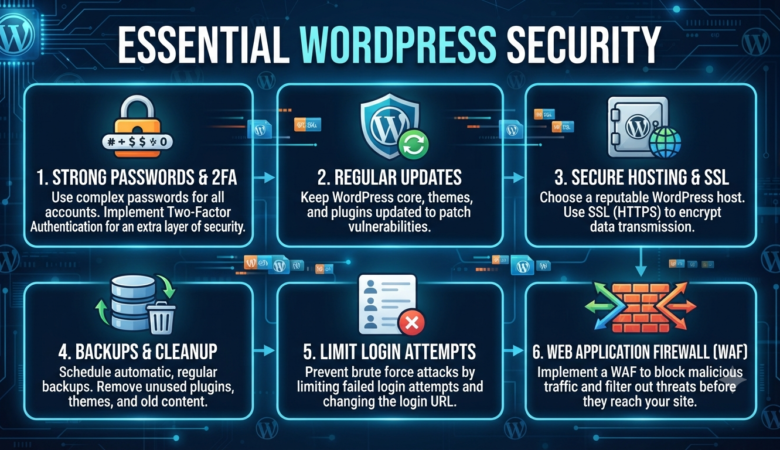
Essential WordPress Security: Protecting Your Site in 2026   As WordPress continues to dominate the web, powering everything from hobby blogs to global business sites, it faces constant attention—not just from fans and users, but from hackers as well. If you’re a site owner, WordPress security isn’t just a technical detail; it’s the foundation of your site’s trust and longevity. In 2026, with cyber threats growing more sophisticated, it’s never been more important to understand how to protect your WordPress site. This guide will walk you through the main reasons sites get hacked, essential steps to safeguard your site, and practical advice for building a security-first mindset. Why WordPress Sites Get Hacked Let’s start with a hard truth: if you have a website, you’re a target. Hackers aren’t just after the big names. In fact, most attacks are automated—bots roam the internet looking for any site with a weakness, regardless of its size or fame. Here’s why WordPress sites are often in the crosshairs: Popularity: With over 40% of the web running on WordPress, it’s a massive target zone for cybercriminals. More users mean more potential victims. Outdated Software: Many site owners forget or delay updates, leaving known vulnerabilities exposed. Weak Passwords: Simple or reused passwords make it easy for bots to break in with brute-force attacks. Unsafe Plugins/Themes: Not all plugins and themes are created or maintained equally. Outdated or poorly-coded add-ons create security gaps. Default Settings: Failing to customize your site’s settings gives hackers a roadmap for attack. The good news? With awareness and the right steps, you can make your site an unappealing target for attackers. Essential Security Steps for WordPress Let’s dive into the core actions that will help keep your WordPress site safe and secure. 1. Keep Everything Updated   Every software update isn’t just about new features—most importantly, updates patch security holes. Hackers often scan for outdated WordPress installations, plugins, or themes. Action Steps: Log in weekly to check for updates. Enable automatic updates for plugins and the WordPress core if possible. Remove plugins and themes you’re not using. Unused code is still a risk. 2. Use Strong, Unique Passwords Passwords are your first line of defense. Yet, “admin” and “password123” are still shockingly common. Hackers use automated bots to guess passwords by the thousands every minute. Action Steps: Use passwords that are at least 12 characters, mixing upper/lowercase, numbers, and symbols. Change your passwords regularly, especially for admin accounts. Use a password manager to generate and remember complex passwords. Never reuse passwords from other sites. 3. Install a Security Plugin WordPress security plugins are like having a security guard for your site. They can block suspicious traffic, scan for malware, monitor changes, and alert you to threats. Top Plugins: Wordfence Security Sucuri Security iThemes Security These tools provide features like firewalls, malware scanning, real-time alerts, login protection, and more. 4. Limit Login Attempts By default, WordPress lets users try to log in as many times as they want. Brute-force bots take advantage of this to guess passwords. Action Steps: Use plugins like Limit Login Attempts Reloaded to set a cap on failed logins. Temporarily lock out users after several failed attempts. Combine with two-factor authentication for maximum protection. 5. Implement SSL/HTTPS SSL (Secure Sockets Layer) encrypts data between your website and its visitors, preventing eavesdropping and data theft. Google also favors HTTPS sites in search rankings. Action Steps: Ask your host for a free SSL certificate (most offer Let’s Encrypt). Force HTTPS sitewide with a plugin like Really Simple SSL. Check for mixed content—make sure all resources load securely. 6. Back Up Regularly Even with all the right security measures, no site is immune. Regular backups are your lifeline if disaster strikes—whether from hacking, server problems, or accidental errors. Action Steps: Install a backup plugin like UpdraftPlus or BackupBuddy. Schedule automatic backups (daily or weekly, depending on your content updates). Store backups offsite—in the cloud (Dropbox, Google Drive) or on a separate server. Periodically test your backup restore process. 7. Remove Unused Plugins and Themes Every active plugin or theme is a possible entry point for hackers—even if you’re not using it. Action Steps: Uninstall (not just deactivate) any plugins or themes you no longer need. Stick to reputable sources—WordPress.org, trusted developers, or major theme/plugin shops. Update all your add-ons regularly. 8. Secure wp-config.php and .htaccess These core files contain sensitive information about your site’s configuration and database. Protecting them is essential. Action Steps: Restrict file access in your .htaccess file with: <Files wp-config.php> order allow,deny deny from all</Files> Move wp-config.php one directory above your root folder, if your host allows. Limit file permissions to the minimum necessary, typically 400 or 440 for wp-config.php. 9. Monitor User Roles Give users only the access they need. An editor doesn’t need admin privileges, and contributors shouldn’t be able to install plugins. Action Steps: Regularly review all user accounts. Remove or downgrade access for former team members or inactive users. Use plugins like User Role Editor to customize permissions. 10. Hide or Change the Login URL The default login page (/wp-login.php or /wp-admin) is well-known to hackers and bots. Action Steps: Use plugins like WPS Hide Login to create a custom login URL. Don’t share your login URL publicly. Combine with login attempt limits and 2FA for layered security. Bonus Tips: Going Beyond the Basics Disable File Editing in Dashboard: Prevent hackers from editing theme/plugin files if they gain access. Add to wp-config.php: define(‘DISALLOW_FILE_EDIT’, true); Monitor Activity Logs: Plugins like WP Activity Log let you track who did what and when. Set Correct File Permissions: Files should typically be set to 644 and directories to 755. Avoid 777 (full access). Disable XML-RPC if Not Needed: XML-RPC can be a target for brute-force and DDoS attacks. Disable it if you don’t use apps like Jetpack or remote posting. Use a Web Application Firewall (WAF): Services like Cloudflare or Sucuri’s firewall add an extra layer of protection by blocking malicious traffic before it reaches your site. Regularly

Ethical Hacking Explained: Everything You Need to Know

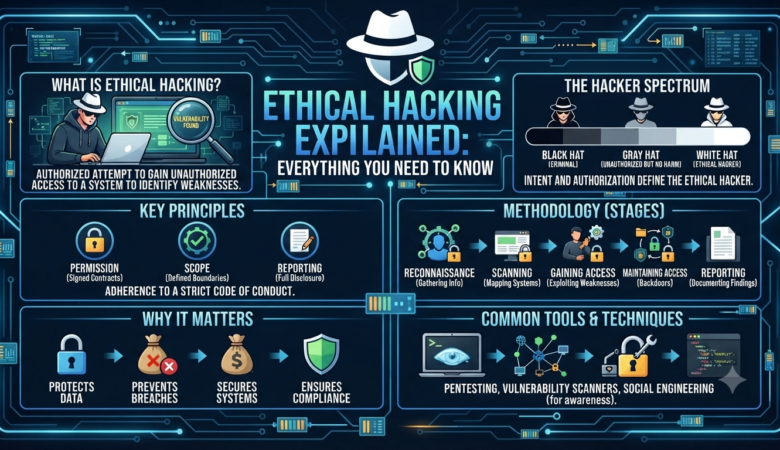
Ethical Hacking Explained: Everything You Need to Know In an age when our lives revolve around technology, cybersecurity is more important than ever. Data breaches, identity theft, ransomware, and digital espionage are daily headlines. But did you know that the same skills hackers use to break into systems can also be wielded to protect them? This is the world of ethical hacking—where hackers wear a “white hat” and use their powers for good. Let’s explore what ethical hacking really is, how it works, who does it, and why it’s essential for modern businesses and individuals. What Is Ethical Hacking? Ethical hacking, sometimes called penetration testing or white-hat hacking, is the process of legally breaking into computers and devices to test an organization’s defenses. An ethical hacker’s mission is to find vulnerabilities before the bad guys do. In simple terms: Ethical hackers use their expertise to help organizations discover security flaws, fix them, and ultimately protect data, assets, and reputation. Analogy: Imagine hiring a skilled burglar to try to break into your house—so you know if your locks are strong enough. That’s what ethical hackers do, but in the digital world. Why Is Ethical Hacking Important? Hackers are constantly scanning the internet, looking for easy targets. No system is 100% secure. Even the world’s largest companies—with armies of security experts—fall victim to cyberattacks. Ethical hacking helps by: Identifying weaknesses before criminals do Preventing data breaches, ransomware, and financial losses Meeting regulatory requirements (like GDPR, HIPAA, PCI DSS) Building trust with customers and partners Improving the overall health of digital infrastructure Types of Ethical Hackers 1. White Hat Hackers: These are the “good guys.” They have permission to hack systems and report findings to help organizations. 2. Black Hat Hackers: The criminals. They break into systems illegally for personal gain, theft, or sabotage. 3. Gray Hat Hackers: These hackers operate in a gray area—sometimes breaking rules but without malicious intent. They might discover vulnerabilities and disclose them publicly, rather than reporting to the company. Ethical hacking is strictly “white hat.” Only authorized professionals, operating under clear rules and contracts, can call themselves ethical hackers. The Legal Side: Permission Is Everything A crucial difference between ethical and unethical hacking is authorization. Ethical hackers always operate with explicit, written permission. Legal protections: Contracts specify what systems can be tested, the scope, and what’s off-limits. Responsible disclosure policies ensure vulnerabilities are reported privately and fixed. Violating these boundaries—even with good intentions—can lead to prosecution. The Five Phases of Ethical Hacking Ethical hacking isn’t just about running scripts or guessing passwords. It’s a structured, methodical process, often broken into these five phases: 1. Reconnaissance (Information Gathering)   This is like digital detective work. The hacker collects as much information as possible about the target: IP addresses and domains Employee names and emails Software and hardware in use Publicly available data (social media, job postings, etc.) Tools: Google Dorking, WHOIS, Maltego, Shodan 2. Scanning Here, ethical hackers probe the target for weaknesses. Scanning for open ports Identifying vulnerable services Mapping the network Tools: Nmap, Nessus, OpenVAS, Nikto 3. Gaining Access This is the actual “break-in.” Using information from the previous steps, hackers attempt to exploit vulnerabilities—like outdated software, weak passwords, or misconfigurations. SQL injection Cross-site scripting (XSS) Password attacks Tools: Metasploit, Hydra, Burp Suite 4. Maintaining Access A real attacker wouldn’t just get in—they’d try to stay undetected, creating “backdoors” for future access. Ethical hackers simulate this to see if security monitoring and response are strong enough. 5. Covering Tracks Professional hackers erase logs and hide evidence to avoid detection. Ethical hackers may test these tactics to ensure security teams can still spot suspicious activity. 6. Reporting The most important step! Ethical hackers provide a detailed, actionable report: What was tested Vulnerabilities found Proof of concept (how the breach happened) Steps to fix the issues Common Techniques and Tools Used by Ethical Hackers   Some popular methods: Social Engineering: Tricking people into revealing passwords or sensitive info (e.g., phishing emails) Password Cracking: Guessing or brute-forcing weak passwords Vulnerability Scanning: Automated checks for known software flaws Network Sniffing: Capturing data packets to analyze sensitive communications Web Application Attacks: Exploiting flaws in websites or web apps Popular Tools: Kali Linux: The ultimate ethical hacking operating system, packed with hundreds of tools Metasploit: A framework for developing and executing exploit code Burp Suite: For web application security testing Wireshark: For network analysis John the Ripper: Password cracking Aircrack-ng: Wireless network testing Real-World Examples of Ethical Hacking 1. Facebook Bug Bounty: Facebook runs a public program that pays ethical hackers to find and report vulnerabilities. In 2022, they paid millions in rewards—helping keep users safe. 2. Penetration Testing for Banks: Banks routinely hire ethical hackers to simulate attacks, ensuring their defenses can withstand real-world threats. 3. Major Government Audits: Governments employ “red teams” of ethical hackers to test the security of public infrastructure, from power grids to election systems. Becoming an Ethical Hacker: Skills and Certifications   Key skills: Deep knowledge of operating systems (Windows, Linux, macOS) Understanding of networks and protocols (TCP/IP, DNS, HTTP, etc.) Proficiency in programming/scripting (Python, Bash, PowerShell) Knowledge of web technologies and databases Ability to think creatively (and like a hacker) Top certifications: CEH (Certified Ethical Hacker): One of the most recognized entry-level certs OSCP (Offensive Security Certified Professional): Highly respected, hands-on penetration testing CPT (Certified Penetration Tester) CompTIA Security+ and Pentest+ Ethical Hacking Careers Job roles: Penetration Tester (Pen Tester) Security Consultant Red Team Member Security Analyst Vulnerability Researcher Application Security Engineer Industries hiring ethical hackers: Tech companies Financial institutions Healthcare providers Government agencies Cybersecurity firms Consulting companies Demand is huge: As cybercrime grows, companies are eager to hire people who can “think like a hacker” but act ethically. Challenges and Limitations Ethical hacking isn’t all fun and games. There are real challenges: Constantly Evolving Threats: Attackers invent new tactics daily. Legal and Ethical Boundaries: One mistake can land you in legal trouble. Complex Systems: Modern IT environments are vast and complicated. Time and