
Multi-Factor Authentication (MFA): Complete Guide to Better Cybersecurity
Multi-Factor Authentication (MFA): Complete Guide
Cyber threats have become more advanced than ever before, making traditional password-based security insufficient for protecting sensitive data and online accounts. While strong passwords remain an essential part of cybersecurity, they can be stolen through phishing attacks, malware, credential stuffing, or data breaches. Once a password is compromised, attackers can gain unauthorized access to valuable business systems and personal information.
This is where Multi-Factor Authentication (MFA) plays a vital role. MFA adds one or more additional verification steps beyond a password, making it significantly harder for cybercriminals to access an account—even if they already know the password.
Today, organizations of all sizes rely on MFA to protect cloud applications, email accounts, banking systems, remote access platforms, and business-critical services. Whether you’re a small business owner, an IT administrator, or an individual looking to improve online security, understanding MFA is essential.
In this complete guide, you’ll learn what Multi-Factor Authentication is, how it works, the different authentication factors, its benefits, common MFA methods, and why it has become a cornerstone of modern cybersecurity.
What Is Multi-Factor Authentication (MFA)?
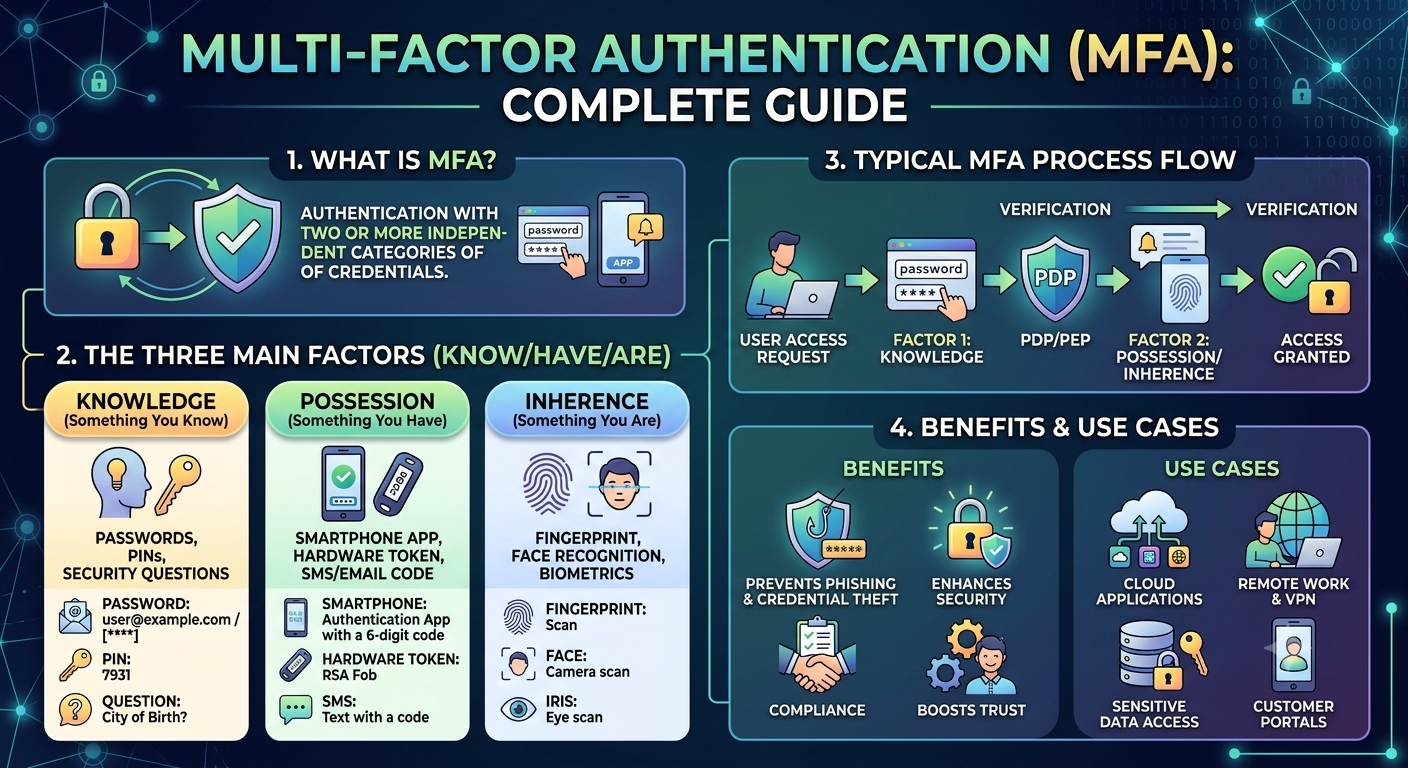
Multi-Factor Authentication (MFA) is a security process that requires users to verify their identity using two or more independent authentication factors before gaining access to an account, device, or application.
Instead of relying solely on a password, MFA combines multiple forms of verification, making unauthorized access much more difficult.
A typical MFA login process might involve:
- Entering a username and password.
- Approving a login request through an authentication app.
- Providing a fingerprint or facial scan.
Even if an attacker steals the password, they still need the second (or third) authentication factor to complete the login process.
Why Multi-Factor Authentication Matters
Passwords are one of the most commonly targeted elements in cyberattacks. Weak, reused, or stolen passwords are responsible for many data breaches each year.
Implementing MFA provides an additional layer of security that helps protect against these threats.
MFA helps organizations:
- Prevent unauthorized account access
- Reduce the risk of phishing attacks
- Protect cloud services
- Secure remote workers
- Safeguard financial transactions
- Improve customer trust
- Meet regulatory compliance requirements
As remote work and cloud computing continue to expand, MFA has become an essential component of a modern cybersecurity strategy.
How Multi-Factor Authentication Works
MFA verifies a user’s identity by requiring multiple forms of authentication from different categories.
A standard login process works like this:
Step 1: Enter Login Credentials
The user enters a username and password.
Step 2: Identity Verification
The system requests another authentication factor, such as:
- A one-time code
- A fingerprint scan
- A security key
- An approval notification
Step 3: Access Granted
If all authentication factors are successfully verified, the user gains access to the requested system or application.
If any verification fails, access is denied.
The Three Main Authentication Factors
Multi-Factor Authentication is based on three primary categories of authentication.
1. Something You Know
This includes information only the user should know, such as:
- Passwords
- PINs
- Passphrases
- Security questions
Although these are common, they can be compromised through phishing or brute-force attacks.
2. Something You Have
This factor requires possession of a trusted device or physical object.
Examples include:
- Smartphone authentication apps
- Hardware security keys
- Smart cards
- USB security tokens
- One-time password generators
Because attackers typically do not possess the user’s physical device, this factor provides strong additional protection.
3. Something You Are
Biometric authentication verifies physical characteristics unique to each individual.
Common biometric methods include:
- Fingerprint recognition
- Facial recognition
- Iris scanning
- Voice recognition
Biometrics provide convenience while making unauthorized access more difficult.
Common Types of Multi-Factor Authentication
Organizations can choose from several MFA methods depending on their security requirements.
Authentication Apps
Authentication apps generate time-based one-time passwords (TOTPs) that change every 30 to 60 seconds.
Advantages include:
- High security
- Works offline
- Easy setup
- Resistant to SIM-swapping attacks
SMS Verification Codes
Users receive a one-time code via text message.
Advantages:
- Easy for beginners
- No additional hardware required
Limitations:
- Vulnerable to SIM-swapping
- Mobile network dependency
- Less secure than authentication apps
Email Verification
A verification code or secure link is sent to the user’s registered email address.
While convenient, this method is only as secure as the email account itself.
Push Notifications
A notification is sent to the user’s smartphone asking them to approve or deny the login attempt.
Benefits include:
- Fast authentication
- User-friendly experience
- Reduced typing errors
Hardware Security Keys
Hardware security keys are physical USB, NFC, or Bluetooth devices that verify a user’s identity during login.
Benefits include:
- Excellent phishing resistance
- Strong protection for privileged accounts
- Suitable for high-security environments
Biometric Authentication
Modern devices increasingly support biometric verification.
Examples include:
- Fingerprint scanners
- Face recognition
- Iris scanning
Biometrics offer convenience while reducing reliance on passwords.
Benefits of Multi-Factor Authentication
Stronger Account Protection
Even if passwords are stolen, attackers still need additional verification to access accounts.
Reduced Risk of Phishing
Phishing attacks often succeed because users unknowingly reveal passwords. MFA significantly limits the usefulness of stolen credentials.
Better Protection for Remote Work
Employees frequently access company resources from home or while traveling. MFA helps secure these remote connections by requiring additional verification before granting access.
Improved Regulatory Compliance
Many cybersecurity standards and regulations recommend or require MFA, including:
- PCI DSS
- HIPAA
- ISO/IEC 27001
- NIST Cybersecurity Framework
- SOC 2
Using MFA can help organizations meet security and compliance obligations while reducing audit risks.
Enhanced Customer Trust
Customers expect businesses to protect their personal and financial information. Offering MFA for customer accounts demonstrates a commitment to security and helps build confidence in your services.
Lower Risk of Data Breaches
By adding an extra verification layer, MFA greatly reduces the chances of unauthorized access, minimizing the likelihood of costly data breaches, ransomware incidents, and account takeovers.
Multi-Factor Authentication (MFA) vs. Two-Factor Authentication (2FA)
Many people use the terms MFA and 2FA interchangeably, but they are not exactly the same.
| Feature | Multi-Factor Authentication (MFA) | Two-Factor Authentication (2FA) |
|---|---|---|
| Number of Factors | Two or more authentication factors | Exactly two authentication factors |
| Security Level | Higher flexibility and stronger protection | Stronger than passwords alone |
| Common Example | Password + Authentication App + Fingerprint | Password + One-Time Code |
| Business Use | Enterprise environments | Personal and small business accounts |
In simple terms, 2FA is a subset of MFA. Every 2FA implementation is MFA, but not every MFA implementation is limited to only two factors.
Where Businesses Should Use MFA
Implementing MFA across all critical systems significantly improves an organization’s security posture. Businesses should prioritize MFA for:
Email Accounts
Business email accounts are among the most common targets for cybercriminals. Compromised email accounts can lead to phishing campaigns, invoice fraud, and unauthorized access to other connected services.
Cloud Applications
Cloud-based platforms often store sensitive business information. Protect services such as:
- Cloud storage
- Customer Relationship Management (CRM) systems
- Accounting software
- Human Resources platforms
- Project management tools
Virtual Private Networks (VPNs)
Remote employees should authenticate with MFA before accessing internal company networks through a VPN.
Administrator Accounts
Privileged accounts have elevated permissions and should always require MFA to reduce the risk of complete system compromise.
Financial Systems
Online banking, payment processing, payroll, and accounting platforms should be protected with multiple authentication factors to reduce financial fraud.
Best Practices for Implementing MFA
Deploying MFA effectively requires more than simply enabling the feature. Consider these best practices:
Require MFA for All Employees
Every employee should use MFA, regardless of their role. Cybercriminals often target lower-privilege accounts as an entry point into an organization’s network.
Prioritize High-Risk Accounts
If full deployment is not immediately possible, begin with:
- Administrator accounts
- Finance teams
- Executive leadership
- Human resources
- IT personnel
These accounts typically have access to the most sensitive systems and data.
Use Authentication Apps or Security Keys
While SMS-based verification is better than using passwords alone, authentication apps and hardware security keys generally provide stronger protection against phishing and SIM-swapping attacks.
Train Employees
Employees should understand:
- How MFA works
- Why it is important
- How to recognize MFA fatigue attacks
- How to report suspicious login requests
Regular cybersecurity awareness training helps reduce human error.
Monitor Authentication Logs
Review login activity to identify:
- Unusual login locations
- Multiple failed authentication attempts
- Repeated verification requests
- Suspicious account behavior
Monitoring helps detect potential attacks before they escalate.
Review Access Regularly
Remove MFA access for former employees and contractors immediately after they leave the organization. Conduct periodic reviews to ensure only authorized users retain access.
Common MFA Challenges
Although MFA provides significant security benefits, organizations may encounter a few implementation challenges.
User Resistance
Some employees may view MFA as inconvenient. Clear communication about the security benefits and user-friendly authentication methods can improve adoption.
Lost or Replaced Devices
Employees may lose their phones or hardware tokens. Businesses should establish secure recovery procedures that verify identity before restoring account access.
MFA Fatigue Attacks
Attackers may repeatedly send authentication prompts, hoping a user eventually approves one out of frustration or confusion. Educating users to reject unexpected requests and investigating repeated prompts can reduce this risk.
Legacy Systems
Some older applications do not support modern MFA methods. Organizations may need additional security controls, such as network segmentation or secure gateways, until those systems are upgraded.
Popular Multi-Factor Authentication Solutions
Businesses have many reliable MFA options to choose from. Common solutions include:
- Microsoft Authenticator
- Google Authenticator
- Duo Security
- Okta
- Cisco Secure Access
- YubiKey hardware security keys
- RSA SecurID
- Authy
The best solution depends on an organization’s size, existing infrastructure, budget, and compliance requirements.
Common MFA Mistakes to Avoid
Avoid these common errors when implementing MFA:
- Relying solely on passwords
- Using the same password across multiple accounts
- Ignoring software updates
- Not enabling MFA for administrator accounts
- Approving unexpected authentication requests
- Sharing authentication devices
- Failing to monitor authentication logs
- Neglecting employee security awareness training
Addressing these issues strengthens the effectiveness of your MFA deployment.
Frequently Asked Questions (FAQs)
Is Multi-Factor Authentication necessary for small businesses?
Yes. Small businesses are increasingly targeted by cybercriminals because they may have fewer security resources. MFA provides a cost-effective way to reduce the risk of unauthorized access.
Can MFA stop phishing attacks?
MFA cannot prevent phishing attempts, but it can significantly reduce the likelihood that stolen passwords alone will allow attackers to access an account.
Is SMS authentication secure?
SMS-based verification offers better protection than passwords alone, but authentication apps and hardware security keys are generally considered more secure because they are less vulnerable to SIM-swapping attacks.
Does MFA replace strong passwords?
No. MFA complements strong password practices rather than replacing them. Organizations should continue enforcing unique, complex passwords alongside MFA.
Can attackers bypass MFA?
Some advanced attacks target MFA through phishing kits, social engineering, or prompt bombing. However, properly configured MFA—especially phishing-resistant methods such as hardware security keys—greatly increases the difficulty of a successful attack.
Conclusion
Multi-Factor Authentication has become one of the most effective and practical ways to strengthen cybersecurity in today’s digital environment. As cybercriminals continue to exploit stolen credentials through phishing, malware, and data breaches, relying on passwords alone is no longer enough.
By requiring two or more forms of identity verification, MFA adds an essential layer of defense that helps protect business systems, cloud applications, customer data, and employee accounts. Whether implemented through authentication apps, hardware security keys, or biometric verification, MFA significantly reduces the risk of unauthorized access.
For organizations of every size, adopting Multi-Factor Authentication is not just a technical upgrade—it is a strategic investment in long-term security. When combined with strong password policies, regular software updates, employee awareness training, and continuous monitoring, MFA becomes a powerful component of a comprehensive cybersecurity strategy.
Suggested Internal Links
- Password Security Best Practices for Businesses
- File Integrity Monitoring: Why It Matters
- Network Security Best Practices
- What Is Zero Trust Security?
- How to Prevent Phishing Attacks
- Endpoint Detection and Response (EDR) Explained
Suggested External Resources
- National Institute of Standards and Technology (NIST) Digital Identity Guidelines
- Cybersecurity and Infrastructure Security Agency (CISA) guidance on securing accounts
- OWASP Authentication Cheat Sheet
Recommended WordPress Category
Cybersecurity
Suggested Tags
- Multi-Factor Authentication
- MFA
- Two-Factor Authentication
- Account Security
- Password Security
- Identity Management
- Cybersecurity
- Data Protection
- Business Security
- Authentication
SEO Excerpt
Strengthen your organization’s defenses with this complete guide to Multi-Factor Authentication (MFA). Learn how MFA works, explore different authentication methods, discover implementation best practices, and find out why every business should use MFA to protect sensitive accounts and data.
Image Alt Text
“Illustration of Multi-Factor Authentication showing password login, smartphone verification, fingerprint authentication, and secure business network.”
Keyword Placement Summary
Primary Keyword: Multi-Factor Authentication (MFA)
Included naturally in:
- SEO Title
- Meta Description
- URL Slug
- Introduction
- Multiple H2 and H3 headings
- Conclusion
- FAQ section
- Image Alt Text
This balanced placement supports search engine optimization while maintaining a natural reading experience and avoiding keyword stuffing.