
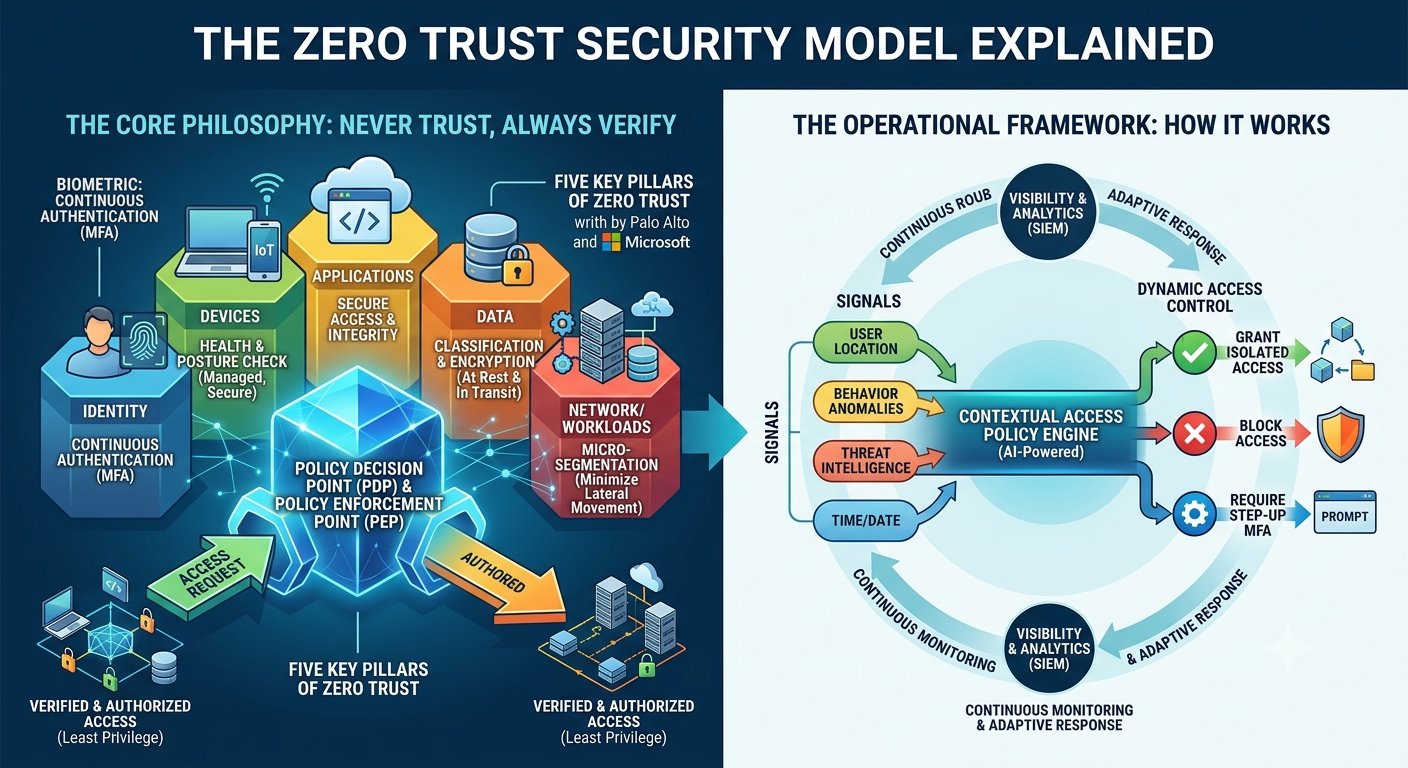
Zero Trust Security Model Explained
Zero Trust Security Model Explained
In today’s digital world, cyber threats are becoming more advanced than ever before. Traditional security models that rely on protecting only the network perimeter are no longer enough to defend against modern cyberattacks. As organizations adopt cloud computing, remote work, mobile devices, and hybrid infrastructures, attackers have more opportunities to exploit vulnerabilities and gain unauthorized access.
This changing threat landscape has led to the rise of the Zero Trust Security Model, a modern cybersecurity approach that assumes no user, device, or application should be trusted automatically—even if they are already inside the organization’s network.
Instead of trusting everything behind a firewall, Zero Trust follows the principle of “Never Trust, Always Verify.” Every request for access must be continuously authenticated, authorized, and validated before access is granted.
In this comprehensive guide, you’ll learn what the Zero Trust Security Model is, how it works, why it is important, its core principles, benefits, implementation steps, challenges, best practices, and why it has become one of the most effective cybersecurity strategies for modern businesses.
What is the Zero Trust Security Model?
The Zero Trust Security Model is a cybersecurity framework that eliminates implicit trust inside or outside an organization’s network.
Unlike traditional security models that automatically trust users once they enter the corporate network, Zero Trust requires verification every time someone attempts to access data, applications, or systems.
The model assumes that:
- Every user could be compromised.
- Every device could be infected.
- Every network connection could be unsafe.
- Every application should be verified.
- Every access request must be authenticated.
The primary objective is to reduce the attack surface and prevent unauthorized access, even if attackers manage to enter the network.
Why is Zero Trust Important?
Cybersecurity has changed dramatically over the past decade.
Modern organizations rely on:
- Cloud applications
- Remote employees
- Hybrid work environments
- Mobile devices
- Third-party vendors
- Internet of Things (IoT) devices
These technologies have expanded the traditional network perimeter, making perimeter-based security much less effective.
Zero Trust helps organizations protect sensitive information by continuously verifying every access request.
It reduces the chances of:
- Data breaches
- Insider threats
- Credential theft
- Malware infections
- Ransomware attacks
- Unauthorized lateral movement
Instead of assuming users are trustworthy, Zero Trust requires proof before granting access.
The Core Principle: Never Trust, Always Verify
At the heart of Zero Trust is a simple philosophy:
Never Trust. Always Verify.
Every login attempt, file request, application access, or network connection is evaluated based on multiple security factors before access is granted.
Verification may include:
- Identity authentication
- Multi-Factor Authentication (MFA)
- Device health checks
- User behavior analysis
- Location verification
- Risk assessment
- Access policies
Even after access is granted, monitoring continues throughout the user’s session.
How the Zero Trust Security Model Works
Zero Trust follows a continuous verification process.
1. Verify Identity
Every user must prove their identity before accessing company resources.
Common verification methods include:
- Username and password
- Multi-Factor Authentication (MFA)
- Biometric authentication
- Single Sign-On (SSO)
- Identity providers
2. Validate Devices
Not every device should be trusted.
Security systems evaluate whether the device:
- Has updated software
- Uses antivirus protection
- Is encrypted
- Meets security policies
- Is company-managed
Compromised devices may be denied access.
3. Grant Least Privilege Access
Users receive only the permissions necessary to perform their jobs.
For example:
- HR employees access HR systems.
- Finance staff access accounting software.
- Developers access development servers.
No one receives unnecessary privileges.
4. Continuously Monitor Activity
Zero Trust doesn’t stop monitoring after login.
Security systems continuously evaluate:
- Login behavior
- File access
- Network traffic
- User activity
- Device status
Suspicious behavior may trigger additional verification or automatically terminate access.
5. Respond to Threats
If unusual activity is detected, Zero Trust solutions can:
- Block access
- Require re-authentication
- Notify administrators
- Isolate compromised devices
- Start automated incident response
Core Components of Zero Trust
Identity and Access Management (IAM)
Identity is the foundation of Zero Trust.
Every user must be authenticated before receiving access.
Multi-Factor Authentication (MFA)
Passwords alone are no longer sufficient.
MFA adds another layer of protection by requiring:
- Mobile authentication apps
- SMS verification codes
- Hardware security keys
- Fingerprint authentication
Device Security
Only secure and compliant devices should connect to organizational resources.
Device monitoring ensures:
- Updated operating systems
- Active antivirus software
- Disk encryption
- Security compliance
Network Segmentation
Instead of one large trusted network, Zero Trust divides the network into smaller secure segments.
If attackers compromise one segment, they cannot easily move to another.
This technique is known as micro-segmentation.
Continuous Monitoring
Security tools continuously collect information from:
- Users
- Applications
- Servers
- Endpoints
- Cloud services
This enables rapid detection of suspicious behavior.
Benefits of the Zero Trust Security Model
Improved Security
Every request is verified before access is granted.
This significantly reduces unauthorized access.
Reduced Risk of Data Breaches
Attackers cannot freely move inside the network after gaining initial access.
Better Protection Against Insider Threats
Employees with excessive privileges represent a significant security risk.
Zero Trust limits unnecessary access.
Stronger Remote Work Security
Remote employees receive the same level of protection as office users.
Cloud Security
Zero Trust protects:
- Cloud applications
- SaaS platforms
- Hybrid environments
- Multi-cloud deployments
Regulatory Compliance
Zero Trust supports compliance with various security frameworks, including:
- PCI DSS
- HIPAA
- ISO 27001
- SOC 2
- NIST Cybersecurity Framework
Common Zero Trust Technologies
Organizations often combine multiple security technologies.
These include:
- Identity and Access Management (IAM)
- Multi-Factor Authentication (MFA)
- Endpoint Detection and Response (EDR)
- Network Access Control (NAC)
- Security Information and Event Management (SIEM)
- File Integrity Monitoring (FIM)
- Endpoint Protection Platforms (EPP)
- Data Loss Prevention (DLP)
- Privileged Access Management (PAM)
- Secure Access Service Edge (SASE)
How to Implement Zero Trust
Identify Critical Assets
Begin by identifying:
- Sensitive data
- Business applications
- Databases
- Cloud resources
- Servers
Verify Every User
Require strong authentication for all users.
Implement Multi-Factor Authentication wherever possible.
Enforce Least Privilege
Grant only the minimum permissions required.
Review permissions regularly.
Secure Endpoints
Ensure all devices meet security standards before connecting.
Segment the Network
Separate sensitive systems into isolated security zones.
Monitor Continuously
Use monitoring tools to detect unusual activity in real time.
Automate Security Responses
Automated actions reduce response times during attacks.
Challenges of Zero Trust
Although highly effective, Zero Trust also presents challenges.
Organizations may face:
- Complex implementation
- Legacy system compatibility
- Higher initial costs
- User resistance
- Increased administrative effort
- Continuous policy management
Despite these challenges, the long-term security benefits usually outweigh the implementation effort.
Best Practices for Zero Trust
To maximize effectiveness:
- Enable Multi-Factor Authentication for every account.
- Apply the principle of least privilege.
- Monitor all network traffic.
- Encrypt sensitive data.
- Keep systems updated.
- Audit user permissions regularly.
- Secure cloud workloads.
- Monitor endpoint health continuously.
- Train employees on cybersecurity awareness.
- Test security controls through regular assessments.
Zero Trust vs Traditional Security
| Feature | Traditional Security | Zero Trust Security |
|---|---|---|
| Trust Model | Trust after login | Never trust by default |
| Authentication | Initial login only | Continuous verification |
| Network Access | Broad access | Least privilege access |
| Insider Threat Protection | Limited | Strong |
| Remote Work Security | Moderate | Excellent |
| Cloud Security | Limited | Excellent |
| Continuous Monitoring | Limited | Yes |
Future of Zero Trust
As cyber threats continue to evolve, Zero Trust will become even more intelligent.
Emerging innovations include:
- Artificial Intelligence (AI)
- Machine Learning
- Behavioral Analytics
- Risk-Based Authentication
- Passwordless Authentication
- Continuous Adaptive Trust
- Automated Threat Response
- Cloud-Native Security
These technologies will improve threat detection while reducing manual security management.
Frequently Asked Questions (FAQs)
Is Zero Trust only for large enterprises?
No. Businesses of all sizes, including small businesses, schools, healthcare organizations, and government agencies, can benefit from Zero Trust.
Does Zero Trust replace firewalls?
No. Firewalls remain an important security control. Zero Trust complements them by continuously verifying users and devices instead of relying solely on network boundaries.
Can Zero Trust stop ransomware?
While no solution can guarantee complete protection, Zero Trust greatly reduces the likelihood of ransomware spreading by limiting access and preventing lateral movement.
Is Multi-Factor Authentication required for Zero Trust?
MFA is one of the most important components of a Zero Trust architecture because it strengthens identity verification.
Can Zero Trust protect cloud environments?
Yes. Zero Trust is specifically designed to secure cloud applications, hybrid environments, and remote access scenarios.
Conclusion
The Zero Trust Security Model has become one of the most important cybersecurity strategies for protecting modern organizations. As businesses continue adopting cloud computing, remote work, and connected devices, traditional perimeter-based security is no longer sufficient.
By following the principle of “Never Trust, Always Verify,” Zero Trust continuously authenticates users, validates devices, limits access through least privilege, and monitors activity in real time. This approach significantly reduces the risk of data breaches, insider threats, ransomware, and unauthorized access.
Whether you’re managing a personal website, a growing business, or a large enterprise, implementing Zero Trust strengthens your overall security posture and prepares your organization for today’s evolving cyber threats. Investing in Zero Trust is not just about preventing attacks—it’s about building a resilient, future-ready cybersecurity strategy that protects your most valuable digital assets.