Linux Piping: A Fundamental Method of Command-Line Data Processing

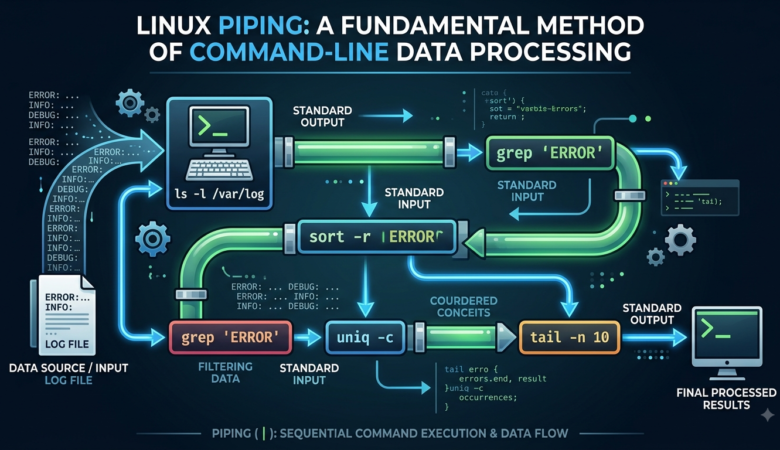
Linux Piping: A Fundamental Method of Command-Line Data Processing Abstract Linux piping is one of the most useful features of the Linux command-line environment. It allows the output of one command to be transferred directly to another command as input, making it possible to combine simple utilities to perform more complex tasks. The concept is based on the Unix philosophy of developing small programs that perform specific functions and can work together when necessary. In Linux, the pipe operator, represented by the vertical bar (|), provides a connection between commands and allows information to move through a sequence of processing stages. This technique is widely used in system administration, software development, data processing, networking, and cybersecurity. This article examines the concept of Linux piping, its relationship with standard input and output, its syntax, common commands used in pipelines, and practical applications. It also discusses multiple pipelines, output redirection, advantages, limitations, and common mistakes made by beginners. Understanding Linux piping provides students with an important foundation for working efficiently with the command line and developing more advanced Linux and cybersecurity skills. Keywords: Linux, piping, pipe operator, command line, shell, terminal, standard input, standard output, Unix, cybersecurity 1. Introduction Linux is an operating system that is widely used in servers, cloud environments, programming, networking, cybersecurity, and academic computing. One of its most important characteristics is the power and flexibility of its command-line interface. Although modern Linux distributions provide graphical desktop environments, many technical tasks can be performed more efficiently through the terminal. Among the features that make the Linux command line powerful is piping. Piping allows the output generated by one command to become the input of another command. Instead of running commands separately and manually transferring information between them, users can connect commands together to create a processing sequence. The pipe operator is represented by the symbol |. A simple example is: ls | less In this example, the ls command produces a list of files and directories. The pipe sends that output to less, which allows the information to be viewed page by page. The importance of piping becomes more obvious when dealing with large amounts of information. Linux provides many small utilities, such as grep, sort, uniq, head, tail, and wc. Each utility has a particular purpose, but they can be combined through pipes to solve more complicated problems. For students learning Linux, piping is therefore more than just another command-line feature. It represents an important way of thinking about problem solving. Instead of looking for one program that performs an entire task, users can divide the task into smaller operations and connect appropriate tools together. 2. Background of Linux Piping The idea of piping originated from the Unix operating-system tradition. Unix designers developed a philosophy based on small programs that perform specific tasks and can be combined to create more useful workflows. This philosophy contributed significantly to the flexibility of Unix and Linux command-line environments. A command does not necessarily need to produce its final result directly for the user. Its output can instead be passed to another command. This makes it possible to construct a chain of operations. For example: command1 | command2 | command3 In this structure, the output from command1 is passed to command2, and the output from command2 is passed to command3. This approach is particularly useful because each program can remain relatively simple. A text-searching program does not need to know how to sort information, and a sorting program does not need to know how to search for a particular word. The shell connects the programs and allows them to work together. 3. Standard Input and Standard Output A basic understanding of Linux piping requires knowledge of standard input and standard output. Linux programs normally work with three standard streams: Standard input (stdin) Standard output (stdout) Standard error (stderr) Standard input is normally associated with information entered through the keyboard. Standard output is normally displayed on the terminal. Standard error is used for error messages and diagnostic information. Consider the following command: ls The output produced by ls normally appears on the screen. When a pipe is added, the behavior changes: ls | grep “.txt” The output from ls is no longer intended only for direct display. Instead, it is passed to grep, which searches the incoming text for .txt. The basic relationship can be represented as: Command A → standard output → pipe → standard input → Command B The pipe therefore acts as a connection between two processes. 4. Basic Syntax of a Pipeline The general form of a pipeline is: command1 | command2 The first command is executed and its output is passed to the second command. For example: ls | grep “report” The ls command produces directory information, while grep filters that information and displays only lines containing the word report. Pipelines can also contain several commands: ls | sort | less This pipeline performs three stages. First, ls produces the information. Next, sort organizes it. Finally, less provides an interactive way of viewing the result. The ability to connect several commands is one of the main reasons the Linux shell is so powerful. 5. The grep Command in Pipelines The grep command is one of the most commonly used utilities with pipes. Its primary purpose is to search text for patterns. For example: ps aux | grep “python” The ps aux command produces information about running processes. The pipe sends that information to grep, which searches for lines containing python. Another example is: ip addr | grep “inet” This filters the output of ip addr and displays lines containing the selected text. The usefulness of grep becomes particularly clear when the original command produces a large amount of information. Rather than manually examining every line, users can apply a filter. In system administration and cybersecurity, similar techniques are often used when examining logs or system information. However, a text match should not automatically be interpreted as proof of a security problem. It is simply a way of

Zero Trust Architecture: Rethinking Enterprise Network Defense in a Boundaryless World

Zero Trust Architecture: Rethinking Enterprise Network Defense in a Boundaryless World Abstract The classic paradigm of perimeter security—frequently referenced as the “castle-and-moat” strategy—has broken down under the pressure of modern operational requirements and threat vectors. As corporate environments migrate toward distributed hybrid multi-cloud systems and support widespread remote work, the physical corporate network perimeter has effectively vanished. Zero Trust Architecture (ZTA) offers an strategic model built around a simple guiding rule: never trust, always verify. This article examines the core concepts, structural pillars, implementation strategies, and practical challenges associated with building a Zero Trust security posture in modern computing environments.   1. The Breakdown of Perimeter Security For decades, IT teams relied on a strict boundary line between trusted internal networks and untrusted external space. Security professionals placed firewalls, Virtual Private Networks (VPNs), and intrusion prevention systems (IPS) along the edge to inspect incoming connection attempts. Once an entity—whether a employee workstation, server, or service account—cleared authentication at that outer boundary, the system granted broad, implicit trust across internal resources. That foundational assumption created a serious vulnerability: internal implicit trust. If an attacker obtained valid login credentials, compromised a local device, or gained access through a supply chain partner, they could move laterally across internal networks with very little resistance. Furthermore, modern technology adoption—such as software-as-a-service (SaaS) tools, public cloud platforms, and bring-your-own-device (BYOD) policies—means corporate assets and employees no longer reside within a single geographic or physical boundary. When applications and workloads run across multiple cloud providers, trying to protect a single static perimeter becomes structurally impossible. 2. Fundamental Tenets of Zero Trust Zero Trust is not a specific software package, dynamic agent, or hardware appliance; it represents an architectural framework and operational mindset. As detailed by the National Institute of Standards and Technology (NIST) in Special Publication 800-207, Zero Trust moves defense from static network locations toward dynamic evaluation of individual users, workloads, and resources. ACCESS REQUEST & CONTEXT (Identity, Device, Behavioral) POLICY DECISION POINT (Evaluate Rules & Risk) DENY ACCESS ALLOW SESSION POLICY ENFORCE (Microsegment) REAL-TIME LOGS & TELEMETRY Explicit Verification Under Zero Trust, systems must evaluate every access request individually regardless of where the request originates. Trust is never granted based on an internal IP address or an existing network connection. Instead, decision engines process continuous signals before granting access: Identity Verification: Requiring Multi-Factor Authentication (MFA), passwordless credentials, or risk-based step-up prompts for every session. Device Posture Checks: Checking endpoint health, compliance status, operating system patch levels, and installed security software before permitting access to sensitive data. Contextual Risk Analysis: Evaluating login timing, physical location, user behavior history, and target data classification in real time. Least Privilege Access Organizations must limit user and system permissions strictly to what is required for immediate business tasks. Reducing unnecessary administrative access prevents attackers from abusing broad credentials during a security breach. Key mechanisms include: Just-In-Time (JIT) Provisioning: Temporarily granting elevated access permissions only when approved for specific tasks, then revoking them automatically once finished. Just-Enough-Access (JEA): Restricting service rights to target API calls, specific database commands, or defined application functions rather than full system access. Assume Breach Mindset Designers assume malicious actors already exist inside internal environments. This perspective focuses engineering efforts on limiting the potential impact of an incident rather than relying solely on external prevention: Microsegmentation: Isolating workloads into small, logically separate network zones to stop unauthorized lateral movement. Ubiquitous Encryption: Enforcing strong transport layer security (TLS) for data moving across internal networks while encrypting databases and files at rest. Continuous Monitoring: Collecting telemetry from systems, identities, and network paths into centralized SIEM and security automation platforms for immediate correlation. 3. Key Structural Pillars A functional Zero Trust model relies on interconnected controls operating across five major operational pillars: Architectural Pillar Primary Objective Key Security Controls Identity Establish verified identity as the access boundary. SSO, FIDO2 Hardware Keys, Conditional Access Rules. Devices Validate health and security of requesting endpoints. EDR Agents, Patch Compliance, MDM Registration. Networks Remove implicit network trust and enforce boundaries. Microsegmentation, Encrypted Session Paths, SDP. Applications & Workloads Secure software components and inter-service messaging. Service Mesh, mTLS, API Authentication Tokens. Data Protect sensitive assets regardless of storage location. Automatic Tagging, Encryption at Rest, DLP Tools. 4. Implementation Phasing Migrating an enterprise from perimeter-based controls to a Zero Trust Architecture requires a structured, multi-phase plan: Asset and Flow Mapping: Catalog user roles, critical applications, internal workloads, and sensitive data stores. Document communication paths across these resources to build a baseline map of business workflows. Control Plane Deployment: Deploy centralized Policy Decision Points (PDP) alongside distributed Policy Enforcement Points (PEP). This control architecture intercepts incoming connection attempts and evaluates them against established security rules. Segmentation and Encryption Enforcement: Apply granular microsegmentation around high-value targets. Require mutual TLS (mTLS) for microservice communications and enforce encrypted channels across all traffic paths. Adaptive Behavioral Response: Incorporate machine learning models to analyze log streams and continuous telemetry. When user behavior deviates significantly from baseline norms, automated systems can adjust access policies or revoke active sessions immediately. 5. Practical Implementation Challenges Adopting Zero Trust delivers clear security improvements, but organizations routinely encounter practical friction points during implementation: Legacy Systems Support: Older operational systems, proprietary mainframes, and legacy software often lack support for modern single sign-on protocols, API tokens, or local security agents. Securing these assets requires dedicated application proxies or isolated network wrapping. Operational Friction: Excessively strict authentication policies or frequent MFA prompts can slow down employee workflows. If access rules disrupt everyday productivity, employees may attempt to bypass official tools using unapproved services (“Shadow IT”). Configuration Complexity: Maintaining granular access policies across complex multi-cloud environments demands careful operational coordination. Poorly managed policy sets can lead to unexpected service outages or security gaps. Conclusion Zero Trust is not a short-term technology trend, but an essential evolution in network defense strategy. By replacing implicit internal trust with dynamic verification, least-privilege permissions, and network microsegmentation, enterprises can limit lateral attacker movement and build resilient defenses capable of protecting decentralized infrastructure.  

Why Zero Trust Is Becoming the Default, Not the Exception

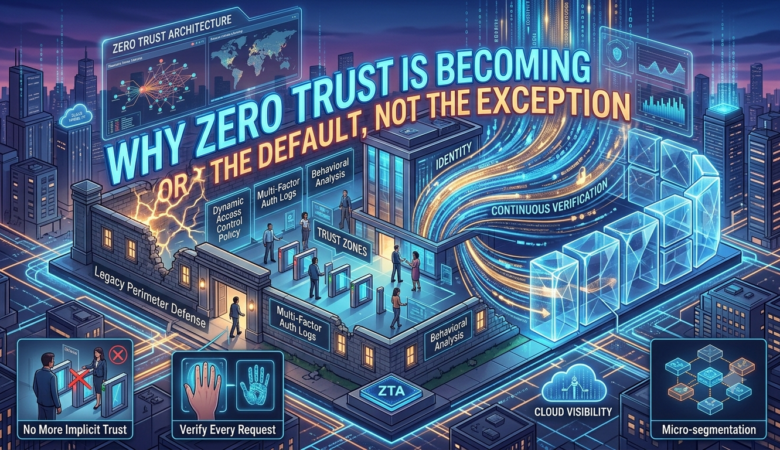
Why Zero Trust Is Becoming the Default, Not the Exception How a shift in mindset — from trusting the network to verifying everything — is reshaping enterprise security The Old Assumption Is Breaking Down For decades, corporate security worked a lot like a medieval castle. Build a strong wall, dig a moat, guard the gate, and trust whatever is already inside. Firewalls marked the edge of the network, and once a device or user made it past that edge, they were largely free to roam. This model made sense when employees sat at desks inside an office, applications lived on servers down the hall, and “remote access” meant someone dialing in from a hotel business center. That world is mostly gone. People now work from kitchen tables, coffee shops, and airport lounges. Applications live scattered across multiple cloud providers instead of a single data center. Contractors, partners, and personal devices routinely touch company systems. The castle-and-moat model assumes a clear inside and outside, but for most organizations today, that boundary has quietly dissolved. Attackers know this too, which is exactly why breaches so often start with one stolen password or one compromised laptop that already had the keys to everything. What Zero Trust Actually Means Zero trust is less a product you buy and more a change in posture. The core idea is simple to say and harder to live by: never assume trust based on location, and verify every request as if it originated from an open, untrusted network. It doesn’t matter if a login attempt comes from inside the building or from across the world — it gets checked the same way, every time. In practice, this means identity becomes the new perimeter. Every user, device, and application has to prove who it is before getting access to anything, and that access is scoped as narrowly as possible. A finance employee might get access to the finance system and nothing else, rather than a broad slice of the internal network. Sessions are continuously evaluated rather than trusted once and forgotten — so a login that looked fine at 9 a.m. can still be challenged again if something about the device or behavior changes at 2 p.m. Why Adoption Has Picked Up Speed Interest in zero trust isn’t new, but the pace of adoption has clearly accelerated. A few forces are pushing it forward at once. Hybrid and remote work made the traditional network edge mostly meaningless, since a huge share of traffic now originates outside any office. Cloud adoption spread company data and applications across environments that a single perimeter firewall was never designed to protect. And attackers have gotten sharper at using stolen credentials to move sideways through a network once they’re in, which is precisely the kind of lateral movement zero trust is built to contain. There’s also a practical business driver: boards and executives increasingly treat security posture as something they’re personally accountable for, not just an IT line item. When a breach can wipe out market value and trigger regulatory penalties in the same week, “we trusted our internal network” stops being an acceptable answer. “Zero trust doesn’t promise a world without breaches. It promises a world where one bad click doesn’t hand over the entire kingdom.” The Real Work Behind the Buzzword Rolling out zero trust is rarely a single project with a clean finish line. It tends to unfold in layers. Strong identity verification comes first, usually through multi-factor authentication and single sign-on, so that “who is this” is answered with real confidence before anything else happens. From there, organizations start segmenting their networks into smaller, isolated zones instead of one flat space, so that a compromise in one area can’t easily spread to another. Device health checks matter too — a request from a laptop with outdated software or missing security patches can be treated differently than one from a device that meets baseline standards. Continuous monitoring ties it all together, watching for unusual behavior even after access has been granted, because trust in this model is never a one-time decision. It’s something that has to be earned again and again. None of this happens overnight, and that’s actually the point. Organizations that try to flip a single switch and call it done usually end up with a system that looks like zero trust on paper but still has soft, trusted zones underneath. The ones that succeed tend to treat it as an ongoing discipline — something reviewed, tested, and adjusted continuously rather than a project that gets marked complete. The Human Side of the Shift It’s easy to talk about zero trust purely in terms of architecture diagrams, but the harder part is often cultural. Employees who are used to logging in once and working freely all day can find frequent verification prompts frustrating, especially early on. IT and security teams have to balance rigor with usability, because a system that’s technically airtight but drives people to find workarounds isn’t actually secure. The organizations that get this right tend to invest as much in clear communication and smooth user experience as they do in the underlying technology. There’s also a mindset shift for security teams themselves. Zero trust asks them to stop thinking in terms of a safe inside and a dangerous outside, and start treating every access request — no matter where it comes from — with the same healthy skepticism. That’s a real change in habit, not just in tooling, and it takes time to become second nature. Where This Is Headed Zero trust is increasingly treated less as an optional upgrade and more as a baseline expectation, especially for organizations handling sensitive data or operating in regulated industries. Government agencies in several countries have set formal mandates pushing their own systems toward zero trust principles, and that pressure tends to ripple outward to contractors and partners who work with them. None of this means breaches disappear. No architecture offers that. What it does mean is that

Web Penetration Testing: Complete Guide to Web Application Security

Web penetration testing Web penetration testing is an authorized, simulated cyberattack on a web application. Ethical security professionals use it to find flaws, misconfigurations, and design weaknesses Beginner Roadmap: From Recon to Server-Side Attacks 1-Introduction: 2 2-What is web penteration testing? 2 3-The web pentesting roadmap: 3 Phase 1: Reconnaissance – The Foundation 3 Phase 2: Authentication Assessment 4 Phase 3: Session Management: 4 Phase 4: Authorization – The Permission Gap: 4 Phase 5: Client-Side Vulnerabilities: 5 Phase 6: Server-Side Vulnerabilities 5 4-Key tools used in web pentesting: 6 5-Importance of web pentesting in 2026: 6 6-Ethical and Legal Considerations: 7 7-Conclusion:………………………………………………………………………………………………………………………. 7 8-References:……………………………………………………………………………………………………………………….. 8 Introduction: Web penetration testing is commonly known as web pentesting. It is a structured and authorized process of probing web applications for security vulnerabilities before malicious attackers can exploit them. In the era of digital internet continues to evolve rapidly, web applications have become the primary interface between businesses and customers. Therefore, the most targeted layer of any organization’s is digital infrastructure. This report is based on the Web pentesting beginner roadmap (2026): From Recon to server-side attacks, this report provides a concise, structured methodology for aspiring penetration tester and bug bounty hunters. This report expends with deeper explanations, real world context, and academic analysis of each phase. A structured reference guide for anyone who just finished their first web security course What is web penteration testing? Web penetration testing is the practice of simulating real-world cyberattacks on a web application with the explicit written permission of the application owner. The goal is to identify vulnerabilities, weaknesses in code, configuration, or design. It produce a detailed report so they can be fixed before a real attacker exploits them. Key purposes include: Identifying security flaws in web applications before attackers do. Helping developers understand how their code can be exploited in practice. Meeting compliance and regulatory requirements (e.g., PCI-DSS, ISO 27001, GDPR). Supporting bug bounty programs with structured vulnerability reports. Improving the overall security posture of an organization. The web pentesting roadmap: Here’s six core phases of web penetration test. Each phase builds upon the previous one for identifying and ethically exploiting vulnerabilities. Phase 1: Reconnaissance – The Foundation Reconnaissance is the first and most critical phase. Before attempting any attack, a pentester must thoroughly map out the target. This involves gathering as much information as possible about the target web application, its technology stack, and its exposed attack surface. Key techniques: Fingerprinting: Tools like Wappalyzer, Curl, or Burp Suite identify the frameworks, CMS, or server software the target uses. Directory Brute Forcing: Tools like Dirsearch, dirb, and Gobuster uncover hidden pages or endpoints. Subdomain Enumeration: FFUF and Gobuster discover subdomains that may have weaker security. OSINT: Google Dorks, Shodan, and Nmap reveal publicly available information about the target. Business Logic Mapping: Understanding what regular users vs. admins can do sets up later authorization testing. Pro Tip: Always check robots.txt and sitemap.xml before running heavy scans – developers sometimes accidentally expose sensitive paths in plain sight. Phase 2: Authentication Assessment Authentication verifies who a user is. Flaws here are among the most critical vulnerabilities, as they can allow attackers to access accounts without valid credentials. Credential Attacks: Testing for weak/default passwords and credential stuffing using leaked username-password pairs. MFA Bypass: Checking if two-factor authentication can be skipped by manipulating URL parameters or server responses. Password Reset Flaws: Testing for predictable reset tokens or Host Header Injection in password reset emails. OAuth Misconfigurations: Checking for improperly configured redirect URIs that could allow account takeover. Phase 3: Session Management: After login, applications issue session tokens to track users. Poor session management allows attackers to hijack sessions and impersonate legitimate users. Cookie Security Flags: Ensuring HttpOnly and Secure flags prevent cookie theft via JavaScript or insecure connections. Session Fixation: Testing whether session IDs change after login — if not, an attacker can pre-set and later hijack the session. JWT Attacks: Testing for weak signing secrets or the “alg: none” vulnerability that bypasses token signature verification entirely. Phase 4: Authorization – The Permission Gap: While authentication asks “who are you?”, authorization asks “what are you allowed to do?”. Authorization vulnerabilities allow users to access data or perform actions beyond their permitted scope. IDOR (Insecure Direct Object Reference): Changing id=123 to id=124 in a URL to access another user’s data. One of the most common bugs in bug bounty programs. Broken Access Control: Accessing restricted pages like /admin as a regular guest user. Mass Assignment: Sending hidden parameters like “is_admin”: true in API requests to escalate privileges. Phase 5: Client-Side Vulnerabilities: Client-side vulnerabilities target the user’s browser rather than the server. These are dangerous because they can steal sessions, redirect users to malicious sites, or force unauthorized actions. XSS (Cross-Site Scripting): Injecting malicious JavaScript into a web page that runs in another user’s browser. Three types: Reflected, Stored, and DOM-based. CSRF (Cross-Site Request Forgery): Tricking a logged-in user’s browser into sending an unauthorized request (e.g., changing their email or password). Open Redirects: Manipulating redirect parameters to send users to malicious external websites. CORS Misconfigurations: Exploiting incorrectly configured Cross-Origin Resource Sharing policies to read sensitive API data. Clickjacking: Embedding the target site in an invisible iframe to trick users into clicking on hidden UI elements. Phase 6: Server-Side Vulnerabilities Server-side vulnerabilities are typically the most severe, directly targeting the application backend. A successful server-side attack can result in complete server compromise, mass data theft, or total application destruction. SQL Injection (SQLi): Inserting malicious SQL code into input fields to manipulate the database can result in full data theft or database takeover. SSRF (Server-Side Request Forgery): Forcing the server to make requests to internal services like AWS/GCP metadata APIs, exposing cloud credentials. File Upload Vulnerabilities: Bypassing file type filters to upload malicious web shells (PHP/JSP) that grant command execution on the server. Path Traversal: Reading files outside the web root directory (e.g., /etc/passwd on Linux). SSTI (Server-Side Template Injection): Injecting template syntax into inputs processed by template engines, potentially leading to remote

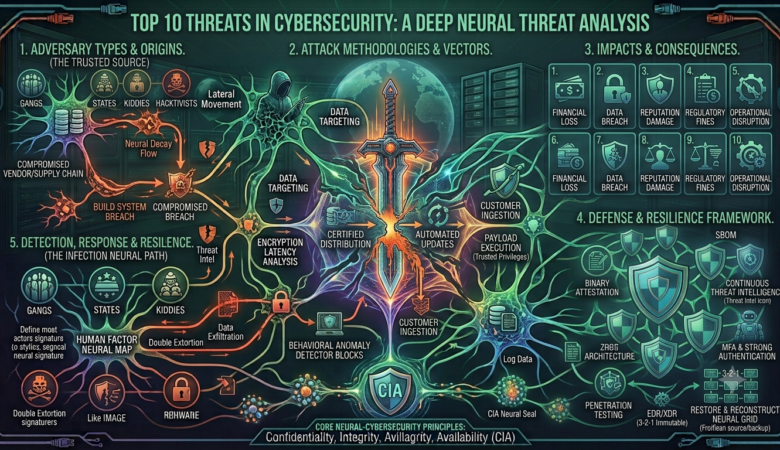
Top 10 threats in Cybersecurity

The top cybersecurity threats in 2026 are dominated by agentic AI-driven attacks, advanced identity and credential abuse, and multi-stage ransomware extortion. top cybersecurity threats in 2026 Emerging Risks and Defense Strategies Table of contents 1- INTRODUCTION: 2 2- The 2026 Cyber threat reality: Key statistics: 2 3- The top 10 cybersecurity threats of 2026: 3 Threat 1: AI-Assisted Autonomous Attacks: 3 Threat 2: AI-Enhanced Phishing and Social Engineering: 3 Threat 3: Identity Abuse and Credential Compromise: 4 Threat 4: Ransomware 3.0 and Intelligent Extortion: 4 Threat 5: Supply Chain Attacks: 5 Threat 6: DDoS Megascale Operations: 5 Threat 7: Deepfake and Synthetic Identity Fraud: 6 Threat 8: IoT and Edge Device Vulnerabilities: 6 Threat 9: Adversarial AI and Data Poisoning: 7 Threat 10: Post-Quantum Cryptographic Pressure: 7 4- Summary Comparison of All 10 Threats: 8 5- Why These Threats Matter for Cybersecurity Professionals: 9 6- Critical Analysis of the Article: 9 8- References: 10 INTRODUCTION: The cybersecurity landscape of 2026 is defined by an unprecedented arms race between attackers and defenders. As organizations accelerate their digital transformation, adversaries are harnessing emerging technologies particularly artificial intelligence to launch attacks at a speed and scale that was previously unimaginable. Every defensive tactic is met by a novel offensive breakthrough, making cybersecurity one of the most critical and fast-evolving disciplines in the world today. This report is based on top cybersecurity threats in 2026: emerging and how to defend against them. This report identifies the ten most consequential cybersecurity threats of 2026, supported by real-world statistics and actionable defense strategies. The 2026 Cyber threat reality: Key statistics: Before examining individual threats, it is important to understand the broader statistical context of the 2026 cybersecurity environment. The EC-Council article presents five critical figures that frame the scale of the problem: Statistic Key findings AI-Driven Attack Growth 87% of organizations rank AI vulnerabilities as the fastest-growing cyber risk Global Cyber Incidents (2025) Over 7.5 million incidents recorded — a significant rise from the prior year Ransomware Dominance Ransomware drove more than half of all global cyberattacks Phishing as Entry Point 91% of all successful breaches began with a phishing attack Vulnerabilities Volume CVE database exceeds 305,000 entries; 30,000+ new disclosures projected in 2026 These statistics paint a clear picture: cyber threats are not just growing in number but are becoming more automated, intelligent, and financially devastating. The global cost of cybercrime is projected to rise from $9.22 trillion in 2024 to $13.82 trillion by 2028 making it one of the most expensive challenges facing society today. The top 10 cybersecurity threats of 2026: This report identifies ten distinct threat categories that are reshaping the cybersecurity landscape in 2026. Each is analyzed below with its description, real-world context, target victims, and recommended defenses. Threat 1: AI-Assisted Autonomous Attacks: Artificial intelligence has fundamentally transformed the nature of cyberattacks. In 2026, attackers are deploying AI agents capable of performing autonomous discovery, exploitation, and lateral movement across networks drastically reducing the time between initial breach and full compromise. Unlike traditional malware that follows fixed instructions, AI-powered attack tools can adapt in real-time, identify vulnerabilities they were not specifically programmed to find, and evade signature-based detection systems. A notable example cited in the article involves AI malware that autonomously uncovered and weaponized OpenSSL vulnerabilities using AI-powered scanning tools. Primary targets: Large enterprises with legacy systems. Cloud environments with extensive API surfaces. Organizations with delayed patch management cycles. Defense strategies: Deploy defender-side AI platforms for behavioral threat detection. Implement automated privilege escalation constraints. Use continuous monitoring to detect anomalous network behavior. Threat 2: AI-Enhanced Phishing and Social Engineering: Phishing remains the single most prevalent entry point for cyberattacks responsible for 91% of all successful breaches according to the article. In 2026, generative AI has made phishing dramatically more effective by enabling attackers to craft highly personalized, grammatically perfect, and contextually convincing messages at scale. Traditional phishing was easy to spot due to poor grammar, generic salutations, and suspicious links. AI-generated phishing now mimics the writing style of colleagues, references real recent events, and is nearly indistinguishable from legitimate communications. Credential theft increased by 160% in 2025, driven largely by these AI-enhanced campaigns. Organizations without phishing-resistant MFA are especially vulnerable. Employees without regular security awareness training are prime targets. Enforce phishing-resistant MFA (e.g., hardware security keys). Conduct regular red-team phishing simulations. Invest in adaptive security awareness training programs. Threat 3: Identity Abuse and Credential Compromise: Identity-based attacks have become as common as malware. In 2026, compromised credentials usernames, passwords, tokens, and session cookies are the primary mechanism attackers use to gain unauthorized access to systems. The article notes that 75% of all intrusions now involve compromised identity credentials. This shift reflects a broader trend: rather than exploiting technical vulnerabilities, attackers are simply “logging in” using stolen credentials obtained through phishing, data breaches, or dark web markets. Federated identity systems, cloud service accounts, and unmanaged third-party vendor accounts are particularly at risk. Implement Zero Trust architecture never trust, always verify. Enforce continuous authentication and behavioral analytics. Apply strict identity governance and privileged access management (PAM). Monitor for credential exposure on dark web threat intelligence feeds. Threat 4: Ransomware 3.0 and Intelligent Extortion: Ransomware has evolved far beyond simple file encryption. In 2026, “Ransomware 3.0” combines data encryption with data theft, deepfake blackmail, and targeted individual coercion creating multi-layered extortion schemes that are far harder for organizations to simply recover from by restoring backups. Ransomware now drives over half of all global cyberattacks, with healthcare, manufacturing, and critical infrastructure being the most heavily targeted sectors. Victims face not just operational disruption but also reputational damage, regulatory penalties, and personal threats to executives. Healthcare – patient data is extremely valuable on black markets. Manufacturing -operational disruption has immediate financial consequences. Critical infrastructure – power grids, water systems, transport networks. Defense strategies: Maintain immutable, air-gapped backups tested regularly. Conduct ransomware incident simulation exercises. Implement network segmentation to limit lateral movement. Threat 5: Supply Chain Attacks: Supply chain attacks exploit the trust organizations place in their