USB Device Security and Detection Systems

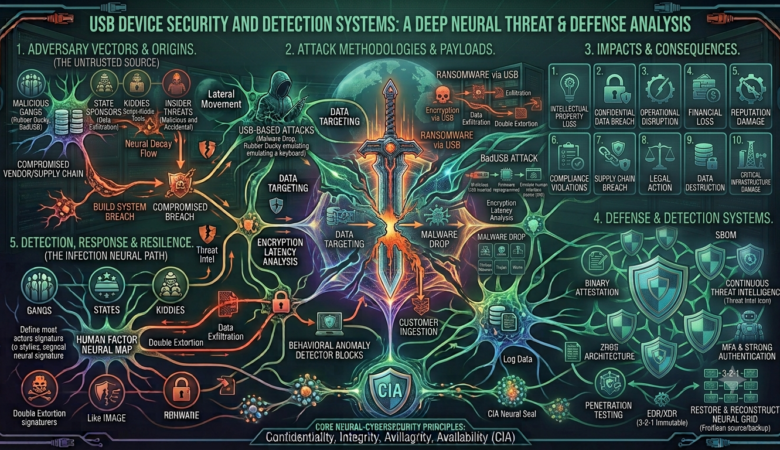
USB Device Security and Detection Systems Introduction USB devices have become a normal part of our daily computer use. We use USB flash drives, external hard drives, mobile phones, keyboards, mice, and other USB devices to transfer data and connect different devices. USB technology is fast, easy to use, and convenient. However, it can also create serious security problems if it is not properly controlled. A USB device can carry important files, personal information, or even harmful software. If someone connects an unknown or infected USB drive to a computer, it may put the whole system at risk. Because of this, USB Device Security and Detection Systems are becoming increasingly important in schools, offices, banks, companies, and other organizations. A USB Device Security and Detection System is designed to monitor USB connections, identify connected devices, and alert the user or administrator when an unknown or unauthorized device is detected. What Is USB Device Security? USB device security means protecting a computer or network from possible threats caused by USB devices. The main purpose is to control which USB devices can be connected and what they are allowed to do. For example, an organization may allow employees to use company-owned USB drives but block unknown storage devices. This reduces the possibility of sensitive information being copied or malware being introduced into the computer.   USB security is not only about blocking devices. It can also involve monitoring, logging, scanning, and generating alerts when suspicious activity occurs.   Why USB Security Is Important   USB devices are small and easy to carry. This makes them useful, but it also makes them difficult to control. A person can easily bring a USB drive from outside and connect it to a computer without anyone noticing.   One major risk is malware. An infected USB device can contain viruses, worms, spyware, ransomware, or other harmful programs. When the device is connected, malicious files may be opened or executed.   Another important problem is data theft. An employee or unauthorized person could copy confidential documents from a computer to a USB drive. This can cause financial loss and damage an organization’s reputation.   There is also the risk of using unknown USB devices. A device may look like an ordinary flash drive but could have a different purpose. Therefore, organizations need a system that can detect and control USB devices before they become a security problem. How a USB Detection System Works A USB detection system continuously monitors the computer for newly connected USB devices. When a device is plugged in, the operating system usually provides information about it, such as its device name, manufacturer, type, and unique identification details. The security system can collect this information and compare it with a list of approved devices. For example, if a company has three authorized USB drives, their details can be stored in an approved-device list. If another USB drive is connected, the system can recognize that it is not on the list and generate an alert.   A basic system can follow these steps: Detect a newly connected USB device. Collect information about the device. Check whether the device is authorized. Allow or block the device according to the security policy. Record the event in a log. Send an alert if the device is suspicious or unauthorized. This process can happen within seconds. Main Features of a USB Security System A good USB Device Security and Detection System can include several useful features. Device Detection: The system detects when a USB device is connected or removed from the computer. Device Identification: It collects information such as device name, manufacturer, type, and unique identifiers. Alert System: If an unknown device is detected, the system can display a warning or send an alert to an administrator. Device Blocking: Unauthorized USB storage devices can be blocked to prevent access to the computer. Activity Logging: The system can record information about USB activity, including the date and time of connection and the device details. Device Whitelisting: Trusted devices can be added to a whitelist. These devices can be used without generating unnecessary warnings.   Device Blacklisting: Known unwanted or restricted devices can be added to a blacklist and automatically blocked. Benefits of USB Device Detection Systems There are many benefits of using a USB security system. The first benefit is improved protection against malware. By controlling unknown USB devices, organizations can reduce the chance of infected devices entering their systems. Another benefit is data protection. If USB storage is restricted, it becomes more difficult for unauthorized users to copy confidential information. USB monitoring can also help administrators understand what is happening on their computers. Logs provide useful information about when devices were connected and which devices were used. These systems are especially useful in organizations where many computers are connected to the same network. Instead of manually checking every computer, an administrator can use monitoring software to keep track of USB activity. Challenges and Limitations Although USB security systems are useful, they are not perfect. One challenge is that there are many different types of USB devices. A system needs to correctly identify devices without blocking legitimate equipment. Another issue is user convenience. If security rules are too strict, employees may have difficulty using devices they actually need for their work. False alerts can also become a problem. If the system generates warnings for every normal USB device, users may start ignoring the alerts. Therefore, the system should be configured carefully. USB security should also be combined with other security measures. Blocking USB devices alone cannot protect a computer from every possible cyber threat. Practical Example Consider a college computer laboratory with 30 computers. Students frequently use USB drives to transfer assignments. Without any security system, a student could connect an infected USB drive to one computer, potentially spreading malware. A USB Device Security and Detection System could monitor all 30 computers. When a student connects a USB drive, the system checks its information. If the device is approved,
Supply Chain Attacks Explained: How Trusted Software Becomes a Security Threat

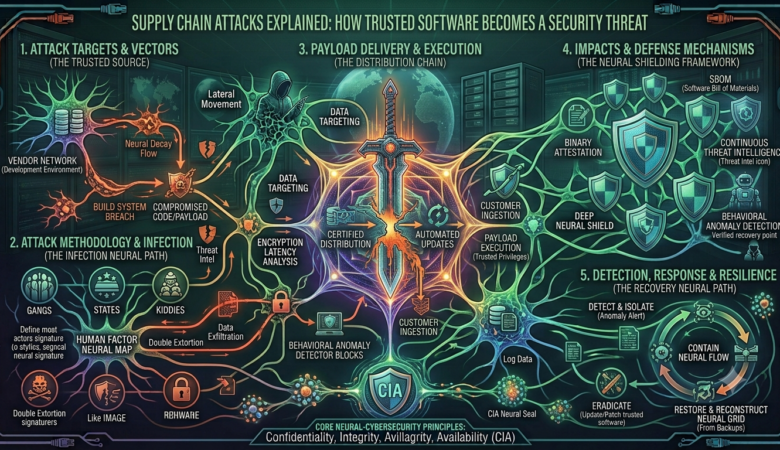
Nobody Broke In. We Let Them In. A closer look at how supply chain attacks turned everyday trust into the biggest hole in modern security   A weird kind of break-in Ask someone to picture a hacker at work and they’ll probably imagine a hooded figure typing furiously, trying password after password until a firewall gives way. That’s not really how the scariest breaches of the last few years have gone. In a lot of the worst cases, nobody “broke in” at all. They just waited for the front door to be opened for them, by someone who had every reason to think they were doing something perfectly normal. That’s the strange, slightly unsettling logic of a supply chain attack. Instead of going after a company directly, an attacker goes after something the company already trusts: a piece of software it installs without a second thought, a vendor it’s used for a decade, a tiny code library some developer pulled in on a Tuesday afternoon to save themselves an hour of work. The target doesn’t get hacked so much as it gets handed the malware, wrapped up in something familiar.   SolarWinds, or: how a routine update went very wrong If you want to understand why this style of attack scares security people more than almost anything else, it’s worth sitting with what happened to SolarWinds. It’s a company most people outside IT had never heard of before 2020, but its network monitoring software was quietly running inside thousands of organizations, including some pretty serious government agencies. The attackers here didn’t bother trying to breach those thousands of organizations one at a time. Way too slow, way too risky. Instead, they got into SolarWinds itself, worked their way into the software build process, and slipped malicious code into what looked like an entirely ordinary update. That update got signed, packaged, and pushed out the normal way. Customers installed it the same way they’d installed dozens of updates before it, because why wouldn’t they? It came from SolarWinds. It was signed. It looked exactly like it was supposed to. And then it just… sat there. Quietly. For a while. No loud alarms, no obvious weirdness. That patience is honestly the part that gets me — this wasn’t a smash-and-grab. It was someone willing to plant something and wait, betting correctly that nobody would think to double-check a routine vendor update. By the time it came to light, the damage had already spread far beyond anything a traditional firewall could have stopped, because the firewall was never the thing that failed.   The organizations that got hit didn’t screw up. They did the responsible thing — kept their software updated — and got burned for it anyway.   Meanwhile, the same thing happens every week in open source SolarWinds got headlines because of who it hit. But a smaller, quieter version of this same problem happens constantly in the world of open-source code, and honestly it might matter more, just because of sheer volume. Here’s the thing about modern software: almost nobody writes it from scratch anymore. A developer building an app will reach for dozens, sometimes hundreds, of free code packages from public repositories — npm if you’re doing JavaScript, PyPI if you’re in Python — rather than reinventing something that already exists. It’s a genuinely great system most of the time. It’s also a huge, mostly unguarded door. One trick that keeps working is what’s called typosquatting — an attacker publishes a fake package with a name that’s one letter off from something popular, betting that a developer typing fast will fat-finger the install command and grab the wrong one without noticing. Another, honestly nastier approach: attackers target the popular package itself. Sometimes that means compromising a maintainer’s account. Sometimes it’s even simpler — a lot of these hugely important packages are maintained by one exhausted volunteer in their spare time, and an attacker just offers to “help out” and take over maintenance. Either way, once they’re in control, they slip malicious code into what looks like a normal update, and because thousands of other projects automatically pull in that package, the poison spreads almost instantly, with basically nobody watching. What makes this so hard to get a handle on is just the scale of it. A single app might depend, directly or through a chain of other dependencies, on a couple thousand separate packages, most written by people the developer has never met and never will. Nobody’s reading all of that code line by line. Nobody realistically can. And attackers absolutely know it.   Why this isn’t going away anytime soon It would be nice to treat each of these incidents as a one-off, a fluke, a lesson learned. But the pattern keeps repeating because it’s not really about any one company slipping up — it’s baked into how software gets built now. Everything is assembled out of other people’s parts, and the whole system runs on trust that mostly goes unexamined. A signed update is trusted because it’s signed. A popular package is trusted because it’s popular. Neither of those things actually proves the code is safe. They just feel like proof, because checking every dependency by hand isn’t realistic when software ships this fast.   There’s also just… better math for attackers here. Compromise one popular package, or one trusted vendor’s build process, and you might get access to thousands of downstream victims in one move. Compare that to attacking companies one at a time, the old-fashioned way. It’s not even close, which is a big part of why this style of attack has become the go-to move for more sophisticated groups, including ones believed to have state backing.   So what actually helps There’s no clean fix for a problem this structural — I wish there were. But the organizations that handle this reasonably well tend to share a few habits. They actually know what software and dependencies they’re running, which sounds obvious but a

Ransomware: How It Works and How to Stay Protected:

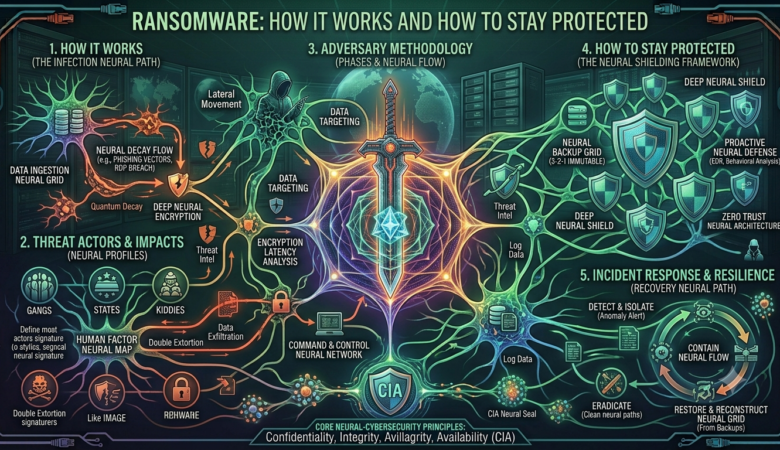
Ransomware: How It Works and How to Stay Protected: Ransomware is a type of malware that can lock a computer or encrypt its files and then demand money from the victim. In simple words, the attacker takes control of your data and asks you to pay before you can get it back. It can happen to an ordinary computer user, a school, a hospital, a company, or even a large government organization. What Exactly Is Ransomware? The name itself gives us a good idea of what ransomware does. “Ransom” means money demanded for releasing someone or something, while “ware” comes from software. So, ransomware is basically malicious software used to demand a ransom. Most ransomware attacks work by encrypting files. Encryption changes the information in a file into a form that the normal user cannot understand or open. Your photos, Word documents, videos, or other files may still be sitting on your computer, but you cannot access them normally. After the files are encrypted, the attacker usually leaves a message explaining what has happened. The message may tell the victim to pay a certain amount of money in cryptocurrency. Sometimes the criminals also threaten to publish the stolen information if the victim refuses to pay. How Does Ransomware Get Into a Computer? There isn’t just one way ransomware can enter a system. One of the most common methods is through phishing emails. For example, imagine receiving an email that looks like it came from a bank, delivery company, teacher, or even your boss. The email may say that you need to open an attachment or click a link urgently. If the attachment contains malware or the link leads to a harmful website, ransomware could be installed on the computer. Another common problem is downloading software from unsafe websites. People sometimes download cracked programs, games, movies, or other files from unknown sources. The file may look normal, but it could contain malware hidden inside it. Ransomware can also take advantage of old software. If a computer has not been updated for a long time, attackers may use known security weaknesses to get into the system. Weak passwords can cause problems too, especially when attackers are able to guess or steal them. What Happens After an Attack? Once ransomware gets onto a computer, it may start looking for files that are useful to the victim. It can also try to spread across a network and infect other connected computers. The ransomware then starts encrypting files. This can happen surprisingly quickly. A user might suddenly notice that documents, pictures, or other files will no longer open. After that, a ransom note usually appears on the screen. The attackers explain that the files have been locked and give instructions for making a payment. They may also set a deadline and threaten the victim with additional consequences if the money is not paid. This is a frightening situation, especially when the files are important. However, paying the ransom does not guarantee that the files will actually be recovered. The attackers are criminals, so there is no real reason to trust their promises. Why Is Ransomware Such a Big Problem? Ransomware can cause serious problems for both individuals and organizations. For an individual, losing personal photos, university assignments, or important documents can be extremely upsetting. Imagine having years of family pictures stored on a computer and suddenly being unable to open any of them. For businesses, the damage can be much bigger. A company may lose access to customer information, financial records, databases, and important work files. Employees might not be able to do their jobs, and the company could lose money while trying to recover its systems. Hospitals and other important organizations can face even more serious problems because they depend heavily on computer systems. If their systems stop working, important services can be delayed. This is why ransomware is not just a small computer problem. A major attack can affect an entire organization and the people who depend on it. How Can We Protect Ourselves? There is no single method that can completely stop every ransomware attack. Still, there are some simple things we can do to make our computers much safer. Keep Your Software Updated: One of the easiest things to do is keep your operating system and applications updated. Updates are not only about adding new features. They often fix security problems that attackers could use to enter a computer. Be Careful With Emails:   Never click on every link or attachment you receive without checking it first. If an email looks strange or creates unnecessary urgency, take a moment to think before clicking. Even if the sender’s name looks familiar, the account could have been hacked or the address could have been copied. Keep Backups: Backups are extremely important. Important documents and personal files should be copied somewhere safe. If ransomware locks the files on your computer, a clean backup can help you recover them. It is also important not to keep the only backup connected to the computer all the time. If ransomware can access the backup, it may encrypt that as well. Use Antivirus and Security Tools A good antivirus or security program can detect and block many types of malware. It is not a perfect solution, but it provides another layer of protection. A firewall can also help by controlling certain unwanted network connections. Use Strong Passwords: Using the same simple password everywhere is a bad idea. If an attacker gets that password, several of your accounts could be at risk. It is better to use strong and different passwords for important accounts. Multi-factor authentication, commonly called MFA, is also useful because it adds another security step. Don’t Download Software From Random Websites: Free software can sometimes come with a hidden cost. Downloading cracked or pirated programs from unknown websites is risky because the files may contain malware. It is much safer to download software from official or trusted sources. What If Your Computer Gets Infected? If

IoT Security Assessment & Threat Landscape Report

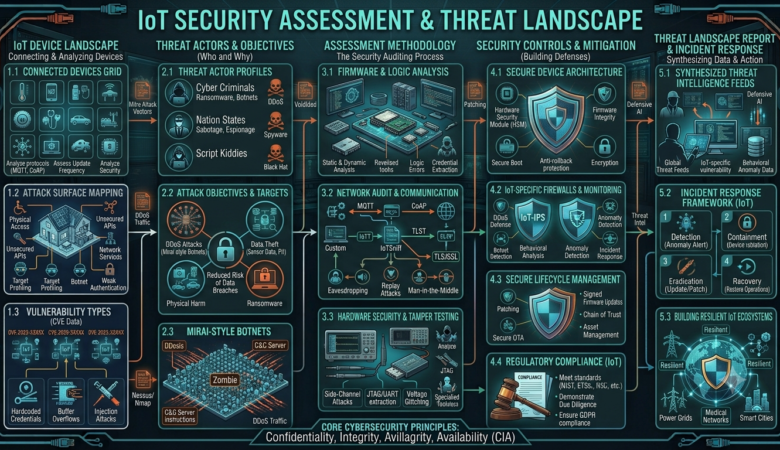
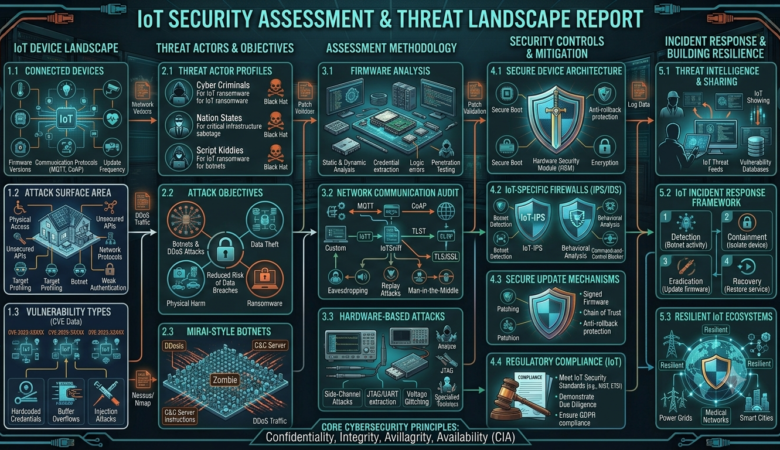
IoT SECURITY ASSESSMENT & THREAT LANDSCAPE REPORT Analysis of Vulnerabilities, Attack Surfaces, and Defense Architecture Author: Abdul Wahab (Cyber Security Student) Date: August 2026 Classification: ACADEMIC RESEARCH Subject: IoT Devices Teacher: Farakh Fareed Executive Summary The primary theme for the 2018 OWASP Internet of Things Top 10 is simplicity. Rather than having separate lists for risks vs. threats vs. vulnerabilities, or for developers vs. enterprises vs. consumers, the project team elected to have a single, unified list that captures the top things to avoid when dealing with IoT Security. Fostering cybersecurity in the IoT ecosystem, across industry sectors and at scale. An initial public draft (IPD) of NIST SP 800-213 Revision 1, IoT Product Cybersecurity Guidelines for the Federal Government: Establishing IoT Product Cybersecurity Requirements is out now for your review and comment! The IPD reflects current needs, with lessons learned from stakeholders who use these guidelines. Particularly, it’s focused on providing clearer guidance, more relevant content, and better alignment to today’s environment. (https://nvlpubs.nist.gov/nistpubs/ir/2019/NIST.IR.8228.pdf) Introduction & IoT Attack Surface The Internet of Things (IoT) refers to a network of physical devices, vehicles, appliances, and other physical objects that are embedded with sensors, software, and network connectivity, allowing them to collect and share data. IoT enables these smart devices to communicate with each other and with other internet-enabled devices. Like smartphones and gateways, creating a vast network of interconnected devices that can exchange data and perform various tasks autonomously. For this research, our primary goal is to define an attack surface for networks utilizing the IoT (Internet of Things) devices. The IoT consists of systems of integrated objects, computing devices, digital, or mechanical machines that are given the ability to transmit and receive the data over a network without the need for human interaction. An attacker or an unauthorized user can take advantage of these attack vectors to penetrate and change or extract data from the threat environment. By designing an IoT architecture and breaking it down into several zones, we focus on each zone to identify any vulnerability or weaknesses within a system that allows unauthorized privileges, as well as any attacks that can target that area. IoT Architectural Vulnerabilities Vulnerabilities in IoT are weaknesses or flaws in device design, communication, software, or hardware that could be exploited by attackers to steal data, gain unauthorized control, or disrupt services. These vulnerabilities are present across various IoT layers: device, network, cloud, and application. IoT security must be layered, addressing vulnerabilities at every point in the system. These models follow the five-layer IoT : Perception Layer (Sensing/Device Layer) Network Layer Middleware Layer Application/Service Layer Cloud/Storage Layer Threat Landscape & OWASP IoT Top 10 : Billions of active IoT and edge devices expand enterprise and consumer exposure. Bots constantly scan for default passwords and unpatched ports. Remote Code Execution (RCE) Exploitable vulnerabilities in cash registers and other IoT devices Ability to execute arbitrary commands, often chained with “;” separators Malware Infiltration Known malware (e.g., “Tsunami”, Mirai Botnet variants) Unknown malware with seemingly legitimate signatures Example: Malware communicating with suspicious domains (e.g., pokdeng.com) Multi-Stage Exploits A sophisticated attack pattern observed in recent IoT breaches: Initial connection via exposed web server (commonly on Port 8080) Secondary connection to a new, apparently “legitimate” domain Execution of a new, seemingly “legitimate” process (e.g., hacked.sh) Tunnels Server Exploitation Persistent SSH connections to all devices in a network Potential for widespread access across global device networks Exploitation of shared certificates and super user credentials Weak or Hardcoded Passwords Many IoT devices use default or hardcoded credentials that users never change. This allows attackers to gain instant unauthorized access without complex techniques. Insecure Network Services Devices often expose unnecessary services like Telnet or FTP, increasing the attack surface. These services may lack proper authentication or contain exploitable flaws. Insecure Ecosystem Interfaces Web apps, mobile apps, and APIs controlling IoT devices may lack proper validation and access controls. Attackers can exploit these interfaces to manipulate devices or extract data. Lack of Secure Update Mechanisms IoT devices may not verify firmware authenticity before installing updates. This allows attackers to push malicious or modified firmware. Use of Outdated Components Devices often rely on outdated libraries with known vulnerabilities. These can be exploited using publicly available exploits. Insufficient Privacy Protection Sensitive data collected by devices is not properly secured or access-controlled. This can lead to data leaks or unauthorized tracking. Insecure Data Transfer and Storage Data may be transmitted in plaintext or stored without encryption. Attackers can intercept or retrieve this data easily. Lack of Device Management Organizations may not track or monitor IoT devices effectively. This leads to unmanaged or vulnerable devices remaining active. Insecure Default Settings Devices are often deployed with insecure configurations like open access or disabled logging. These defaults create easy entry points. Lack of Physical Hardening IoT devices can be physically accessed and tampered with. Attackers can extract firmware or manipulate hardware. Real-World Case Study / Attack Scenario The Mirai botnet attack of 2016 was a massive cyber-attack that affected millions of devices connected to the Internet of Things (IoT). The attack was carried out by a malware called Mirai, which targeted vulnerable IoT devices and turned them into bots that could be used for Distributed Denial of Service (DDoS) attacks. This case study explores the Mirai botnet attack, its impact, and the lessons learned from the incident. Press enter or click to view image in full size Working of Botnet. The Mirai botnet attack occurred in late 2016, when the Mirai malware was used to launch a series of DDoS attacks. Mirai is a type of malware that targets IoT devices, such as routers, cameras, and other connected devices, that are protected by default passwords or are running unpatched software. More than 600,000+ IoT devices infected (CCTV cameras, routers, DVRs) and Krebs on Security ne 620 Gbps attack survive kiya. Dyn DNS pe attack Twitter, Netflix. And Default telnet credentials brute-forced And according to Verkada Cameras Breach March 2021, more than 1500000 cameras were exposed.  

IoT Security Assessment & Threat Landscape Report

IoT SECURITY ASSESSMENT & THREAT LANDSCAPE REPORT Analysis of Vulnerabilities, Attack Surfaces, and Defense Architecture Author: Abdul Wahab (Cyber Security Student) Date: August 2026 Classification: ACADEMIC RESEARCH Subject: IoT Devices Teacher: Farakh Fareed Executive Summary Cloud security is a discipline of cyber security dedicated to securing cloud computing systems. This includes keeping data private and safe across online-based infrastructure, applications, and platforms. Securing these systems involves the efforts of cloud providers and the clients that use them, whether an individual, small to medium business, or enterprise uses. Cloud providers host services on their servers through always-on internet connections. Since their business relies on customer trust, cloud security methods are used to keep client data private and safely stored. However, cloud security also partially rests in the client’s hands as well. Understanding both facets is pivotal to a healthy cloud security solution. As an overview, backend development against security vulnerabilities is largely within the hands of cloud service providers. Aside from choosing a security-conscious provider, clients must focus mostly on proper service configuration and safe use habits. Additionally, clients should be sure that any end-user hardware and networks are properly secured. Cloud Architecture & Shared Responsibility Model Security and Compliance is a shared responsibility. This shared model can help relieve the customer’s operational burden as AWS operates, manages and controls the components from the host operating system and virtualization layer down to the physical security of the facilities in which the service operates. The customer assumes responsibility and management of the guest operating system (including updates and security patches), other associated application software as well as the configuration of the AWS provided security group firewall. Customers should carefully consider the services they choose as their responsibilities vary depending on the services used, the integration of those services into their IT environment, and applicable laws and regulations. The nature of this shared responsibility also provides the flexibility and customer control that permits the deployment. As shown in the chart below, this differentiation of responsibility is commonly referred to as Security “of” the Cloud versus Security “in” the Cloud. Cloud Attack Surfaces & Entry Points Let’s examine the cloud attack surface as part of our What is Attack Surface Management: Complete Guide and Best Practices guide. The cloud attack surface includes all the internet-facing parts of your cloud setup. These are the systems attackers can find and try to exploit. It covers APIs, storage buckets, virtual machines, containers/k8s, identity tools, databases, and more. In the cloud, everything is fast and decentralized. Services launch quickly, teams move fast, and many parts run across different regions and availability zones. This can make it difficult to track and secure everything simultaneously. Gartner predicts that by 2025, 99% of cloud security issues will stem from inadequate setup and lack of customer knowledge. Five Top Cloud Attack Surface Risks These are the most common cloud attack surface management vulnerabilities that attackers exploit when cloud environments aren’t properly secured. Misconfigured Cloud Storage Cloud storage services, such as AWS S3, Google Cloud Storage, or Azure Blob, are used to store files, backups, and sensitive data. But if these storage buckets aren’t configured properly (e.g., left public by accident), anyone on the internet can access them. The same logic applies to data warehouse and data lake providers. In fact, in 2025, 82% of cloud breaches were linked to misconfigured services, with 23–31% of incidents traced to human error. 82 of cloud breaches were linked to misconfigured services.-17 Exposed APIs and Endpoints APIs are the connection points between apps. In the cloud, they enable systems to communicate with each other. But if these APIs aren’t secured with proper authentication, encryption, or rate limits, hackers can find them, flood them with requests, or even steal data. Shadow Cloud Assets Sometimes teams spin up cloud servers, apps, or databases without telling IT. These “shadow assets” don’t follow the same security checks and often go unnoticed or unpatched. Hackers look for these forgotten assets because they’re easy to exploit. Studies show that 41% of employees use cloud apps and systems which are unknown to their IT department. Physical networks — routers, electrical power, cabling, climate controls, etc. Data storage — hard drives, etc. Data servers — core network computing hardware and software Computer virtualization frameworks — virtual machine software, host machines, and guest machines Operating systems (OS) — software that houses Middleware — application programming interface (API) management, Runtime environments — execution and upkeep of a running program Data — all the information stored, modified, and accessed Applications — traditional software services (email, tax software, productivity suites, etc.) End-user hardware — computers, mobile devices, Internet of Things (IoT) devices, etc. Threat Landscape & OWASP IoT Top 10 : OWASP Risk Cloud Application 1:2025 Broken Access Control Misconfigured S3, public Azure Blob storage, lack of IAM boundaries 2:2025 Cryptographic Failures Unencrypted S3 buckets, weak TLS configs, KMS keys with overly broad access 3:2025 Injection Cloud-hosted APIs vulnerable to SQLi or command injection 5:2025 Security Misconfiguration Default cloud accounts, open security groups, debug enabled in production 6:2025 Vulnerable & Outdated Components Outdated container images, unpatched Lambda runtimes, EOL OS VMs 7:2025 Identification & Authentication Failures Service account key leakage, weak token validation, credential reuse Real-World Case Study / Attack Scenario 2012 Incident: A hacker obtained Dropbox user credentials through a third-party breach and accessed users’ cloud-stored files, exposing millions of accounts. Response: A Dropbox investigation determined that usernames and passwords stolen from other websites were used to sign in to “a small number” of Dropbox accounts. The company contacted those users, offering to help them protect their accounts. Aditya Agarwal, then VP of engineering at Dropbox, said: “A stolen password was also used to access an employee Dropbox account containing a project document with user email addresses. We believe this improper access is what led to the spam.” He added that Dropbox was putting additional controls in place to help make sure there was no repeat of the issue. Incident: Snapchat’s cloud-based infrastructure was compromised due