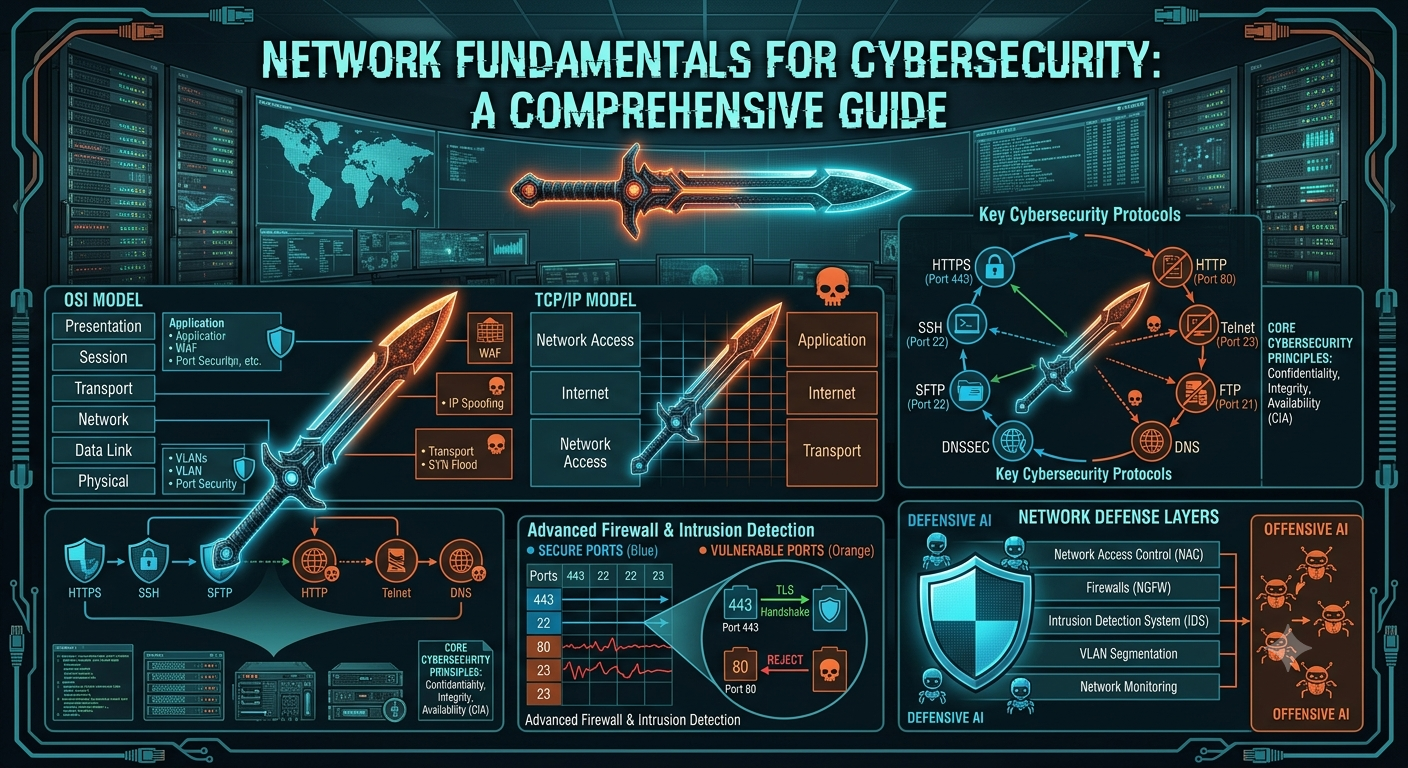
Networking Fundamentals for Cybersecurity: OSI Model, TCP/IP, Protocols, Ports & Network Security
1. Fundamentals of Networking
For cybersecurity domain, at least the following topics are a must to cover as basics for the field.
- What is an IP address? — public / private / static / dynamic.
- IPv4 vs IPv6: differences why IPv6 is important.
- Ports & Services: concept aur common ports (HTTP, FTP, SSH, SMTP, DNS, SMB, etc.).
- TCP/IP vs UDP: 3-way handshake, use-cases, when which to use.
- OSI Model (7 layers): every layer and it’s role
- Subnetting basics: CIDR, netmask, simple examples.
- Common protocols: ICMP, DNS, ARP, HTTP/HTTPS, SMB, SMTP, FTP.
- Port forwarding: concept + basic router configuration steps.
- Web basics, how websites work: client-server model, DNS resolution, HTTP/HTTPS.
- Firewalls & IDS/IPS: stateless vs stateful, basic detection concepts.
2. OSI Reference Model
Definition: OSI is a 7-layer conceptual model describing network communication which is used as reference for applicable model.
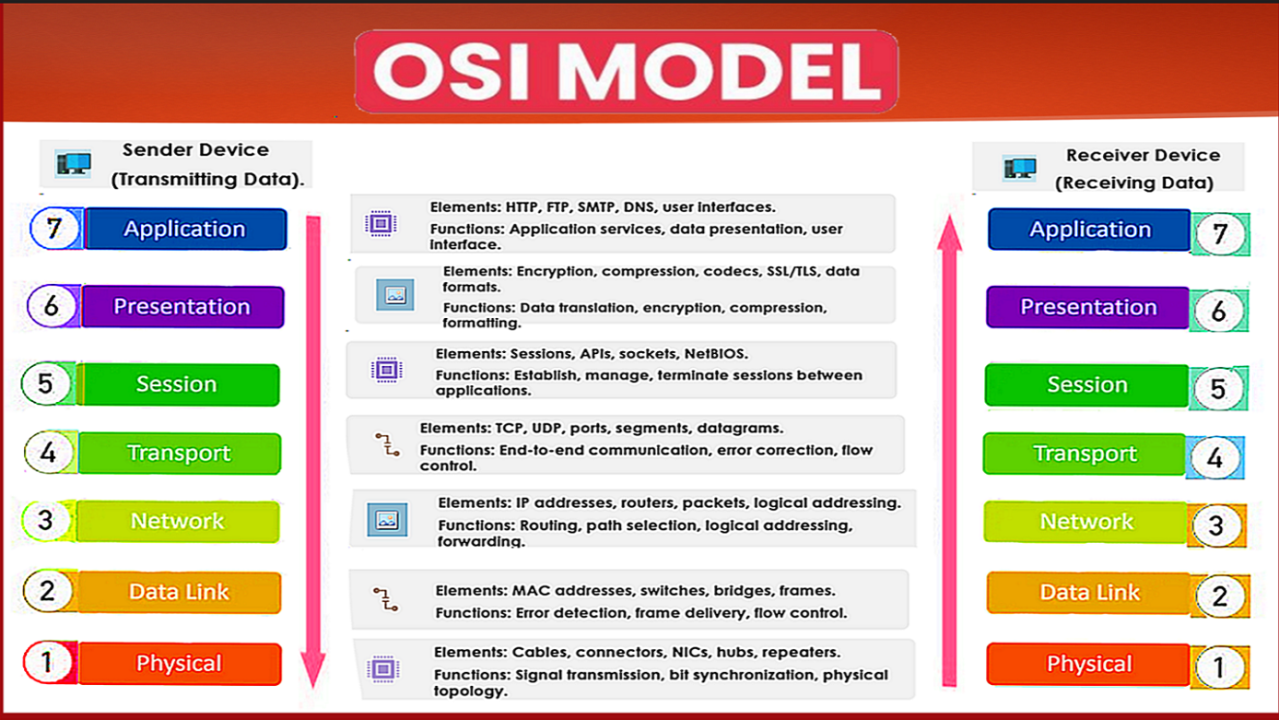
The OSI (Open System Interconnection) a 7-Layer conceptual model or framework was introduced to troubleshoot the network for any problem or vulnerability because it standardizes how data moves across a network; from raw signals up to user interfacing applications.
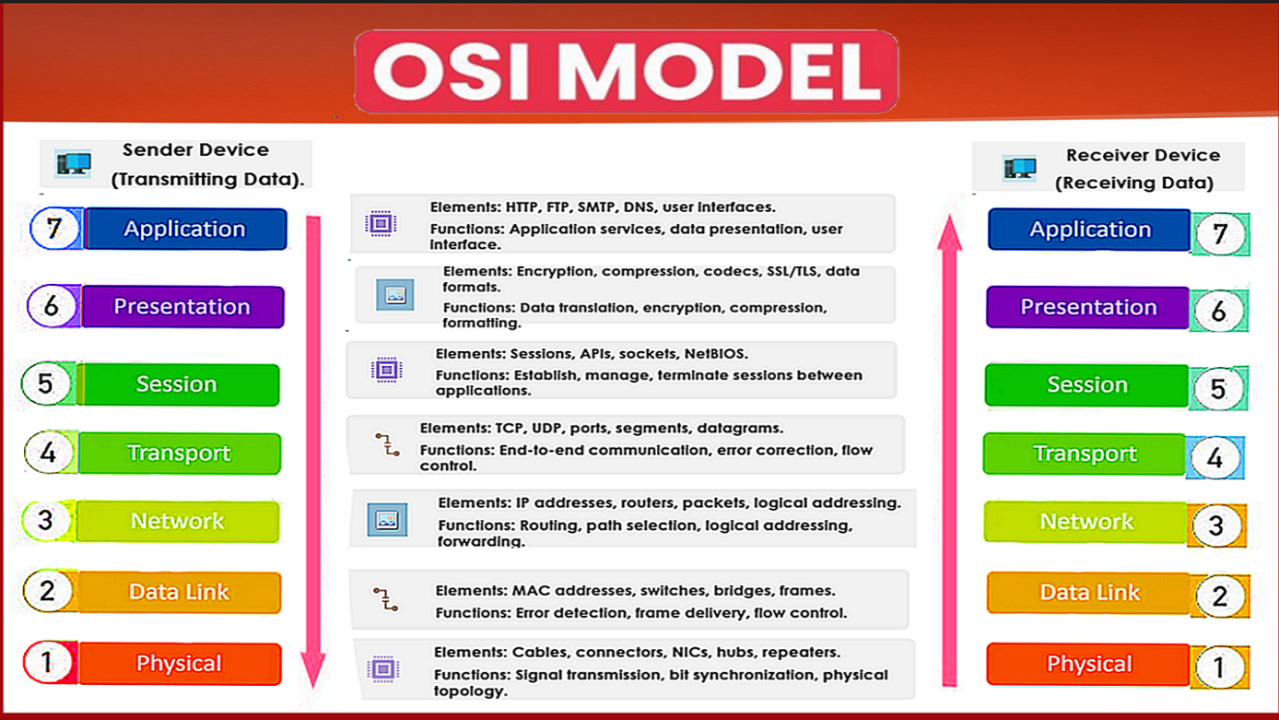
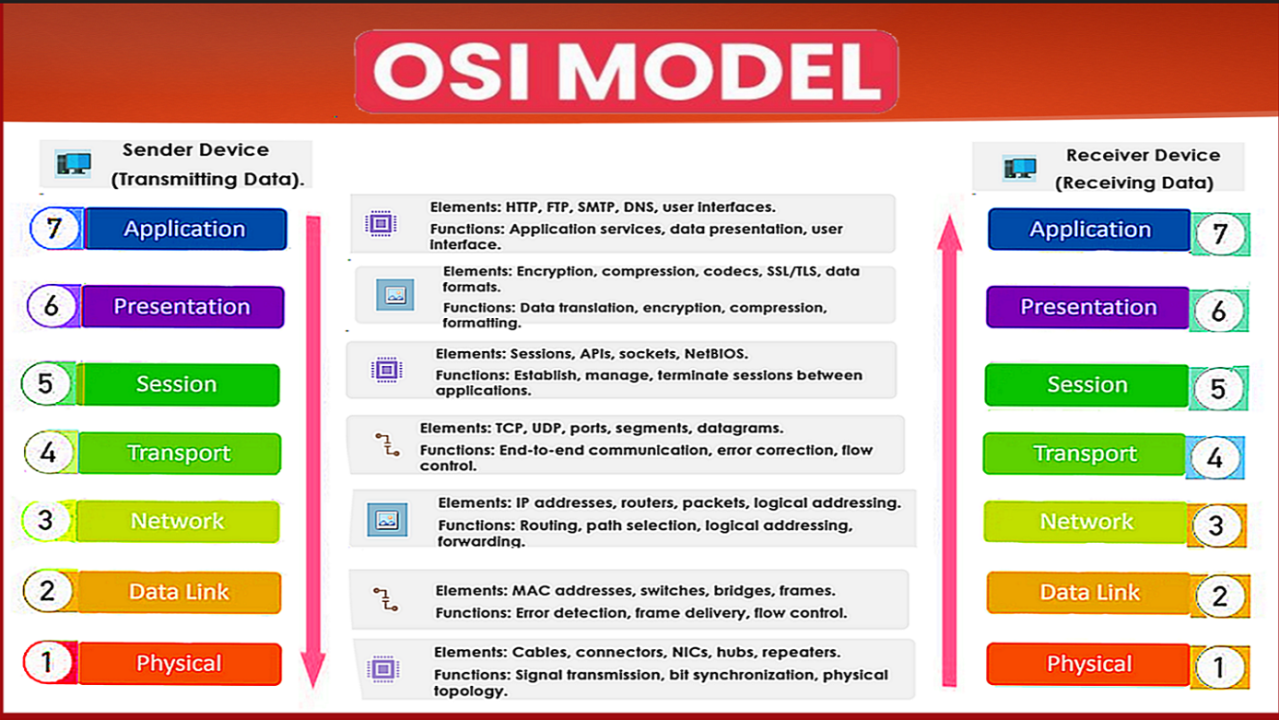
According to sender first layers is application (7) and according to receiver first layer is physical (1).
COM-A COM-B
Application (1) Application (7)
Presentation (2) Presentation (6)
Session (3) Session (5)
Transport (4) Transport (4)
Network (5) Network (3)
Data Link (6) Data Link (2)
Physical (7) Physical (1)
The data starts transport from COM-A as input/output and data travel from Application (7) Layers via Presentation, Session, Transport, Network, Data Link, Physical (1) layers.
Then data is received to COM-B as input/output and data travel from Physical (1) via Data Link, Network, Transport, Session, Presentation, Application (7)
- Application Layer: Is where there is any kind of Interface Application available to start the communication pr transfer of data e.g. WhatsApp, YouTube.
- Presentation Layer: Is where the data is encrypted or decrypted for or from presentation, e.g. ASCII, MPEG.
- Session: It acts a dialogue manager for establishing, maintaining and terminating session between applications. e.g. NetBIOS, SIP.
- Transport Layer: It is responsible to end to end communications between devices, by taking the data from session layers and breaking it into small parts and by managing flow control, error detection and data delivery in a orderly and reliable way. e.g. UDP, TCP.
- Network: It handles routing and logical addressing and determines the most efficient path for the packets of data to travel across networks that are interconnected or where the communication is established. e.g. ICMP, IP, routers.
- Data Link Layer: It provides node to node data delivery by packaging raw bits of data from physical layer into frames
- Physical Layer: It transmits or receives raw, unstructured binary (bits) data over the physical medium. Hardware elements, such as cables, connectors, signal voltages, and frequencies are defined by it.
| Layer # | Layer | Function | Example / Usage |
| 7 | Application | HTTP, DNS, FTP, SMTP – the interface applications use to access network services | Web browsing, email |
| 6 | Presentation | Translates, encrypts, and compresses data (e.g. SSL/TLS, JPEG, ASCII/EBCDIC) | Encryption, encoding |
| 5 | Session | Establishes, manages, and terminates sessions between applications | Login sessions, RPC |
| 4 | Transport | End-to-end delivery, segmentation, flow control, error recovery (TCP, UDP) | Reliable/fast delivery |
| 3 | Network | Logical addressing and routing between networks (IP, ICMP) | Routing packets |
| 2 | Data Link | Physical addressing, framing, error detection on a local link (MAC, switches) | LAN frame delivery |
| 1 | Physical | Raw bit transmission over a physical medium (cables, radio, voltages) | Cabling, NICs, signals |
Usage
The OSI model is primarily a teaching and troubleshooting tool. When diagnosing a network issue, engineers reason about which layer the problem lives in – for example, distinguishing a Layer 1 cabling problem from a Layer 3 routing problem. It also underlies how protocol analysers, such as Wireshark, categorize and label captured traffic.
Main Usage: Troubleshooting, protocol analysis, network design, security analysis.
3. TCP/IP Model
Definition: A practical 4-layer networking model used by the Internet.
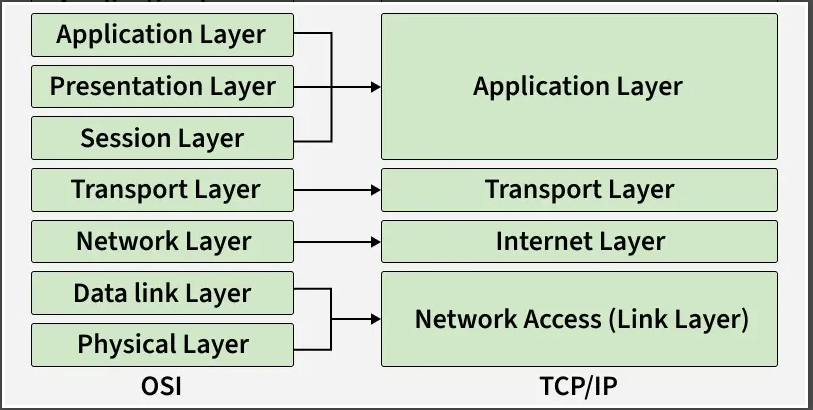
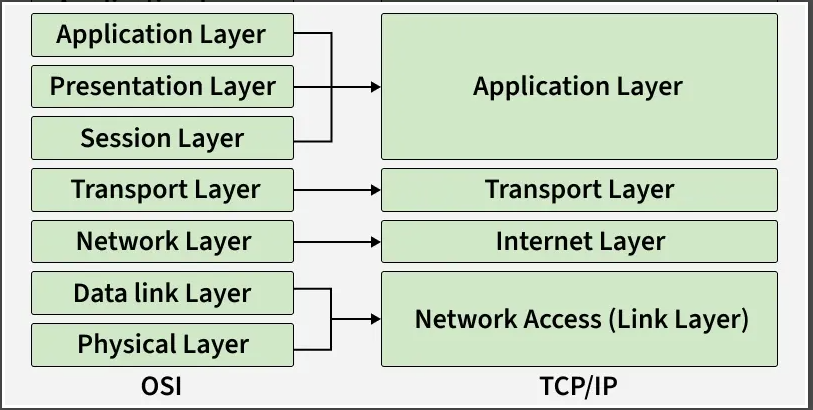
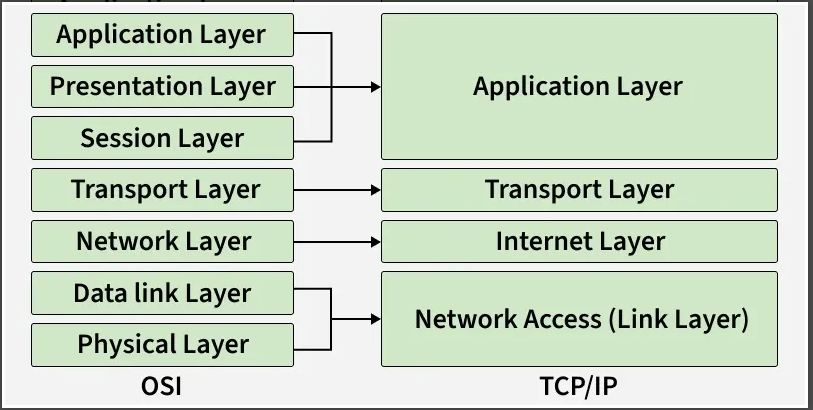
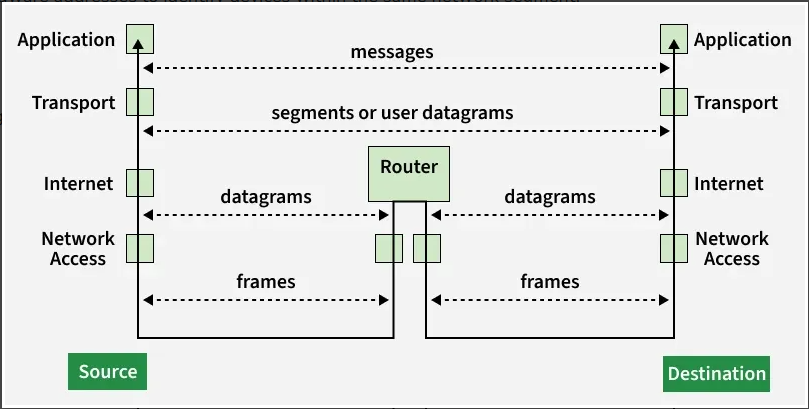
The TCP/IP model is the practical 4-layer model that is implemented and modern internet runs on. It is simpler than the OSI model because several OSI layers are packages or conjoined together into single layers.
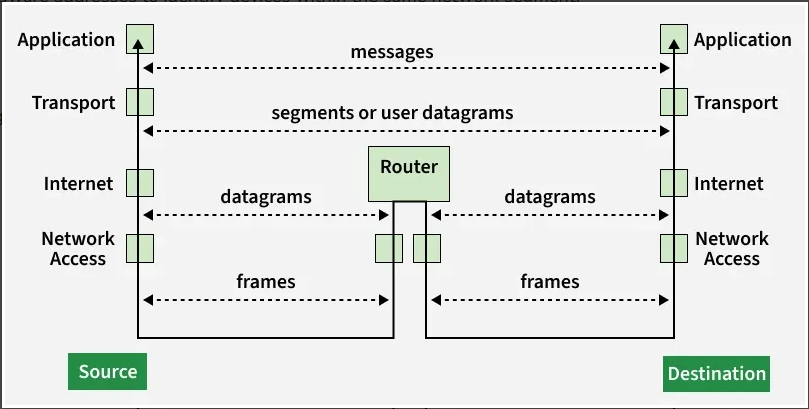
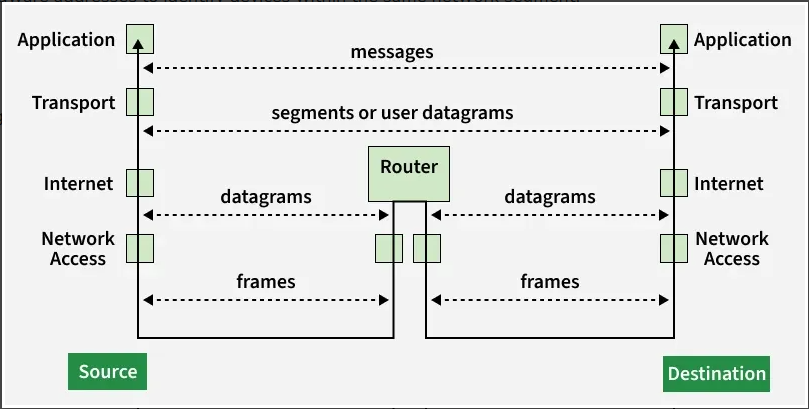
- Application Layer: It functions as a user interface that connects software programs (e.g. web browsers or messaging tools) directly to the network. Common Protocols uses; HTTP for web pages, SMTP for mail, & DNS for domain name lookups. It prepares and formats data for the receiving end to understand.
- Transport Layer: It manages end to end delivery of data flow and checks for any error between the host systems. It implements segmentation, for the in and out of the data. Core Protocol that it uses are TCP for reliable connection-based transfer and UDP for connectionless delivery that is fast.
- Internet Layer: It acts as logical addressing layer, that assigns IP addresses to packets for data communication. It determines the route by selecting best path and forwards the packets to different networks for data transfer. Key protocols, IP, ICMP, ARP.
- Network Access Layer: It acts as the physical transmission media, which sends raw bits of data over the cables, Wi-Fi, or Fiber optics. It acts as the hardware manager which manages physical address (MAC Addresses) and network hardware interfaces. Standard protocols; uses ethernet for wired links and 802.11 standards for wireless connections.
| Layer | Description | Usage |
| Application | Corresponds to OSI layers 5-7. Protocols: HTTP, DNS, SMTP, FTP | User-facing services |
| Transport | Corresponds to OSI layer 4. Protocols: TCP (reliable), UDP (fast) | End-to-end delivery |
| Internet | Corresponds to OSI layer 3. Protocols: IP, ICMP, routing | Addressing & routing |
| Network Access | Corresponds to OSI layers 1-2. Ethernet, Wi-Fi, ARP | Physical/link delivery |
Usage
This is the model implemented in real protocol stacks and operating systems. When configuring a firewall rule, setting up routing, or writing socket-level code, engineers work directly within this model.
Usage: Internet communication, routing, packet analysis, VPNs, firewalls.
Key Difference
The OSI model is a reference and teaching model with 7 layers used for conceptual understanding and troubleshooting. The TCP/IP model is a 4-layer implementation model – it’s what is built into hardware and operating system network stacks.
TCP/IP is preferred over the OSI model because it is simpler, practical, and widely implemented in real-world networks and the Internet. Unlike OSI, which is mostly theoretical, TCP/IP is protocol-driven and focuses on actual communication needs.
1. Fundamentals of Networking
For cybersecurity domain, at least the following topics are a must to cover as basics for the field.
- What is an IP address? — public / private / static / dynamic.
- IPv4 vs IPv6: differences why IPv6 is important.
- Ports & Services: concept aur common ports (HTTP, FTP, SSH, SMTP, DNS, SMB, etc.).
- TCP/IP vs UDP: 3-way handshake, use-cases, when which to use.
- OSI Model (7 layers): every layer and it’s role
- Subnetting basics: CIDR, netmask, simple examples.
- Common protocols: ICMP, DNS, ARP, HTTP/HTTPS, SMB, SMTP, FTP.
- Port forwarding: concept + basic router configuration steps.
- Web basics, how websites work: client-server model, DNS resolution, HTTP/HTTPS.
- Firewalls & IDS/IPS: stateless vs stateful, basic detection concepts.
2. OSI Reference Model
Definition: OSI is a 7-layer conceptual model describing network communication which is used as reference for applicable model.
The OSI (Open System Interconnection) a 7-Layer conceptual model or framework was introduced to troubleshoot the network for any problem or vulnerability because it standardizes how data moves across a network; from raw signals up to user interfacing applications.
According to sender first layers is application (7) and according to receiver first layer is physical (1).
COM-A COM-B
Applicatio
1. Fundamentals of Networking
For cybersecurity domain, at least the following topics are a must to cover as basics for the field.
- What is an IP address? — public / private / static / dynamic.
- IPv4 vs IPv6: differences why IPv6 is important.
- Ports & Services: concept aur common ports (HTTP, FTP, SSH, SMTP, DNS, SMB, etc.).
- TCP/IP vs UDP: 3-way handshake, use-cases, when which to use.
- OSI Model (7 layers): every layer and it’s role
- Subnetting basics: CIDR, netmask, simple examples.
- Common protocols: ICMP, DNS, ARP, HTTP/HTTPS, SMB, SMTP, FTP.
- Port forwarding: concept + basic router configuration steps.
- Web basics, how websites work: client-server model, DNS resolution, HTTP/HTTPS.
- Firewalls & IDS/IPS: stateless vs stateful, basic detection concepts.
2. OSI Reference Model
Definition: OSI is a 7-layer conceptual model describing network communication which is used as reference for applicable model.
The OSI (Open System Interconnection) a 7-Layer conceptual model or framework was introduced to troubleshoot the network for any problem or vulnerability because it standardizes how data moves across a network; from raw signals up to user interfacing applications.
According to sender first layers is application (7) and according to receiver first layer is physical (1).
COM-A COM-B
Application (1) Application (7)
Presentation (2) Presentation (6)
Session (3) Session (5)
Transport (4) Transport (4)
Network (5) Network (3)
Data Link (6) Data Link (2)
Physical (7) Physical (1)
The data starts transport from COM-A as input/output and data travel from Application (7) Layers via Presentation, Session, Transport, Network, Data Link, Physical (1) layers.
Then data is received to COM-B as input/output and data travel from Physical (1) via Data Link, Network, Transport, Session, Presentation, Application (7)
- Application Layer: Is where there is any kind of Interface Application available to start the communication pr transfer of data e.g. WhatsApp, YouTube.
- Presentation Layer: Is where the data is encrypted or decrypted for or from presentation, e.g. ASCII, MPEG.
- Session: It acts a dialogue manager for establishing, maintaining and terminating session between applications. e.g. NetBIOS, SIP.
- Transport Layer: It is responsible to end to end communications between devices, by taking the data from session layers and breaking it into small parts and by managing flow control, error detection and data delivery in a orderly and reliable way. e.g. UDP, TCP.
- Network: It handles routing and logical addressing and determines the most efficient path for the packets of data to travel across networks that are interconnected or where the communication is established. e.g. ICMP, IP, routers.
- Data Link Layer: It provides node to node data delivery by packaging raw bits of data from physical layer into frames
- Physical Layer: It transmits or receives raw, unstructured binary (bits) data over the physical medium. Hardware elements, such as cables, connectors, signal voltages, and frequencies are defined by it.
| Layer # | Layer | Function | Example / Usage |
| 7 | Application | HTTP, DNS, FTP, SMTP – the interface applications use to access network services | Web browsing, email |
| 6 | Presentation | Translates, encrypts, and compresses data (e.g. SSL/TLS, JPEG, ASCII/EBCDIC) | Encryption, encoding |
| 5 | Session | Establishes, manages, and terminates sessions between applications | Login sessions, RPC |
| 4 | Transport | End-to-end delivery, segmentation, flow control, error recovery (TCP, UDP) | Reliable/fast delivery |
| 3 | Network | Logical addressing and routing between networks (IP, ICMP) | Routing packets |
| 2 | Data Link | Physical addressing, framing, error detection on a local link (MAC, switches) | LAN frame delivery |
| 1 | Physical | Raw bit transmission over a physical medium (cables, radio, voltages) | Cabling, NICs, signals |
Usage
The OSI model is primarily a teaching and troubleshooting tool. When diagnosing a network issue, engineers reason about which layer the problem lives in – for example, distinguishing a Layer 1 cabling problem from a Layer 3 routing problem. It also underlies how protocol analysers, such as Wireshark, categorize and label captured traffic.
Main Usage: Troubleshooting, protocol analysis, network design, security analysis.
3. TCP/IP Model
Definition: A practical 4-layer networking model used by the Internet.
The TCP/IP model is the practical 4-layer model that is implemented and modern internet runs on. It is simpler than the OSI model because several OSI layers are packages or conjoined together into single layers.
- Application Layer: It functions as a user interface that connects software programs (e.g. web browsers or messaging tools) directly to the network. Common Protocols uses; HTTP for web pages, SMTP for mail, & DNS for domain name lookups. It prepares and formats data for the receiving end to understand.
- Transport Layer: It manages end to end delivery of data flow and checks for any error between the host systems. It implements segmentation, for the in and out of the data. Core Protocol that it uses are TCP for reliable connection-based transfer and UDP for connectionless delivery that is fast.
- Internet Layer: It acts as logical addressing layer, that assigns IP addresses to packets for data communication. It determines the route by selecting best path and forwards the packets to different networks for data transfer. Key protocols, IP, ICMP, ARP.
- Network Access Layer: It acts as the physical transmission media, which sends raw bits of data over the cables, Wi-Fi, or Fiber optics. It acts as the hardware manager which manages physical address (MAC Addresses) and network hardware interfaces. Standard protocols; uses ethernet for wired links and 802.11 standards for wireless connections.
| Layer | Description | Usage |
| Application | Corresponds to OSI layers 5-7. Protocols: HTTP, DNS, SMTP, FTP | User-facing services |
| Transport | Corresponds to OSI layer 4. Protocols: TCP (reliable), UDP (fast) | End-to-end delivery |
| Internet | Corresponds to OSI layer 3. Protocols: IP, ICMP, routing | Addressing & routing |
| Network Access | Corresponds to OSI layers 1-2. Ethernet, Wi-Fi, ARP | Physical/link delivery |
Usage
This is the model implemented in real protocol stacks and operating systems. When configuring a firewall rule, setting up routing, or writing socket-level code, engineers work directly within this model.
Usage: Internet communication, routing, packet analysis, VPNs, firewalls.
Key Difference
The OSI model is a reference and teaching model with 7 layers used for conceptual understanding and troubleshooting. The TCP/IP model is a 4-layer implementation model – it’s what is built into hardware and operating system network stacks.
TCP/IP is preferred over the OSI model because it is simpler, practical, and widely implemented in real-world networks and the Internet. Unlike OSI, which is mostly theoretical, TCP/IP is protocol-driven and focuses on actual communication needs.
n (1) Application (7)
Presentation (2) Presentation (6)
Session (3) Session (5)
Transport (4) Transport (4)
Network (5) Network (3)
Data Link (6) Data Link (2)
Physical (7) Physical (1)
The data starts transport from COM-A as input/output and data travel from Application (7) Layers via Presentation, Session, Transport, Network, Data Link, Physical (1) layers.
Then data is received to COM-B as input/output and data travel from Physical (1) via Data Link, Network, Transport, Session, Presentation, Application (7)
- Application Layer: Is where there is any kind of Interface Application available to start the communication pr transfer of data e.g. WhatsApp, YouTube.
- Presentation Layer: Is where the data is encrypted or decrypted for or from presentation, e.g. ASCII, MPEG.
- Session: It acts a dialogue manager for establishing, maintaining and terminating session between applications. e.g. NetBIOS, SIP.
- Transport Layer: It is responsible to end to end communications between devices, by taking the data from session layers and breaking it into small parts and by managing flow control, error detection and data delivery in a orderly and reliable way. e.g. UDP, TCP.
- Network: It handles routing and logical addressing and determines the most efficient path for the packets of data to travel across networks that are interconnected or where the communication is established. e.g. ICMP, IP, routers.
- Data Link Layer: It provides node to node data delivery by packaging raw bits of data from physical layer into frames
- Physical Layer: It transmits or receives raw, unstructured binary (bits) data over the physical medium. Hardware elements, such as cables, connectors, signal voltages, and frequencies are defined by it.
| Layer # | Layer | Function | Example / Usage |
| 7 | Application | HTTP, DNS, FTP, SMTP – the interface applications use to access network services | Web browsing, email |
| 6 | Presentation | Translates, encrypts, and compresses data (e.g. SSL/TLS, JPEG, ASCII/EBCDIC) | Encryption, encoding |
| 5 | Session | Establishes, manages, and terminates sessions between applications | Login sessions, RPC |
| 4 | Transport | End-to-end delivery, segmentation, flow control, error recovery (TCP, UDP) | Reliable/fast delivery |
| 3 | Network | Logical addressing and routing between networks (IP, ICMP) | Routing packets |
| 2 | Data Link | Physical addressing, framing, error detection on a local link (MAC, switches) | LAN frame delivery |
| 1 | Physical | Raw bit transmission over a physical medium (cables, radio, voltages) | Cabling, NICs, signals |
Usage
The OSI model is primarily a teaching and troubleshooting tool. When diagnosing a network issue, engineers reason about which layer the problem lives in – for example, distinguishing a Layer 1 cabling problem from a Layer 3 routing problem. It also underlies how protocol analysers, such as Wireshark, categorize and label captured traffic.
Main Usage: Troubleshooting, protocol analysis, network design, security analysis.
3. TCP/IP Model
Definition: A practical 4-layer networking model used by the Internet.
The TCP/IP model is the practical 4-layer model that is implemented and modern internet runs on. It is simpler than the OSI model because several OSI layers are packages or conjoined together into single layers.
- Application Layer: It functions as a user interface that connects software programs (e.g. web browsers or messaging tools) directly to the network. Common Protocols uses; HTTP for web pages, SMTP for mail, & DNS for domain name lookups. It prepares and formats data for the receiving end to understand.
- Transport Layer: It manages end to end delivery of data flow and checks for any error between the host systems. It implements segmentation, for the in and out of the data. Core Protocol that it uses are TCP for reliable connection-based transfer and UDP for connectionless delivery that is fast.
- Internet Layer: It acts as logical addressing layer, that assigns IP addresses to packets for data communication. It determines the route by selecting best path and forwards the packets to different networks for data transfer. Key protocols, IP, ICMP, ARP.
- Network Access Layer: It acts as the physical transmission media, which sends raw bits of data over the cables, Wi-Fi, or Fiber optics. It acts as the hardware manager which manages physical address (MAC Addresses) and network hardware interfaces. Standard protocols; uses ethernet for wired links and 802.11 standards for wireless connections.
| Layer | Description | Usage |
| Application | Corresponds to OSI layers 5-7. Protocols: HTTP, DNS, SMTP, FTP | User-facing services |
| Transport | Corresponds to OSI layer 4. Protocols: TCP (reliable), UDP (fast) | End-to-end delivery |
| Internet | Corresponds to OSI layer 3. Protocols: IP, ICMP, routing | Addressing & routing |
| Network Access | Corresponds to OSI layers 1-2. Ethernet, Wi-Fi, ARP | Physical/link delivery |
Usage
This is the model implemented in real protocol stacks and operating systems. When configuring a firewall rule, setting up routing, or writing socket-level code, engineers work directly within this model.
Usage: Internet communication, routing, packet analysis, VPNs, firewalls.
Key Difference
The OSI model is a reference and teaching model with 7 layers used for conceptual understanding and troubleshooting. The TCP/IP model is a 4-layer implementation model – it’s what is built into hardware and operating system network stacks.
TCP/IP is preferred over the OSI model because it is simpler, practical, and widely implemented in real-world networks and the Internet. Unlike OSI, which is mostly theoretical, TCP/IP is protocol-driven and focuses on actual communication needs.