
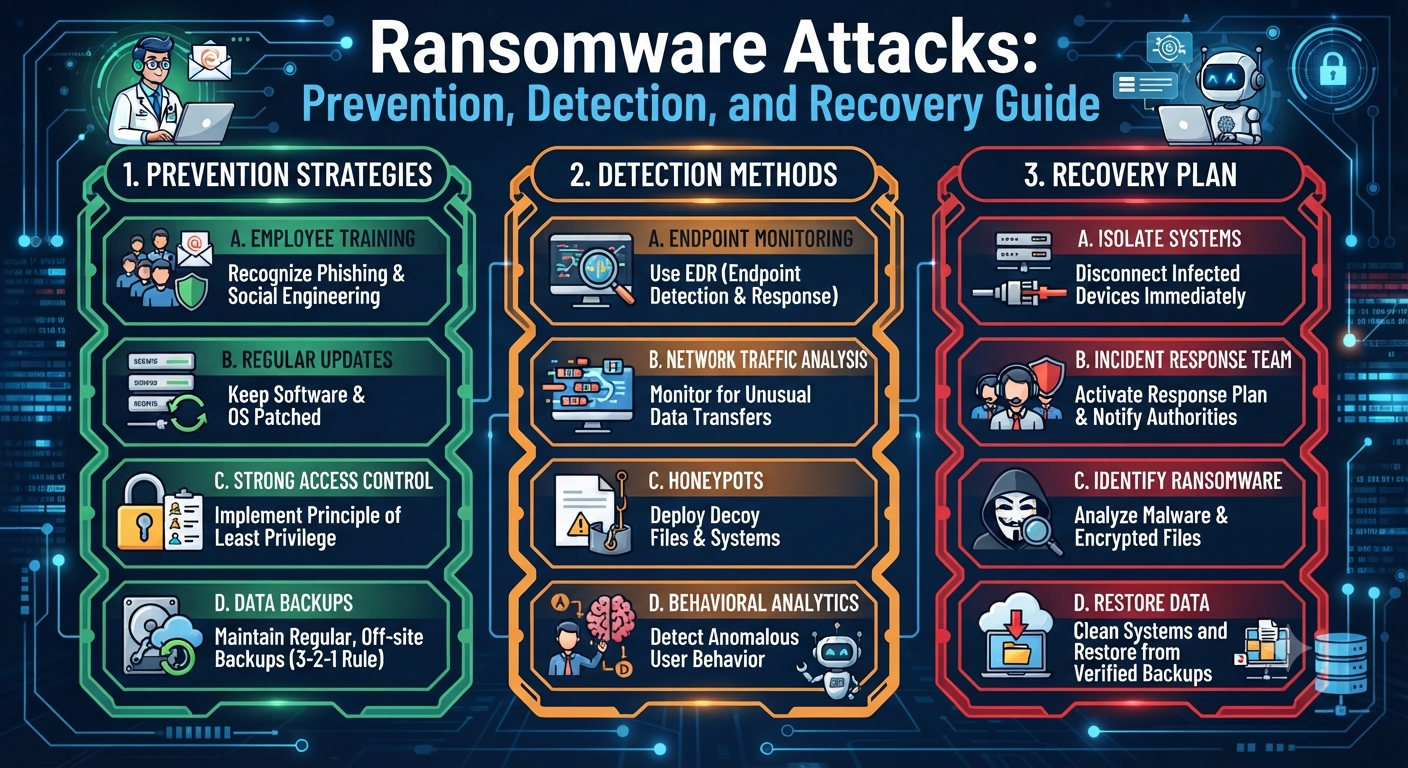
Ransomware Attacks: Prevention, Detection, and Recovery Guide
Ransomware Attacks: Prevention, Detection, and Recovery Guide
In the digital age, ransomware has become one of the most alarming and destructive threats in the cybersecurity landscape. From large corporations and hospitals to small businesses and individuals, no one is immune. The damage caused by ransomware can be financially devastating and emotionally exhausting—locking away vital data, paralyzing operations, and demanding a hefty ransom for a decryption key.
But the news isn’t all bad. With understanding, preparation, and the right strategies, you can drastically reduce your risk and respond effectively if you ever find yourself a target. This guide will walk you through how ransomware works, how to prevent it, ways to detect an attack early, and what to do if you get hit.
What is Ransomware?
Ransomware is a type of malicious software (malware) that encrypts files or locks you out of your device, holding your data hostage until you pay a ransom—often in cryptocurrency like Bitcoin. The attacker promises a decryption key or unlock code after payment, but there’s no guarantee they’ll deliver.
How Ransomware Spreads
- Phishing emails: Malicious attachments or links that install ransomware when clicked.
- Malvertising: Infected ads on legitimate websites.
- Drive-by downloads: Visiting compromised webpages can trigger automatic downloads.
- Remote Desktop Protocol (RDP) attacks: Weak or exposed remote access can be exploited.
- Software vulnerabilities: Outdated apps, plugins, or operating systems with known security flaws.
Real-World Impact
Ransomware has crippled city governments, health systems, law firms, and countless small businesses. In 2023, global ransomware damages were estimated at over $20 billion—a figure that continues to grow.
The Ransomware Lifecycle: How Attacks Unfold
-
Initial Entry:
The attacker finds a way in—often via phishing, weak passwords, or unpatched software. -
Establishing Foothold:
Malware is quietly installed, sometimes lying dormant while spreading laterally across the network. -
Payload Deployment:
The ransomware encrypts files, locks screens, or both. Victims see a ransom note with payment instructions. -
Payment Demand:
Attackers threaten to permanently delete data, leak sensitive files, or increase the ransom if demands aren’t met quickly. -
Aftermath:
Even if you pay, there’s no guarantee of recovery. Data could be lost, stolen, or compromised.
Section 1: Prevention—How to Stop Ransomware Before It Starts
1. Secure Your Email Gateways
Since most ransomware arrives via phishing emails, robust email security is critical.
- Use advanced spam filters to block suspicious messages and attachments.
- Train employees to recognize phishing, including urgent, unexpected, or poorly written emails.
- Disable automatic downloads of attachments in email clients.
- Consider sandboxing email attachments—testing them in a safe environment before opening.
2. Update and Patch Everything
Attackers thrive on outdated software.
- Enable automatic updates for your operating system, browsers, and all applications.
- Regularly patch hardware devices, like routers and firewalls.
- Remove software you no longer use, as it may not receive security patches.
3. Restrict User Privileges
Limit what users can install, run, and access.
- Give users the lowest level of access needed for their tasks (principle of least privilege).
- Use separate accounts for administrative tasks and everyday use.
- Disable unnecessary services like RDP (Remote Desktop Protocol) unless absolutely required, and secure it with strong passwords and two-factor authentication.
4. Use Strong Authentication
- Implement multi-factor authentication (MFA/2FA) for all remote and administrative access.
- Enforce strong, unique passwords, and use a password manager to avoid reusing credentials.
5. Segment Your Network
Don’t let ransomware spread unchecked.
- Set up network segmentation—separate sensitive systems from standard user devices.
- Limit communication between different parts of your network.
6. Regularly Back Up Data
- Back up all critical data frequently, ideally using both onsite (external hard drive/NAS) and offsite/cloud solutions.
- Ensure at least one backup is offline or air-gapped (disconnected from the network).
- Test backups regularly to confirm you can restore them after an incident.
7. Install Robust Security Software
- Use reputable antivirus and anti-ransomware tools on all endpoints.
- Enable real-time scanning and automatic updates.
- Consider endpoint detection and response (EDR) solutions for larger networks.
8. Educate and Train Employees
Human error is the #1 cause of breaches.
- Run regular cybersecurity awareness training.
- Conduct phishing simulations to test and improve employee vigilance.
- Foster a culture where employees report suspicious activity immediately.
Section 2: Detection—Spotting Ransomware Early
Early detection can minimize damage. Here’s what to watch for:
1. Unusual System Behavior
- Sudden slowness or unresponsiveness.
- Files or folders that can’t be opened or have strange extensions (e.g., .locked, .crypt, .encrypted).
- Frequent system crashes or error messages.
2. Suspicious Network Activity
- Unexpected outbound traffic to unknown IP addresses.
- Large volumes of data being transferred, especially outside business hours.
- Unusual login attempts or failed logins.
3. Security Alerts
- Antivirus or endpoint security notifications about blocked threats.
- Alerts from SIEM (Security Information and Event Management) solutions or network monitoring tools.
4. Ransom Messages
- Pop-up windows or text files with ransom demands.
- Instructions to pay with cryptocurrency.
Tip:
Configure monitoring tools to alert you to these signs. Early action can sometimes stop the spread before it’s too late.
Section 3: Response and Recovery—What to Do If You’re Hit
If ransomware slips through, a calm, methodical response is vital.
1. Isolate the Infection
- Immediately disconnect infected devices from the network (Wi-Fi and Ethernet).
- Unplug external storage devices.
- Disable shared drives and remote access on all affected systems.
2. Assess the Damage
- Identify which systems and files are affected.
- Check backups to ensure they are clean and up-to-date.
- Document everything for later analysis or law enforcement.
3. Do NOT Pay the Ransom
- There’s no guarantee you’ll get your data back, and paying funds criminal activity.
- Many ransomware groups do not honor payments, and some may target you again.
4. Report the Attack
- Notify your IT provider, managed security service, or internal security team immediately.
- Report to local authorities and, if applicable, federal agencies (like the FBI’s Internet Crime Complaint Center).
5. Begin the Recovery Process
- Restore clean data from backups. Scan backups first to ensure they are malware-free.
- Rebuild affected systems from scratch if necessary.
- Change all passwords, especially for privileged and remote access accounts.
- Monitor for signs of reinfection.
6. Examine and Harden Security
- Analyze how the attack occurred and plug any gaps.
- Patch all systems, update antivirus, and consider changing security vendors if your solution failed.
- Educate staff about the incident to reinforce vigilance.
Section 4: Long-Term Strategies and Lessons Learned
1. Regularly Test Your Incident Response Plan
- Simulate ransomware attacks (“tabletop exercises”) with your team.
- Update your plan as new threats emerge or your business changes.
2. Maintain Ongoing Training
- Make cybersecurity part of new employee orientation.
- Conduct refresher training and phishing drills at least quarterly.
3. Stay Informed About Threats
- Subscribe to security newsletters, alerts from vendors, and government advisories.
- Share new findings with your team.
4. Secure Your Supply Chain
- Ensure vendors, partners, and third-party apps follow security best practices.
- Ask them about their incident response plans and recovery capabilities.
5. Invest in Advanced Security Solutions
- Consider managed detection and response (MDR) services for round-the-clock monitoring.
- Deploy application whitelisting to restrict what can run on your systems.
- Use data loss prevention (DLP) tools to prevent exfiltration of sensitive information.
Quick Checklist: Ransomware Prevention and Response
- Are all systems, apps, and devices patched and updated?
- Is strong, multi-factor authentication enabled everywhere?
- Are regular, offline backups maintained and tested?
- Are employees trained to spot phishing and social engineering?
- Is your network segmented to limit the spread of threats?
- Do you have a clear, well-practiced incident response plan?
- Are you monitoring for early signs of infection?
- Is paying ransom strictly prohibited in your policy?
Real-World Cautionary Tale
In 2021, a small city’s municipal network was hit by ransomware after an employee clicked a malicious email attachment. Vital records and public services were inaccessible for weeks. The city refused to pay, relying on backups to recover—but found some backups were also compromised. It took months (and a lot of money) to fully restore operations—a stark reminder of why layered prevention, staff training, and tested backups are essential.
The Human Side: Teamwork Beats Ransomware

Ransomware isn’t just a technical issue—it’s a human one. A culture of caution, communication, and shared responsibility can make all the difference. Encourage everyone, from interns to executives, to treat digital security as a team effort.
Final Thoughts: Stay Vigilant, Stay Resilient
Ransomware attacks are a clear and present danger, but they are not unbeatable. With strong prevention, fast detection, and a well-rehearsed recovery plan, you can protect your data, your business, and your peace of mind.
Remember:
- Invest in prevention—patch, train, and back up.
- Don’t panic if you’re attacked—act quickly and methodically.
- Learn from every incident and keep improving your defenses.
Digital threats are always evolving, but so can you. By making cybersecurity a daily habit and a shared priority, you can turn ransomware from a nightmare into a manageable risk.