
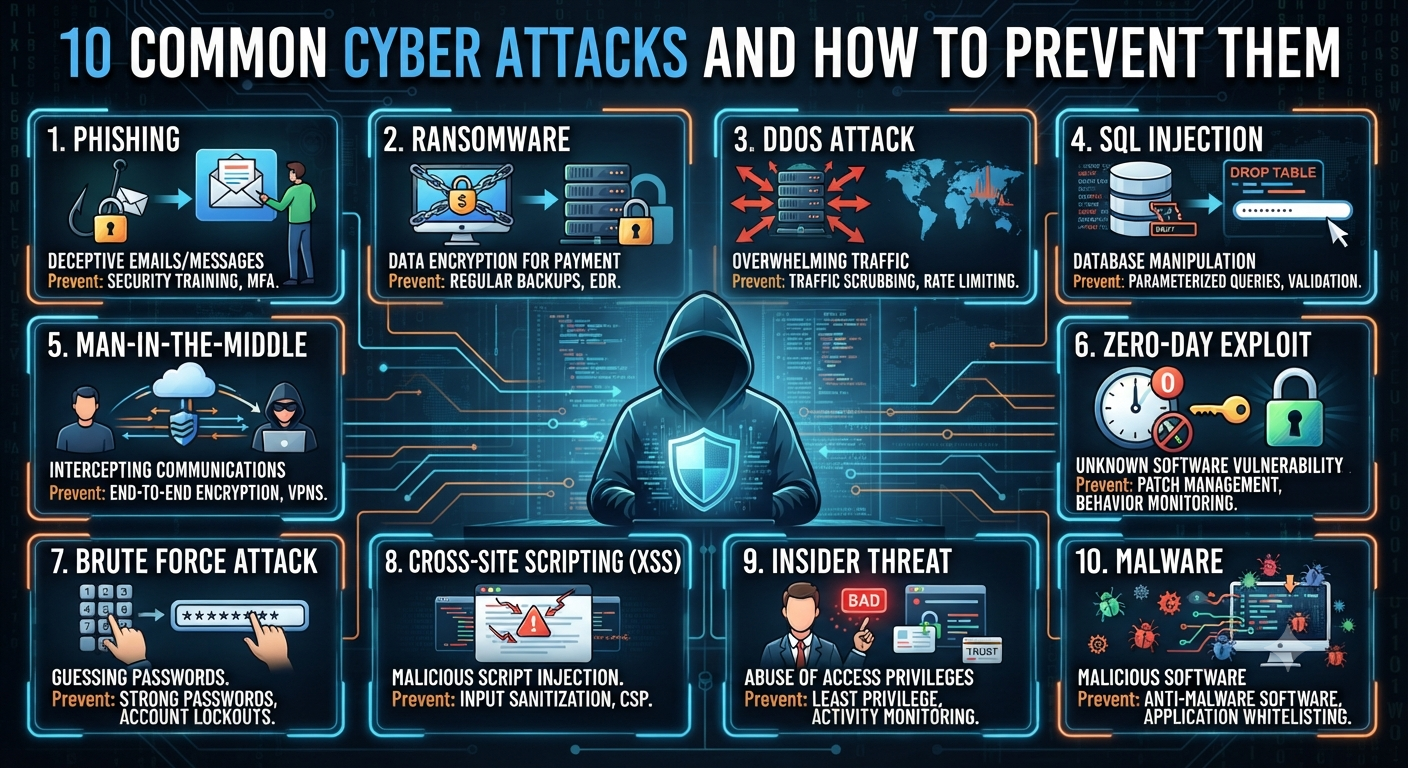
10 Common Cyber Attacks and How to Prevent Them
10 Common Cyber Attacks and How to Prevent Them
 In our digital-first world, cyber attacks are an ever-present threat for individuals and organizations alike. From subtle phishing scams to devastating ransomware, the risk of falling victim grows each year. But understanding the most common types of cyber attacks—and how to defend against them—can dramatically lower your risk and help you navigate the online world with confidence.
Let’s break down the top 10 cyber attacks you’re most likely to encounter, explain how they work, and provide practical, actionable steps to keep your data safe.
1. Phishing Attacks
What Is Phishing?
Phishing is the most widespread and persistent cyber attack today. Attackers disguise themselves as trustworthy entities—banks, coworkers, or service providers—to trick you into sharing sensitive information like passwords, credit card numbers, or Social Security numbers.
Phishing attacks usually arrive via email, but can also come through SMS (smishing), phone calls (vishing), or even fake websites.
Real-World Example
You receive an email that looks like it’s from your bank, warning you of suspicious activity. It urges you to click a link and “verify your account.” The link leads to a counterfeit website designed to steal your login credentials.
How to Prevent Phishing
- Be skeptical: Don’t trust emails asking for personal info or urgent action.
- Check the sender: Look for slight misspellings or suspicious email addresses.
- Hover before you click: Preview links before clicking to ensure they lead to legitimate sites.
- Enable two-factor authentication (2FA): Even if your password is stolen, 2FA adds a layer of defense.
- Use anti-phishing filters: Modern email services and security suites can help flag suspicious emails.
2. Ransomware
What Is Ransomware?
Ransomware is malicious software that locks your files or systems until you pay a ransom—usually in cryptocurrency. Victims are often given a deadline, with threats of permanent data loss if demands aren’t met.
Real-World Example
A hospital’s network is encrypted by ransomware, paralyzing patient care and records access. The attackers demand millions to restore access.
How to Prevent Ransomware
- Back up data regularly: Store backups offline or in the cloud, and test your restore process.
- Update software: Patch all applications and operating systems to fix vulnerabilities.
- Use reputable security software: Antivirus and anti-malware tools can block many threats.
- Train staff: Human error is the leading cause; teach employees to avoid suspicious downloads and emails.
3. Malware
What Is Malware?
Malware is a broad term for any software designed to damage, disrupt, or steal from computers or networks. Types include viruses, worms, trojans, spyware, and adware.
Real-World Example
A trojan hidden in a free software download silently steals login credentials, sending them to a remote hacker.
How to Prevent Malware
- Install and update antivirus software: Regularly scan your system for threats.
- Download from trusted sources: Avoid “cracked” software or untrusted websites.
- Update everything: Outdated software is a common entry point for malware.
- Use strong firewalls: Monitor and control incoming/outgoing traffic.
4. Denial-of-Service (DoS) and Distributed DoS (DDoS) Attacks
What Are DoS and DDoS Attacks?
A DoS attack overwhelms a website or server with traffic, making it unavailable to legitimate users. DDoS takes it further by using a network of compromised computers (botnet) to amplify the attack.
Real-World Example
An online retailer’s website is flooded with fake traffic on Black Friday, crashing the site and causing lost sales.
How to Prevent DoS and DDoS Attacks
- Use a Content Delivery Network (CDN): Services like Cloudflare absorb large surges of traffic.
- Monitor network traffic: Set up alerts for unusual spikes.
- Implement rate limiting: Restrict the number of requests to your site.
- Work with your ISP or hosting provider: They can often help mitigate attacks.
5. Man-in-the-Middle (MitM) Attacks
What Is a Man-in-the-Middle Attack?
In a MitM attack, a cybercriminal secretly intercepts and possibly alters communications between two parties. This often happens on unsecured Wi-Fi networks.
Real-World Example
You log into your bank’s website from a coffee shop’s public Wi-Fi. An attacker intercepts your session and steals your login credentials.
How to Prevent MitM Attacks
- Use encrypted connections: Only enter sensitive info on HTTPS websites.
- Avoid public Wi-Fi for sensitive transactions: Use your phone’s data or a secure home network.
- Use a VPN: Encrypts your traffic, even on unsecured networks.
- Enable 2FA: Even if credentials are stolen, 2FA can block unauthorized access.
6. SQL Injection
What Is SQL Injection?
An SQL injection attack targets websites or apps that don’t properly filter user inputs. Attackers inject malicious SQL code to manipulate databases—viewing, stealing, or deleting data.
Real-World Example
An attacker enters malicious code into a login form, tricking the website’s database into granting unauthorized access.
How to Prevent SQL Injection
- Sanitize user inputs: Always validate and escape inputs before passing them to the database.
- Use prepared statements: Modern development frameworks offer built-in protection.
- Keep software up to date: Many vulnerabilities are fixed in regular updates.
- Limit database permissions: Give applications only the access they truly need.
7. Credential Stuffing
What Is Credential Stuffing?
Cybercriminals use stolen username-password pairs, often from previous breaches, to try and access other accounts—knowing many people reuse credentials across sites.
Real-World Example
A hacker uses leaked email and password combos from a social media breach to access online banking accounts.
How to Prevent Credential Stuffing
- Use unique passwords: Never reuse passwords between sites.
- Enable 2FA: Adds a strong secondary barrier to account access.
- Monitor for suspicious logins: Set up alerts for unusual access patterns.
- Encourage users to reset passwords after major breaches.
8. Social Engineering
What Is Social Engineering?
Social engineering is all about manipulating people, not just systems. Attackers use deception to trick individuals into giving up confidential information or performing risky actions.
Real-World Example
A scammer calls an employee, claiming to be IT support and urgently requests their password to “fix a problem.” The employee complies, handing over access to sensitive systems.
How to Prevent Social Engineering
- Educate employees: Training is your best defense; teach staff how to recognize scams.
- Establish verification procedures: Never share passwords or sensitive info without confirming the requester’s identity.
- Promote a “trust, but verify” culture: Encourage skepticism of unexpected requests.
9. Zero-Day Exploits
What Are Zero-Day Exploits?
A zero-day exploit targets a previously unknown vulnerability—one that software makers haven’t patched yet. These attacks are especially dangerous because there’s no immediate fix.
Real-World Example
Hackers discover a flaw in a popular web browser and use it to install malware on millions of devices before a patch is released.
How to Prevent Zero-Day Exploits
- Enable automatic updates: Patch your system and apps as soon as fixes are released.
- Use reputable security software: Some tools provide behavior-based detection, catching unknown threats.
- Limit software exposure: Only install necessary programs and disable unused features.
- Stay informed: Follow security news for alerts on new vulnerabilities.
10. Insider Threats
What Are Insider Threats?
Not all cyber attacks come from the outside. Disgruntled employees, contractors, or partners with inside access can intentionally or accidentally expose data or sabotage systems.
Real-World Example
An employee leaving the company copies sensitive files to a personal drive and sells them to a competitor.
How to Prevent Insider Threats
- Restrict access: Give users the minimum permissions they need.
- Monitor user activity: Track access to sensitive files and systems.
- Conduct regular audits: Review permissions and activity logs.
- Foster a positive workplace: Happy employees are less likely to become threats.
Quick Checklist: Cyber Attack Prevention
- Are your software and operating systems up to date?
- Do you use strong, unique passwords for every account?
- Is two-factor authentication enabled wherever possible?
- Do you have a robust backup strategy?
- Are employees trained about phishing and social engineering?
- Is your antivirus software active and regularly updated?
- Do you monitor for suspicious activity and access?
- Are unused ports and services disabled?
- Do you use firewalls and VPNs for network protection?
- Are you prepared with an incident response plan?
The Human Side of Cybersecurity

Technology alone isn’t enough. Cybersecurity is a blend of the right tools, smart policies, and a culture of vigilance. Most breaches happen not because defenses fail, but because someone clicks a bad link, reuses a password, or lets their guard down.
Key Takeaway:
Make security an everyday habit—at home, at work, and everywhere you connect.
Staying Ahead: The Ongoing Battle
Cyber attackers never rest. New threats emerge constantly, and old ones evolve. But you don’t have to be a tech expert to stay safe. By understanding these common cyber attacks and following the prevention tips above, you dramatically reduce your risk.
Proactive steps, continual learning, and a healthy dose of caution are your best defense.
Final Thoughts: Protecting Yourself in a Digital World
The internet is full of amazing opportunities—but also hidden dangers. The best way to enjoy all it has to offer is to arm yourself with knowledge and make cyber hygiene a routine part of your life.
- Stay curious, but cautious.
- Update, educate, and back up.
- Take control of your online security before someone else does.
Because in cybersecurity, the best attack is a strong defense.